filament Needed by BlockBoy Arcade BlockBoyArcade-1.1.0+26.3.jar
requiredMatching file found Matched file: filament-1.8.12+26.3.jar
CurseForge · Minecraft mod
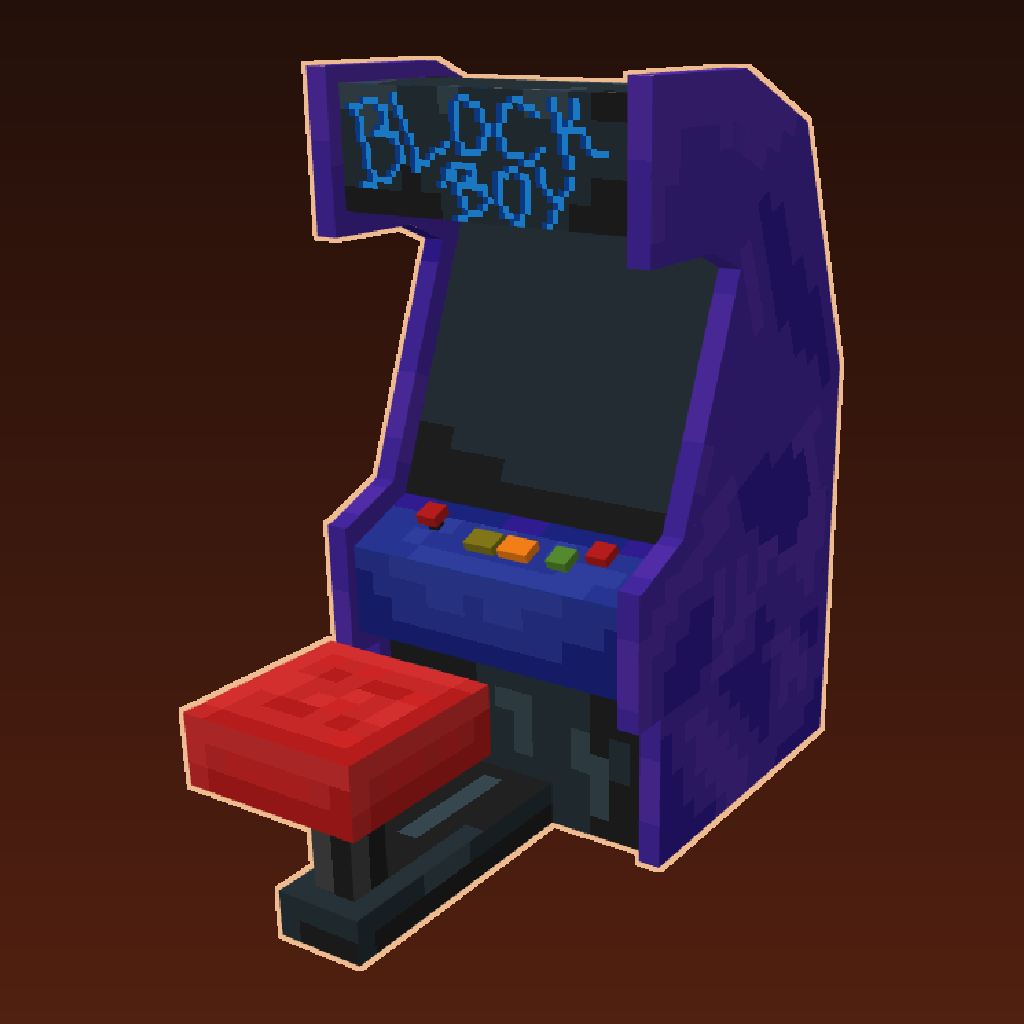
Arcade version of the serverside gameboy emulator!
Quick answer
BlockBoy Arcade BlockBoyArcade-1.1.0+26.3.jar targets 26.3 with Fabric, Quilt. The project page does not say whether this file belongs on the client, dedicated server, or both. All 3 required mods have matching files.
Where it goes
The project page does not say whether this file belongs on the client, dedicated server, or both.
The source does not explicitly classify this release as client-only or server-only.
BlockBoyArcade-1.1.0+26.3.jar. Change the file and its required mods may change too.
Install filament, Fabric API, Polymer first. We found matching files for this game-version and loader setup. 2 come through another mod in the chain.
2 extra mods were pulled in by other dependencies. Indented rows show who needs each one. We only count dependency files that match this setup. A file for another loader does not fill the gap.
Before you install it
Built for BlockBoy Arcade BlockBoyArcade-1.1.0+26.3.jar. Pick another file and the loader, install side or required mods may change.
Use BlockBoyArcade-1.1.0+26.3.jar. It targets 26.3 with Fabric, Quilt; another release may have different loader, side or dependency requirements.
Install filament, Fabric API, Polymer first. We found matching files for this game-version and loader setup. 2 come through another mod in the chain.
The project page does not say whether this file belongs on the client, dedicated server, or both.
Use the “Get this file” button beside BlockBoyArcade-1.1.0+26.3.jar. It opens that exact file at the source.
About this project
Arcade machines with full gameboy resolution and color support!
Fully server-side, using polymer! Checkout polymers authost feature to host the resource-pack (in polymer/resourcepack.zip) automagically!
There are no recipes, use /polymer creative to see the items or use /give @s blockboy:arcade
The mods' builtin datapack comes with 6 open source gameboy games:
{
  "dateFormat": "dd.MM yyyy, HH:mm",
  "sound": false
}
dateFormat: Date format for rom save data tooltipsound: Flag to enable sounds for the playing player using simple voice chatYou can either add cartridge items using filament or just use the blockboy:rom component to give yourself an item that can play a given rom file: /give @s paper[blockboy:rom="namespace:game.gb"]
Put the roms in data/<namespace>/blockboy/<rom>.gb and data/<namespace>/blockboy/<rom>.gbc Make sure the rom file names are lowercase and only contain letters from a to z, 0-9 and/or underscores.
To add your own arcade model item + block use the filament mod and the blockboy:arcade behaviour for decorations.
Arcade example for filament (data/<namespace>/filament/decoration/<name>.json):
{
  "id": "blockboy:arcade",
  "group": "blockboy:items",
  "blockTags": ["shulker_boxes"],
  "itemResource": {
    "models": {
      "default": "blockboy:item/arcade-item",
      "floor": "blockboy:item/arcade"
    }
  },
  "properties": {
    "rotate": true,
    "rotateSmooth": true,
    "stackSize": 1,
    "destroyTime": 2,
    "requiresTool": false
  },
  "behaviour": {
    "blockboy:arcade": {
      "seatTranslation": [0, 0.4, 0],
      "screenTranslation": [0, 0.95, -0.775],
      "screenPitch": -22.5,
      "brightness": 10
    }
  },
  "blocks": [
    {
      "origin": [0,0,-1],
      "size": [1,1,2]
    },
    {
      "origin": [0,1,-1],
      "size": [1,1,1]
    }
  ]
}
Cartridge / rom item example for filament (data/<namespace>/filament/item/<name>.json):
{
  "id": "blockboy:flooder",
  "translations": {
    "en_us": "Flooder"
  },
  "group": "blockboy:items",
  "vanillaItem": "minecraft:paper",
  "itemResource":{
    "models": {
      "default": "blockboy:item/cartridge2"
    }
  },
  "properties": {
    "stackSize": 1
  },
  "components": {
    "blockboy:rom": "namespace:flooder.gb"
  }
}
Blockboy Arcade comes with 2 item textures/models for cartridges, feel free to modify them as you wish: blockboy:item/cartridge1 and blockboy:item/cartridge2
Permissions for Luckperms and friends: blockboy_arcade.command, with vanilla permission level 1
This project uses code from the coffee-gb gameboy emulator and the Image2Map Mod You can find the original licenses in the "licenses" directory. My changes are also licensed under the MIT license.
Project description from CurseForge.
Pick your setup
Choose the version and loader you play, then open the matching release.
Check the dependencies, then try the file in a copied instance before changing a world you care about.
Recent files
1 Oct 2026
21 Aug 2026
26 Jun 2026
1 Apr 2026
6 Jan 2026
3 Jul 2025
29 Apr 2025
Looking for an older file? The official CurseForge project page is in Resources.
 mod
Rain, snow and frost on your windows: raindrops running down the glass, snowflakes and frost. Pixel art, client side.
 mod
makeo and HellFirePvP's Gadomancy, ported to Thaumaturge: silverwood golems, Essentia Compressor, Aura Pylons and node tools.
 mod
A client-side optimization mod to make block entities render faster