playerAnimator Optional for Zoma's SwordSkill swordskill-1.3.0-1.20.1.jar
optionalMatching file found Matched file: player-animation-lib-forge-1.0.2-rc1+1.20.jar

CurseForge · Minecraft mod
Added sword skills that respect Sword Art Online.
Quick answer
Zoma's SwordSkill swordskill-1.3.0-1.20.1.jar targets 1.20.1 with Forge. The project page does not say whether this file belongs on the client, dedicated server, or both. No extra mods listed for this file.
Where it goes
The project page does not say whether this file belongs on the client, dedicated server, or both.
The source does not explicitly classify this release as client-only or server-only.
swordskill-1.3.0-1.20.1.jar. Change the file and its required mods may change too.
This file does not list any required mods. Do not add a library just because a different file uses it.
1 extra mod was pulled in by another dependency. Indented rows show who needs each one. We only count dependency files that match this setup. A file for another loader does not fill the gap.
Before you install it
Built for Zoma's SwordSkill swordskill-1.3.0-1.20.1.jar. Pick another file and the loader, install side or required mods may change.
Use swordskill-1.3.0-1.20.1.jar. It targets 1.20.1 with Forge; another release may have different loader, side or dependency requirements.
This file does not list any required mods. Do not add a library just because a different file uses it.
The project page does not say whether this file belongs on the client, dedicated server, or both.
Use the “Get this file” button beside swordskill-1.3.0-1.20.1.jar. It opens that exact file at the source.
About this project
…is a Minecraft mod that allows you to use several unique sword techniques that appeared in the anime "Sword Art Online." This mod currently only works with Forge. Also, this text may be difficult to read because it uses translations. Sorry!
It will look even better if you install a shader.
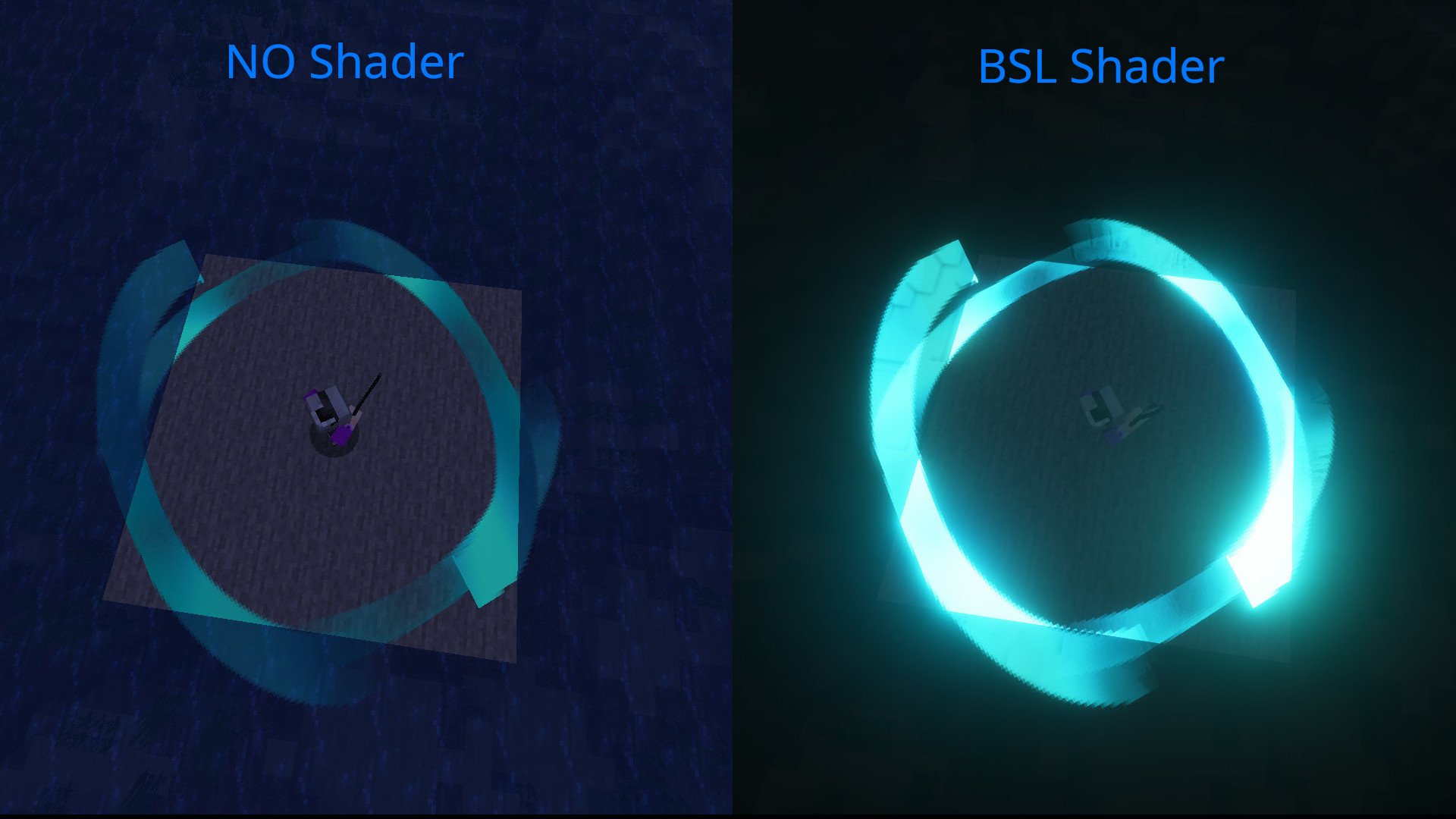
Skill Orbs are now required to use Sword Skills. Unlocking Sword Skills now requires Skill Orbs. Skill Orbs can be obtained from chests in dungeons and villages.
swordskill-client:
swordskill-server:
DataPackName/data/swordskill/weapon_types/youritems.json
{
  "name" : "modname:youritems",
  "item" : ["modname:supersupersword",
    "modname:dark_repulsor",
    "modname:elucidator",
    "modname:aneal_blade",
    "modname2:god_sword",
    "modname3:yajuu_sword"
  ],
  "weapontype" : ["ONE_HANDED_SWORD","TWO_HANDED_SWORD",…]
}
Project description from CurseForge.
Pick your setup
Choose the version and loader you play, then open the matching release.
Check the dependencies, then try the file in a copied instance before changing a world you care about.
Recent files
20 Nov 2026
20 Nov 2026
6 Apr 2026
6 Apr 2026
6 Apr 2026
3 Mar 2026
3 Mar 2026
3 Mar 2026
15 Jan 2026
6 Jan 2026
5 Jan 2026
4 Jan 2026
Looking for an older file? The official CurseForge project page is in Resources.
 mod
Brings the sanity mechanic from Don't Starve into Minecraft
 mod
Become a werewolf, master multiple forms and skills, survive Hunters armed with Silver, and conquer the Alpha Trial.
 mod
Give your maid more unique features~