Balm Needed by Picture Axe picaxe-1.21.1-fabric-1.1.2.jar
requiredMatching file found Matched file: balm-fabric-1.21.1-21.0.67.jar
CurseForge · Minecraft mod
Place images from the web into your Minecraft world in various ways. From beds, banners, and shields you can put images onto vast array of things.
Quick answer
Picture Axe picaxe-1.21.1-fabric-1.1.2.jar targets 1.21.1 with Fabric. The project page does not say whether this file belongs on the client, dedicated server, or both. All 3 required mods have matching files.
Where it goes
The project page does not say whether this file belongs on the client, dedicated server, or both.
The source does not explicitly classify this release as client-only or server-only.
picaxe-1.21.1-fabric-1.1.2.jar. Change the file and its required mods may change too.
Install Balm, Architectury API, Fabric API first. We found matching files for this game-version and loader setup. 1 comes through another mod in the chain.
1 extra mod was pulled in by another dependency. Indented rows show who needs each one. We only count dependency files that match this setup. A file for another loader does not fill the gap.
Before you install it
Built for Picture Axe picaxe-1.21.1-fabric-1.1.2.jar. Pick another file and the loader, install side or required mods may change.
Use picaxe-1.21.1-fabric-1.1.2.jar. It targets 1.21.1 with Fabric; another release may have different loader, side or dependency requirements.
Install Balm, Architectury API, Fabric API first. We found matching files for this game-version and loader setup. 1 comes through another mod in the chain.
The project page does not say whether this file belongs on the client, dedicated server, or both.
Use the “Get this file” button beside picaxe-1.21.1-fabric-1.1.2.jar. It opens that exact file at the source.
About this project
⚠ Dependency Required: PicAxe needs Architectury API or Balm depending on your Minecraft version. Scroll to the Installation section below for exact matches.
PicAxe is the ultimate decoration mod that gives you the power to bring any image from the internet directly into your Minecraft world. Personalize your base like never before by applying custom textures to beds, banners, shields, and a variety of versatile blocks. Make your world uniquely yours!
The PicAxe Tool: A special tool used to copy and paste image URLs. Right-click in the air to open the URL screen and store your link.
Image Configurator (v1.1 & Up): A powerful secondary tool for advanced editing. Use it on image blocks to open a modern tabbed interface where you can precisely control size, alignment, stretching behavior, rotation, position offsets, and block-specific options.
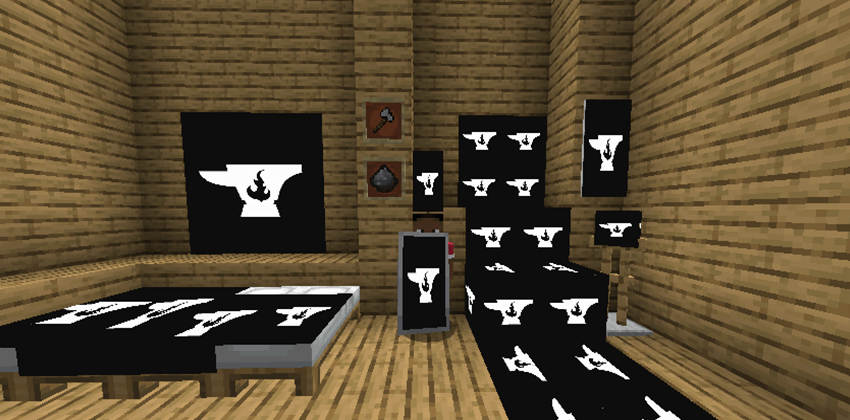
Image Beds: Convert any vanilla bed into a canvas! Apply your image and customize how it renders with multiple display styles and appearance options.
Image Banners & Shields: Turn a banner into a high-definition picture that waves in the wind. Combine it with a shield in a crafting grid to take your art into battle!
6-Sided Image Block: A creative block that can have a different, unique image applied to each of its six faces. Includes optional lighting controls — apply glowstone to make it emit light, and use a stick to remove the glowstone.
Resizable Image Frame: A dynamic frame block that can be resized from 1x1 up to 6x6. Use the configurator for advanced alignment, transformation, and offset controls, or choose to stretch the image or preserve its aspect ratio.
Modern & Consistent System: Store a link on the PicAxe and apply it anywhere. Use the Image Configurator whenever you want deeper precision.
For always up-to-date recipes, please visit the GitHub documentation:
https://github.com/Jacobwasbeast/PicAxe/blob/1.21.1/RECIPES.md
This mod was inspired by the original Images mod.
Be sure to install the correct dependency for your version:
Project description from CurseForge.
Pick your setup
Choose the version and loader you play, then open the matching release.
Check the dependencies, then try the file in a copied instance before changing a world you care about.
Recent files
12 Feb 2026
12 Feb 2026
12 Feb 2026
12 Feb 2026
12 Feb 2026
12 Feb 2026
11 Feb 2026
11 Feb 2026
10 Feb 2026
10 Feb 2026
10 Feb 2026
10 Feb 2026
Looking for an older file? The official CurseForge project page is in Resources.
 mod
The all-you-could-want 1.7, 1.8, and modern animations mod for Minecraft. Animatium fork, backported to 1.8.9 and more. By Polyfrost, best with OneClient.
 mod
A Superb Warfare expansion with automated artillery, Apocalypse tanks, allied AI vehicles, and powerful bosses.
 mod
Call of Duty BO3 Loadouts! Recreate the class setup menu and weapon lists from Black Ops 3 using Tacz and LRTactical. Customize your weapon, choose your lethal and tactical equipment, select wildcards and select functional perks—compatible with gun packs.