Minecraft version
Back to mods 
CurseForge · Minecraft mod
MCLLM
MCLLM is a fork of MCChatGPT for players who want to use non-OpenAI LLM servers. You are not locked into OpenAI's service and can use alternatives like DeepSeek, Claude, Gemini, among others.
Choose a version Pick your version below, then grab the matching file.
Quick answer
Which MCLLM release matches 1.19.4?
alpha file mcchatgptc-forge-0.2.1+mc1.19.4.jar
Game version 1.19.4
Loader Forge
MCLLM mcchatgptc-forge-0.2.1+mc1.19.4.jar targets 1.19.4 with Forge. The project page does not say whether this file belongs on the client, dedicated server, or both. No extra mods listed for this file.
Where it goes
Is MCLLM required on the client, server, or both?
The project page does not say whether this file belongs on the client, dedicated server, or both.
Client Source doesn’t say
Dedicated server Source doesn’t say
Loader for this release Forge
Required install it here Optional supported, not mandatory Not supported do not install here Source doesn’t say do not assume
The source does not explicitly classify this release as client-only or server-only.
What else does MCLLM mcchatgptc-forge-0.2.1+mc1.19.4.jar need?
mcchatgptc-forge-0.2.1+mc1.19.4.jar on 1.19.4. Every mod below is checked against that same setup.
This file does not list any required mods. Do not add a library just because a different file uses it.
This file does not list any required or optional mods.
Before you install it
Add MCLLM without breaking your instance.
Built for MCLLM mcchatgptc-forge-0.2.1+mc1.19.4.jar on 1.19.4. Pick another file and the loader, install side or required mods may change.
- 01
Stick to this file
Use mcchatgptc-forge-0.2.1+mc1.19.4.jar. It targets 1.19.4 with Forge; another release may have different loader, side or dependency requirements.
- 02
Bring the mods it needs
This file does not list any required mods. Do not add a library just because a different file uses it.
- 03
Put it on the correct side
The project page does not say whether this file belongs on the client, dedicated server, or both.
- 04
Pick the file you checked
Use the “Get this file” button beside mcchatgptc-forge-0.2.1+mc1.19.4.jar. It opens that exact file at the source.
About this project
What does MCLLM add?
MCLLM
If you like this project, please consider giving it a ⭐ on GitHub!
This is a fork of MCChatGPT.
Unlike the original, the base URI is no longer hardcoded—you can now configure it via a file, making it compatible with nearly any LLM service, not just OpenAI.
How to Use
Download the JAR file compatible with your Minecraft version from GitHub or here, and place it in your
modsfolder.
(Make sure the appropriate mod loader is installed.)Download the required dependencies from the same source and also place them in the
modsfolder.- Supported platforms: Fabric (>= 1.20.1), Forge (1.19.4–1.20.1), and NeoForge (>= 1.21.1)
Launch the game once to generate the configuration file.
Open
config/mcllm.jsonand edit the following fields:baseurl: Set this to the endpoint of your preferred LLM service, e.g.https://api.deepseek.com/v1model: Specify the model name, e.g.deepseek-chat
Re-launch the game, then run:
/mcllm-auth YourToken
This securely stores your token (it will be encrypted in the config file).Use
/ask YourQuestionto send a message to the LLM.
The LLM’s reply will appear in your local chat—only you can see it.
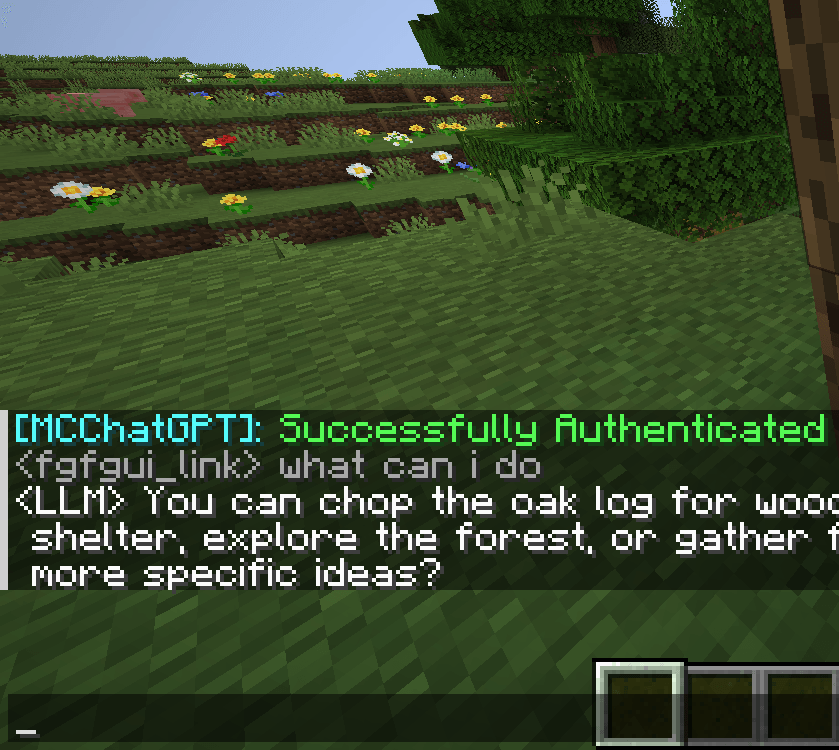
Project description from CurseForge.
Pick your setup
MCLLM by Minecraft version and loader
Choose the version and loader you play, then open the matching release.
Minecraft version
1.21.11
2 loader buildsMinecraft version
1.21.5
2 loader buildsMinecraft version
1.21.1
2 loader buildsMinecraft version
1.20.1
2 loader buildsMinecraft version
1.19.4
1 loader buildCheck the dependencies, then try the file in a copied instance before changing a world you care about.
Recent files
MCLLM versions and loaders
mcchatgptc-forge-0.2.1+mc1.19.4.jar
12 Jun 2025
Client Source doesn’t say Server Source doesn’t say Dependencies No extras listed Listed on Release listing
Check the 1.19.4 · Forge setup 1.19.4Forge alpha
0.2.1
mcchatgptc-forge-0.2.1-all.jar
7 Jun 2025
Client Required Server Not supported Dependencies No extras listed Listed on Release listing
Check the 1.19.4 · Forge setup 1.19.4Forge alpha
Looking for an older file? The official CurseForge project page is in Resources.
 mod
CurseForge + Modrinth · Minecraft
WTHIT
What the hell is that? A fork of Hwyla which is a fork of Waila.
 mod
CurseForge + Modrinth · Minecraft
Carpet TIS Addition
A Carpet mod (fabric-carpet) extension, a collection of carpet mod style useful tools and interesting features
 mod
CurseForge · Minecraft
Anvil reset scroll
This mod introduces Reset Scroll. It allows you to keep your gear forever without worrying about the vanilla anvil repair limits.No Anvil Expensive,No Expensive Never Too Expensive