ASJCore Needed by WolfTailUI-0.0.9.jar
requiredMatching file found Matched file: ASJCore 1.7.0.3
CurseForge · Minecraft mod
The GUI Library for Minecraft 1.7.10.
Quick answer
WolfTailUI-0.0.9.jar targets 1.7.10 with Forge. The project page does not say whether this file belongs on the client, dedicated server, or both. All 1 required mods have matching files.
Where it goes
The project page does not say whether this file belongs on the client, dedicated server, or both.
The source does not explicitly classify this release as client-only or server-only.
WolfTailUI-0.0.9.jar. Change the file and its required mods may change too.
Install ASJCore first. We found matching files for this game-version and loader setup.
We only count dependency files that match this setup. A file for another loader does not fill the gap.
Before you install it
Built for WolfTailUI-0.0.9.jar. Pick another file and the loader, install side or required mods may change.
Use WolfTailUI-0.0.9.jar. It targets 1.7.10 with Forge; another release may have different loader, side or dependency requirements.
Install ASJCore first. We found matching files for this game-version and loader setup.
The project page does not say whether this file belongs on the client, dedicated server, or both.
Use the “Get this file” button beside WolfTailUI-0.0.9.jar. It opens that exact file at the source.
About this project
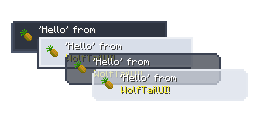
THE PROJECT STILL IN BETA!
Perhaps these things seem simple, but when you start dev, you encounter difficulties ...
But now you have WolfTailUI, you can ...
Project description from CurseForge.
Pick your setup
Choose the version and loader you play, then open the matching release.
Check the dependencies, then try the file in a copied instance before changing a world you care about.
Recent files
12 Oct 2026
9 Oct 2026
17 Mar 2026
12 Jun 2025
Looking for an older file? The official CurseForge project page is in Resources.
 mod
FireCore is the shared library for FireBall1725's NeoForge mods. It provides common helpers, the FireGUI library and optional ComputerCraft and AE2 modules
 mod
FireCore is the shared library for FireBall1725's NeoForge mods. It provides common helpers, the FireGUI library and optional ComputerCraft and AE2 modules
TISAM helps modpack authors remind players about optional mods through official download channels only.