Minecraft version
Back to mods 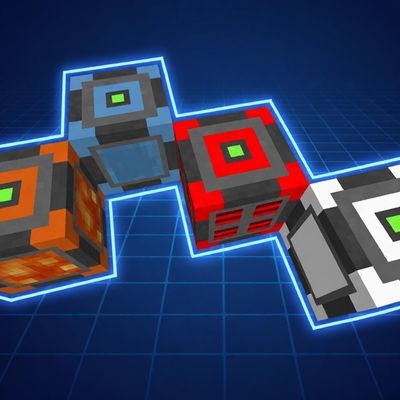
CurseForge · Minecraft mod
Auto Resource
Added low-cost machines that automatically generate FE, fluids, stones, etc.
Choose a version Pick your version below, then grab the matching file.
Quick answer
Which Auto Resource release should I use?
Latest stable file autoresource-neoforge26.1.2-1.0.1.jar
Game version 26.1.2
Loader NeoForge
Auto Resource autoresource-neoforge26.1.2-1.0.1.jar targets 26.1.2 with NeoForge. The project page does not say whether this file belongs on the client, dedicated server, or both. No extra mods listed for this file.
Where it goes
Is Auto Resource required on the client, server, or both?
The project page does not say whether this file belongs on the client, dedicated server, or both.
Client Source doesn’t say
Dedicated server Source doesn’t say
Loader for this release NeoForge
Required install it here Optional supported, not mandatory Not supported do not install here Source doesn’t say do not assume
The source does not explicitly classify this release as client-only or server-only.
What else does Auto Resource autoresource-neoforge26.1.2-1.0.1.jar need?
autoresource-neoforge26.1.2-1.0.1.jar. Change the file and its required mods may change too.
This file does not list any required mods. Do not add a library just because a different file uses it.
This file does not list any required or optional mods.
Before you install it
Add Auto Resource without breaking your instance.
Built for Auto Resource autoresource-neoforge26.1.2-1.0.1.jar. Pick another file and the loader, install side or required mods may change.
- 01
Stick to this file
Use autoresource-neoforge26.1.2-1.0.1.jar. It targets 26.1.2 with NeoForge; another release may have different loader, side or dependency requirements.
- 02
Bring the mods it needs
This file does not list any required mods. Do not add a library just because a different file uses it.
- 03
Put it on the correct side
The project page does not say whether this file belongs on the client, dedicated server, or both.
- 04
Pick the file you checked
Use the “Get this file” button beside autoresource-neoforge26.1.2-1.0.1.jar. It opens that exact file at the source.
About this project
What does Auto Resource add?
Please refer to the Github Old Version documentation for features and usage methods of older versions (below v1.0.0).
旧版本(低于 v1.0.0)功能和使用方法请查看 Gitee旧版本说明文档。
AutoResource
Added some machines that automatically generate resources, supporting the generation of FE, Water, Lava, and various types of stones.

Generator
- The maximum power generation is 9,223,372,036,854,775,807 FE/t (
Long.MAX_VALUE) - The default initial power generation is 1 FE/t. Every second, the power generation increases by 1 FE/t (configurable via
FE_SECOND/FE_STEPin the server config) - Boost slot: place the configured item (default
minecraft:nether_star, configurable viastar_item) into the boost slot, then each increase becomes 1% of the current output (at least 1), so the output keeps growing until it reaches the maximum - Charge slot: place any chargeable item into the charge slot to charge it; when the machine is broken, the charge slot contents drop out (the boost slot is kept with the item)
- Charging above: items in the inventory of any player/entity standing directly above the generator will be charged — including the hotbar, the main storage inventory and the equipment (armor / off-hand) slots
- Container charging above: if there is a container (e.g. chest, hopper) directly above the generator, the chargeable items inside will also be charged
- The generator actively transmits electricity evenly to the six adjacent sides (load-balanced), or other MOD wires can be used to extract FE
- Each transmission face can be enabled / disabled independently in the GUI, and the transmission repeat count can be adjusted (applies to both adjacent and wireless transmission)
- Wireless charging (disabled by default): can be toggled in the GUI, with configurable scan interval (seconds), chunk range (1x1 / 3x3 / 5x5) and repeat count; only scans loaded chunks, and wired transmission always has higher priority
- The GUI displays the current output, stored energy, next increase and a growth progress bar; large numbers use K / M / G / T / P / E abbreviations
- Synthetic materials require 4 smooth stones, 4 redstone and 1 block of redstone
- All per-machine parameters (wireless charging switch, scan interval, chunk range, repeat count and face switches) are saved to NBT and kept when the machine is broken
Fluid machine
- Support the generation of Water and Lava
- The maximum output is 9,223,372,036,854,775.807 B/t
- The default initial production is 0.05 B/t, which is 1 B/second. Every 10 seconds, the production increases by 0.05 B/t
- Right-click to open the GUI, which displays the current liquid amount, output, next increase and a growth progress bar (the same growth mechanic as the generator); large numbers use K / M / G / T / P / E abbreviations. The content is divided by black-outlined boxes in the order: progress → transfer faces → input/output (the transfer faces have no text hint, and the input/output slots have no box)
- Input / output slots: put an empty bucket or any fluid-container item into the input slot; the machine fills it every tick (a bucket is filled with 1000 mB), and when full the filled item is moved to the output slot. The input slot holds one group whose size is the item's own stack limit (e.g. 16 buckets); the output slot holds only 1 item, cannot be manually placed into (only the machine puts filled items there, and players / pipes extract from it)
- Pipe / hopper support: the machine exposes an item handler capability — inserted items always go to the input slot, extracted items always come from the output slot
- Container filling above: if there is a container (e.g. chest) directly above the machine, the fluid-container items inside will also be filled
- When the machine is broken, the input and output slot contents drop out
- Each of the six fluid transmission faces can be enabled / disabled independently in the GUI (saved to NBT and kept when the machine is broken); fluid is still evenly transferred to the enabled faces, and other MOD pipelines can be used to extract fluid
- Synthetic materials require water buckets/lava buckets and smooth stones
- Place fluid below: when the "Place Below" button below the output slot is enabled in the GUI, 4 attempts will be made per second to place fluid into the air block below the machine
- When the main / off hand right clicks on the fluid machine with an empty bucket, a bucket of liquid will be taken out
Block machine
- A single generic markable generator machine (
block_generator) — it can produce any of: dirt, cobblestone, stone, smooth stone, clay, sand, gravel, granite, diorite, andesite, calcite, tuff, cobbled deepslate, prismarine, obsidian, netherrack, soul sand, soul soil, blackstone, basalt, and end stone (chosen via the marker slot) - The maximum output is 9,223,372,036,854,775.807 Block/t
- The default initial output is 0.05 Block/t, which is 1 Block/second. Every 10 seconds, the output increases by 0.05 Block/t
- Right-click to open the GUI (the same style as the fluid machine): displays the stored amount, output, next increase and a growth progress bar; large numbers use K / M / G / T / P / E abbreviations
- Marker slot: put any valid block-generator product (dirt, stone, etc.) into the marker slot; it is locked once placed and determines which block the machine outputs. Generation keeps running, but without a marker nothing can be extracted / transferred; once marked it cannot be changed. When the machine is broken, the marker is kept in the item (does not drop) and the item's tooltip shows what is marked (or "Unmarked" if empty)
- Side display: when marked, the machine shows the marked block on its four side faces (north / south / east / west); the top and bottom keep the machine's own texture
- Output slot: displays the marked item. Click to take one, Shift+click to take a stack, Space+click to take until the inventory is full. The marker and output slots do not support pipe input/output
- Pipe support: after marking, the machine actively transfers the marked block evenly to the six faces (each can be enabled / disabled independently in the GUI), and other MOD pipelines can extract the marked block
- Place block below: when the "Place Below" button below the output slot is enabled, 4 attempts will be made per second to place the marked block into the air block below the machine (replaces the old redstone behavior)
自动资源
添加了一些自动生成资源的机器,支持生成FE、水、岩浆、多种石头。

发电机
- 最大发电量为 9,223,372,036,854,775,807 FE/t(
Long.MAX_VALUE) - 默认初始发电量为 1 FE/t,每过 1 秒发电量增加 1 FE/t(可通过服务端配置
FE_SECOND/FE_STEP修改) - 加速槽:放入指定物品(默认
minecraft:nether_star,可通过配置star_item修改)后,每次增长变为当前发电量的 1%(至少 1),可持续增长直至最大发电量 - 充电槽:可放入任意可充电物品为其充电;破坏时充电槽内容会掉落(加速槽随物品保留)
- 上方充电:站在发电机正上方的玩家/生物,其物品栏(物品栏、存储栏、装备栏)中的可充电物品都会被充电
- 上方容器充电:若发电机正上方是容器(箱子、漏斗等),容器内的可充电物品也会被充电
- 发电机会主动向六个面均匀传输电量(负载均衡),也可以使用其他 MOD 的导线抽取电量
- 六个输电面可在 GUI 中逐面独立开关,并可调整重复传电次数(对相邻输电和无线输电都生效)
- 无线充电(默认关闭):可在 GUI 中开关,可配置扫描间隔(秒)、区块范围(1x1 / 3x3 / 5x5)和重复传电次数;只扫描已加载区块,有线传输始终优先
- GUI 显示当前发电量、当前电量、下次增长量和增长进度条;大数值使用 K / M / G / T / P / E 单位缩写
- 合成材料需要 4 个平滑石头、4 个红石和 1 个红石块
- 所有逐台参数(无线充电开关、扫描间隔、区块范围、重复传电次数和输电面开关)均保存到 NBT,拆方块保留
流体机
- 支持产生水和岩浆
- 最大产量为 9,223,372,036,854,775.807 桶/t
- 默认初始产量为 0.05 桶/t,也就是 1 桶/秒,每过 10 秒,产量增加 0.05 桶/t
- 右击打开 GUI(紧凑布局),展示当前流体量、产量、下次增长量和增长进度条(增长机制与发电机一致);大数值使用 K / M / G / T / P / E 单位缩写。内容按黑色线框分区:进度 → 传输面 → 输入输出(传输面无文字提示,输入输出无黑框)
- 输入/输出槽:把空桶或任何可容纳流体的物品放入输入槽,机器每 tick 会尽力填充(铁桶需 1000 mB),填满后自动转移到输出槽。输入槽可放一组物品,组的大小由物品自身堆叠上限决定(如铁桶一组 16 个);输出槽只能放 1 个,且不可主动放入物品(只能由机器放入,玩家/管道从中抽取)
- 管道/漏斗支持:机器暴露物品能力,插入的物品总是进入输入槽,抽取的物品总是来自输出槽
- 上方容器充液:若机器正上方是容器(如箱子),容器内可容纳流体的物品也会被填充
- 破坏时,输入槽与输出槽的内容会掉落
- 六个流体传输面可在 GUI 中逐面独立开关(保存到 NBT,拆方块保留);流体仍会向开启的面均匀传输,也可使用其他 MOD 的管道抽取流体
- 合成材料需要水桶/岩浆桶和平滑石头
- 下方生成流体:在 GUI 输出槽下方的"下方生成流体"按钮开启后,每秒将尝试 4 次,向机器下方的空气方块中放置流体
- 主手/副手拿空桶右击流体机时,仍可直接取出一桶液体
方块机
- 只有一个通用的可标记生成方块机(
block_generator),可产生泥土、圆石、石头、平滑石头、粘土、沙子、沙砾、花岗岩、闪长岩、安山岩、方解石、凝灰岩、深板岩圆石、海晶石、黑曜石、下界岩、灵魂沙、灵魂土、黑石、玄武岩、末地石中的任意一种(由标记槽决定) - 最大产量为 9,223,372,036,854,775.807 个/t
- 默认初始产量为 0.05 个/t,也就是 1 个/秒,每过 10 秒,产量增加 0.05 个/t
- 右击打开 GUI(与流体机同款):展示存量、产量、下次增长量和增长进度条;大数值使用 K / M / G / T / P / E 单位缩写
- 标记槽:把任意合法的方块生成机产品(泥土、石头等)放入标记槽,放入后锁定,决定机器输出的方块种类。自动生成会一直计算,但未标记时无法取出/传输;标记后不可更换。破坏时标记槽内容随物品保留(不掉落),物品 tooltip 会显示标记内容(为空时显示"未标记")
- 侧面显示:标记后,机器四个侧面(北/南/东/西)会显示标记的方块;上下两面保持机器自身纹理
- 输出槽:显示标记的物品。单击取出一个,Shift+单击取出一组,空格+单击取出直到背包满。标记槽和输出槽均不支持管道输入输出
- 管道支持:标记后,方块机会主动向六个面均匀传输标记的方块(每个面可在 GUI 中独立开关),也可用其他 MOD 的管道抽取标记的方块
- 下方生成方块:开启输出槽下方"下方生成方块"按钮后,每秒将尝试 4 次,向机器下方的空气方块中放置标记的方块(替代原红石激活行为)
Project description from CurseForge.
Pick your setup
Auto Resource by Minecraft version and loader
Choose the version and loader you play, then open the matching release.
Minecraft version
26.1.1
1 loader buildMinecraft version
26.1
1 loader buildMinecraft version
1.21.11
2 loader buildsMinecraft version
1.21.10
2 loader buildsMinecraft version
1.21.9
2 loader buildsMinecraft version
1.21.8
2 loader buildsMinecraft version
1.21.7
2 loader buildsMinecraft version
1.21.6
2 loader buildsMinecraft version
1.21.5
2 loader buildsMinecraft version
1.21.4
2 loader buildsMinecraft version
1.21.3
2 loader buildsShowing the newest 12 of 26 game versions. Older files are in the list below.
Check the dependencies, then try the file in a copied instance before changing a world you care about.
Recent files
Auto Resource versions and loaders
autoresource-neoforge26.1.2-1.0.1.jar
8 Aug 2026
Client Source doesn’t say Server Source doesn’t say Dependencies No extras listed Listed on Release listing
Check the 26.1.2 · NeoForge setup NeoForge26.1.2 release
autoresource-neoforge1.21.1-1.0.1.jar
8 Aug 2026
Client Source doesn’t say Server Source doesn’t say Dependencies No extras listed Listed on Release listing
Check the 1.21.1 · NeoForge setup 1.21.1NeoForge release
autoresource-forge1.20.1-1.0.1.jar
8 Aug 2026
Client Source doesn’t say Server Source doesn’t say Dependencies No extras listed Listed on Release listing
Check the 1.20.1 · Forge setup 1.20.1Forge release
autoresource-neoforge26.1.2-1.0.0.jar
8 Aug 2026
Client Source doesn’t say Server Source doesn’t say Dependencies No extras listed Listed on Release listing
Check the 26.1.2 · NeoForge setup NeoForge26.1.2 release
autoresource-neoforge1.21.1-1.0.0.jar
6 Aug 2026
Client Source doesn’t say Server Source doesn’t say Dependencies No extras listed Listed on Release listing
Check the 1.21.1 · NeoForge setup 1.21.1NeoForge release
autoresource-forge1.20.1-1.0.0.jar
6 Aug 2026
Client Source doesn’t say Server Source doesn’t say Dependencies No extras listed Listed on Release listing
Check the 1.20.1 · Forge setup 1.20.1Forge release
autoresource-neoforge26.1.2-0.1.8-fix1.jar
18 May 2026
Client Source doesn’t say Server Source doesn’t say Dependencies No extras listed Listed on Release listing
Check the 26.1.2 · NeoForge setup NeoForge26.1.2 release
autoresource-neoforge26.1.2-0.1.8.jar
9 May 2026
Client Source doesn’t say Server Source doesn’t say Dependencies No extras listed Listed on Release listing
Check the 26.1.2 · NeoForge setup NeoForge26.1.2 release
autoresource-neoforge26.1.1-0.1.8.jar
9 May 2026
Client Source doesn’t say Server Source doesn’t say Dependencies No extras listed Listed on Release listing
Check the 26.1.1 · NeoForge setup NeoForge26.1.1 release
autoresource-neoforge26.1-0.1.8.jar
31 Mar 2026
Client Source doesn’t say Server Source doesn’t say Dependencies No extras listed Listed on Release listing
Check the 26.1 · NeoForge setup NeoForge26.1 release
autoresource-neoforge1.21.1-0.1.8.jar
9 Feb 2026
Client Source doesn’t say Server Source doesn’t say Dependencies No extras listed Listed on Release listing
Check the 1.21.1 · NeoForge setup 1.21.1NeoForge release
autoresource-forge1.21.11-0.1.8.jar
13 Dec 2025
Client Source doesn’t say Server Source doesn’t say Dependencies No extras listed Listed on Release listing
Check the 1.21.11 · Forge setup Forge1.21.11 release
Looking for an older file? The official CurseForge project page is in Resources.
 mod
mod CurseForge + Modrinth · Minecraft
CobbleBash
A Cobblemon addon that adds modular instanced type Gyms.
 mod
mod CurseForge · Minecraft
MineColonies: Universal Resources
MineColonies: Universal Resources is an addon for MineColonies that makes gathering construction materials much easier and far less grindy.
 mod
mod CurseForge · Minecraft
TaCZFirearmClientOptimization
TaCZ client module: Eliminates perspective jitter, locks the view after the cutscene, and adds automatic firing.