Architectury API Needed by Geco 0.2.0 - NeoForge 1.21.1
requiredMatching file found Matched file: [NeoForge 1.21] v13.0.12
CurseForge · Minecraft mod
Overhauls Minecraft's geology and ecology
Quick answer
Geco 0.2.0 - NeoForge 1.21.1 targets 1.21.1 with NeoForge. The project page does not say whether this file belongs on the client, dedicated server, or both. All 1 required mods have matching files.
Where it goes
The project page does not say whether this file belongs on the client, dedicated server, or both.
The source does not explicitly classify this release as client-only or server-only.
Geco 0.2.0 - NeoForge 1.21.1. Change the file and its required mods may change too.
Install Architectury API first. We found matching files for this game-version and loader setup.
We only count dependency files that match this setup. A file for another loader does not fill the gap.
Before you install it
Built for Geco 0.2.0 - NeoForge 1.21.1. Pick another file and the loader, install side or required mods may change.
Use Geco 0.2.0 - NeoForge 1.21.1. It targets 1.21.1 with NeoForge; another release may have different loader, side or dependency requirements.
Install Architectury API first. We found matching files for this game-version and loader setup.
The project page does not say whether this file belongs on the client, dedicated server, or both.
Use the “Get this file” button beside Geco 0.2.0 - NeoForge 1.21.1. It opens that exact file at the source.
About this project
Bring more variety to Minecraft's natural world with Geco. Discover handmade ebony trees and rare marble formations, then turn your finds into new materials for your next build.
Geco's journey begins with Ebony Wood, Cream Marble, and Multicolor Marble, adding new botanical and geological details while preserving vanilla terrain generation.
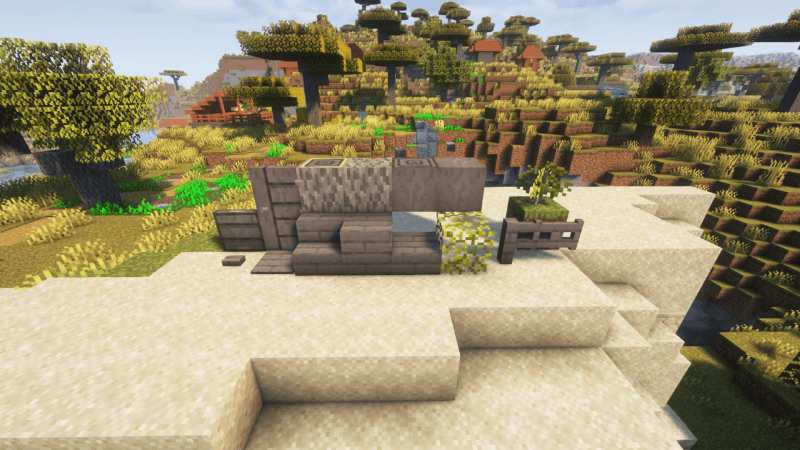
Explore savanna biomes to find ebony trees with several handmade shapes. Collect saplings to grow them near your home, and use their wood to expand your building palette.
The ebony set includes:
Find rare Cream Marble and Multicolor Marble deposits in the Overworld. Both stone types offer a range of finishes for everything from small decorative details to grand halls:
Each finish includes slabs, stairs, and walls, giving you more ways to shape and detail your builds.
Geco adds its trees and marble formations to normal Minecraft terrain. In an existing world, explore newly generated chunks to discover them naturally.
Available for Minecraft 1.21.1 on Fabric and NeoForge. Choose the Geco file matching your loader and place it in your mods folder alongside its dependencies.
Have an idea for Geco's natural world, or found something that needs fixing?
When reporting a bug, include your Minecraft version, loader, Geco version, and any relevant logs or steps to reproduce it.
Project description from CurseForge.
Pick your setup
Choose the version and loader you play, then open the matching release.
Check the dependencies, then try the file in a copied instance before changing a world you care about.
Recent files
geco-neoforge-0.2.0.jar
3 Oct 2026
geco-fabric-0.2.0.jar
3 Oct 2026
29 Jun 2025
29 Jun 2025
Looking for an older file? The official CurseForge project page is in Resources.
 mod
A mob farming automation mod. Yup
 mod
"dreadcore.jar" is an small personal project of mine that revolves around the theme of Minecraft ARGs.
 mod
A Light Level Overlay Mod that's efficient and powerful.