Create Needed by Create: Smart Bounds 1.0.0 [Neoforge 1.21.1]
requiredMatching file found Matched file: Create 6.0.10 for mc1.21.1

CurseForge · Minecraft mod
Improves create mod's block entity renderbounds
Quick answer
Create: Smart Bounds 1.0.0 [Neoforge 1.21.1] targets 1.21.1 with NeoForge. The project page does not say whether this file belongs on the client, dedicated server, or both. All 1 required mods have matching files.
Where it goes
The project page does not say whether this file belongs on the client, dedicated server, or both.
The source does not explicitly classify this release as client-only or server-only.
Create: Smart Bounds 1.0.0 [Neoforge 1.21.1]. Change the file and its required mods may change too.
Install Create first. We found matching files for this game-version and loader setup.
We only count dependency files that match this setup. A file for another loader does not fill the gap.
Before you install it
Built for Create: Smart Bounds 1.0.0 [Neoforge 1.21.1]. Pick another file and the loader, install side or required mods may change.
Use Create: Smart Bounds 1.0.0 [Neoforge 1.21.1]. It targets 1.21.1 with NeoForge; another release may have different loader, side or dependency requirements.
Install Create first. We found matching files for this game-version and loader setup.
The project page does not say whether this file belongs on the client, dedicated server, or both.
Use the “Get this file” button beside Create: Smart Bounds 1.0.0 [Neoforge 1.21.1]. It opens that exact file at the source.
About this project
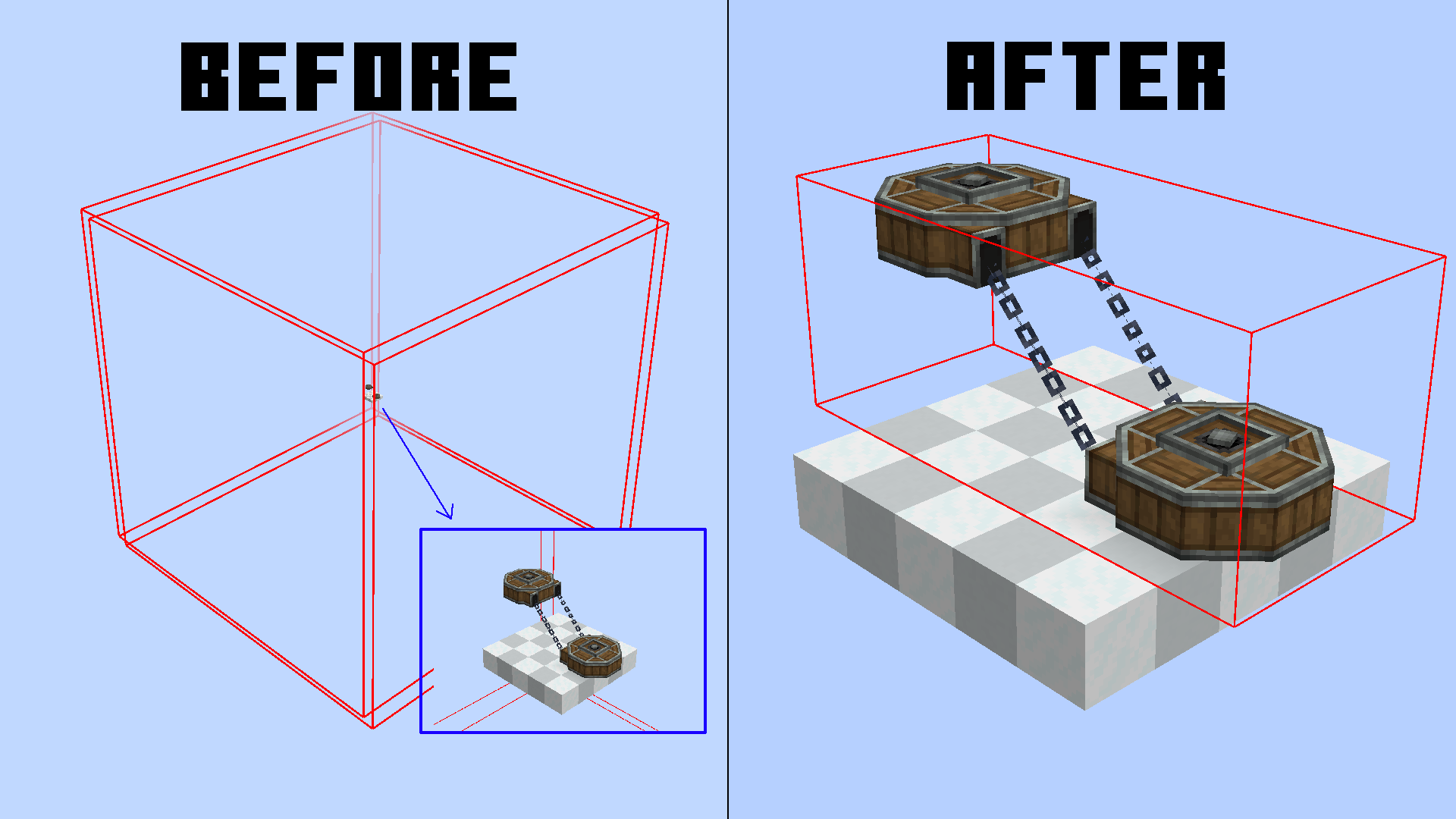 This mod aims to reduce enormous and nonsense render bounds for create block entities. You can check neoforge block entities render bounds with this command
 /neoforge debug_blockentity_renderbounds true
It also reworks some block entities render bounds caching
It's a pretty small optimization, but in large contraptions and big machine areas, it can make the difference.
We currently support:
Usually, to optimize performance, all blocks that are behind/outside your screen are not rendered to avoid useless computations. In blocks, this bound is set to a 3x3 area, but in block entities, this is customizable. The reason? Simple, render things that are bigger than a block. For example, Chain Conveyors need a larger render bounding box for chain connections. The thing is, most times create goes by "better larger" and just inflates the whole area. This makes most of your block entities get rendered even though they are not even visible.
The bounding box is not generated every frame, since the block only needs to change his bounding box on some precise events. This mod also optimizes this, removing useless bounding box reloading for some blocks (Belts) which before reloaded their bounding box EVERY GAME TICK (20 times per second). Now they only update if the block is broken and replaced, reducing the lag.
Project description from CurseForge.
Pick your setup
Choose the version and loader you play, then open the matching release.
Check the dependencies, then try the file in a copied instance before changing a world you care about.
Recent files
smart_bounds-1.0.0.jar
4 Jul 2025
Looking for an older file? The official CurseForge project page is in Resources.
 mod
modAn add-on mod for Mekanism which adds two new factories, and a new Meka-Suit module, all related to potion-making!
 mod
modSelective Render is a client-side Minecraft mod that renders only selected regions - or hides specific areas - with precise block-level filtering.
Restores the classic F3+F render-distance shortcuts in newer minecraft versions.