Pufferfish's Skills [Fabric & Forge & NeoForge] Needed by Respec Skill respec-skill-2.0.0.jar
requiredMatching file found Matched file: puffish_skills-0.19.2-26.1-fabric.jar

CurseForge · Minecraft mod
Server-side skill reset and prestige for Pufferfish Skills. Reset skill points, ascend skill trees, configurable.
Quick answer
Respec Skill respec-skill-2.0.0.jar targets 26.1, 26.1.1, 26.1.2 with Fabric. The project page does not say whether this file belongs on the client, dedicated server, or both. All 2 required mods have matching files.
Where it goes
The project page does not say whether this file belongs on the client, dedicated server, or both.
The source does not explicitly classify this release as client-only or server-only.
respec-skill-2.0.0.jar. Change the file and its required mods may change too.
Install Pufferfish's Skills [Fabric & Forge & NeoForge], Fabric API first. We found matching files for this game-version and loader setup.
We only count dependency files that match this setup. A file for another loader does not fill the gap.
Before you install it
Built for Respec Skill respec-skill-2.0.0.jar. Pick another file and the loader, install side or required mods may change.
Use respec-skill-2.0.0.jar. It targets 26.1, 26.1.1, 26.1.2 with Fabric; another release may have different loader, side or dependency requirements.
Install Pufferfish's Skills [Fabric & Forge & NeoForge], Fabric API first. We found matching files for this game-version and loader setup.
The project page does not say whether this file belongs on the client, dedicated server, or both.
Use the “Get this file” button beside respec-skill-2.0.0.jar. It opens that exact file at the source.
About this project
Reset and reallocate your skills used in Pufferfish's Skills easily!
Server-side mod. Players type /respec to open a clickable menu of every Puffish skill category on the server; each costs a configurable item. Categories are auto-discovered, so no setup is needed to support new skill trees.

| Command | Permission | Description |
|---|---|---|
/respec |
All players | Opens the chat menu listing every Puffish category with a clickable [Reset] button. |
/respec <namespace:category> |
All players | Respecs the given category directly. Used by the menu's [Reset] button. |
/respec prestige |
All players | Lists configured prestige paths. Ineligible paths show greyed out. |
/respec prestige <from_category> |
All players | Ascends from the given category into its configured target. |
/respec reload |
Level 3 (op) | Reloads config/respec-skill.properties from disk. |
/respecPlayers see a chat menu listing every Puffish skill category loaded on the server, with the cost shown next to a clickable [Reset] button.
[Reset] (or run /respec <namespace:category>)The mod checks:
min_level_to_respec)If all pass, the item is consumed, the category is erased, and a fraction of the previous XP is returned (xp_reduction_factor).
Edit config/respec-skill.properties. Reload in-game with /respec reload (requires permission level 3).
# Minimum total skill points a player must have in a category before they can respec it.
min_level_to_respec = 20

# Fraction of category XP returned after respec (0.0 = lose all, 1.0 = lose none).
xp_reduction_factor = 0.2

# Cooldown in seconds between respecs (0 = no cooldown). Per player, in-memory only; resets on server restart.
cooldown_seconds = 0

# Default cost applied to every category that doesn't have an override below.
# Format:  <item_id>, <count>
default_cost = minecraft:emerald, 16

# Optional: per-category cost overrides. Categories without an override use default_cost.
# cost.puffish_skills:combat = minecraft:diamond, 4
# cost.puffish_skills:mining = minecraft:emerald, 32
You do not need to list each category. Every Puffish category loaded on the server is auto-discovered and appears in /respec automatically.
A one-way irreversible ascension from one skill category into another. Configure paths in the same file:
# Format:  prestige.<n> = <from_category>, <to_category>, <min_points_in_from>, <xp_carryover_factor>, <cost_item>, <cost_count>
prestige.1 = puffish_skills:combat, puffish_skills:advanced_combat, 50, 0.4, minecraft:netherite_ingot, 1
prestige.2 = puffish_skills:mining, puffish_skills:master_mining,   75, 0.6, minecraft:netherite_ingot, 2
On a successful prestige, the source category is erased, the target category gains currentXp × xp_carryover_factor, and the cost is consumed. If any prestige paths are configured, /respec shows a clickable link to the prestige menu at the bottom of its output. See the Commands section above for the command syntax.
Pure server-side; clients do not need the mod. Feel free to include in modpacks. Credit appreciated but not required.
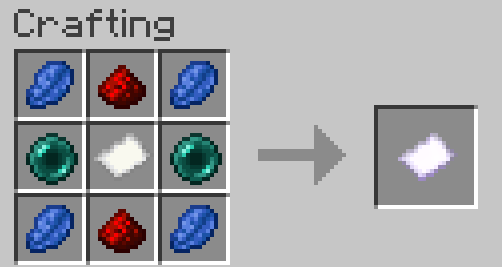
The 1.x versions used a different mechanic: a craftable Respec Scroll right-clicked onto a Skill Altar (a lodestone placed on a configured base block). 2.0 removed all of that in favor of the /respec command described above.
If you are on 1.x and need that documentation, see below. Upgrading to 2.x will require regenerating the config (respec-skill.toml → respec-skill.properties).
Features
How it worked
Craft a Respec Scroll with this recipe:
Build a Skill Altar by placing a configured skill block with a lodestone on top. Example setup for the Default Skill Tree:
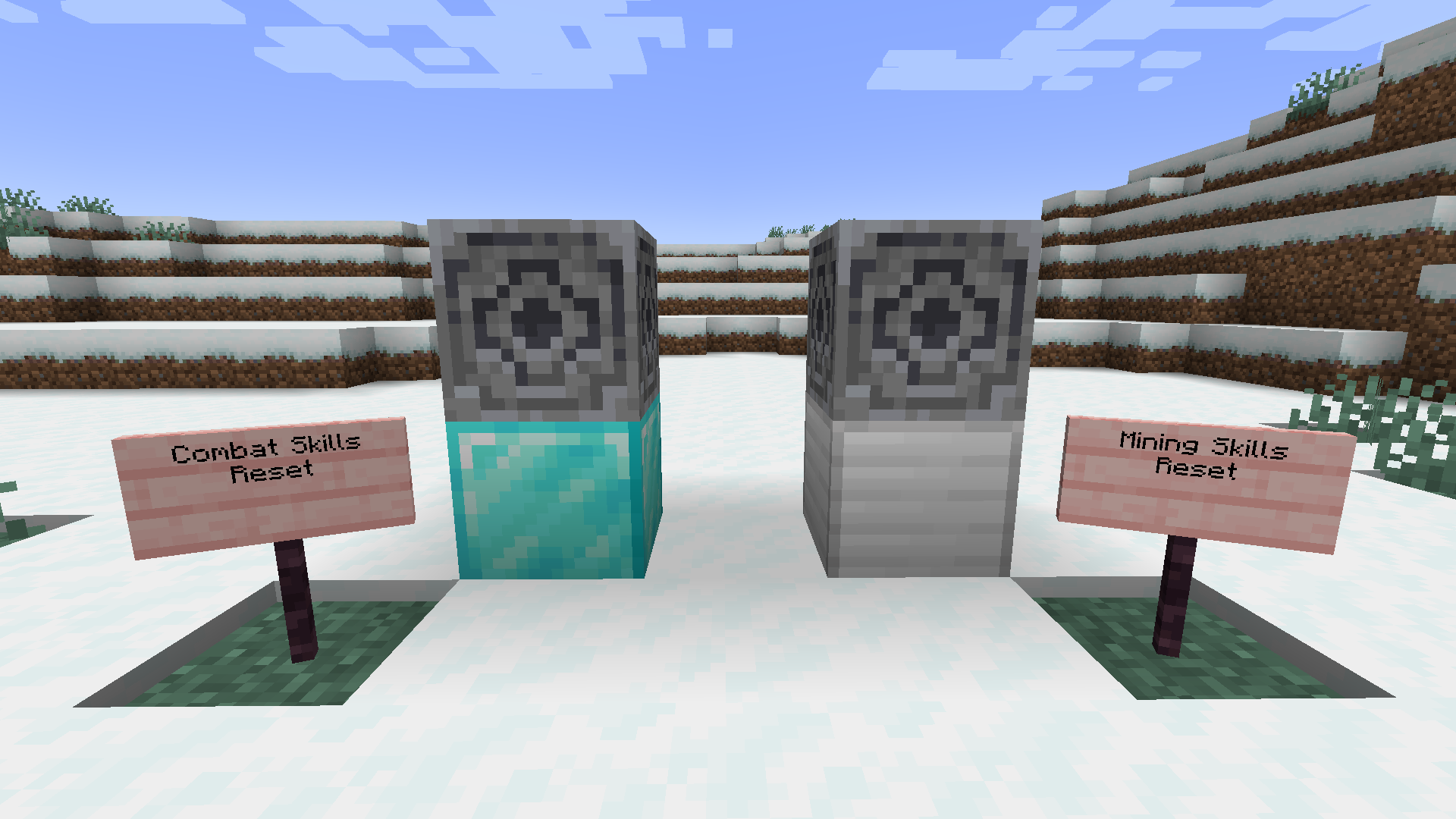
Right-click the lodestone with the scroll to reset that category's points.
Prestige: at high levels, transition into advanced trees via configured from → to mappings.
1.x config (TOML)
# Respec Skill Mod Configuration
config_version = 2

min_level_to_respec = 20
xp_reduction_factor = 0.2

[skill_altar_map]
"minecraft:diamond_block" = "combat"
"minecraft:iron_block" = "mining"

[prestige_mappings]
# "combat" = "advanced_combat,true,50,0.4"
# "mining" = "master_mining,true,75,0.6"
Client-side note (1.x only): to see the Respec Scroll in the creative inventory or in REI, the mod also had to be installed client-side. 2.x is fully server-side.
Project description from CurseForge.
Pick your setup
Choose the version and loader you play, then open the matching release.
Check the dependencies, then try the file in a copied instance before changing a world you care about.
Recent files
28 May 2026
21 Jul 2025
21 Jul 2025
16 Jul 2025
15 Jul 2025
Looking for an older file? The official CurseForge project page is in Resources.
 mod
Adds the mechanics of learning magic schools and spells from Iron's Spells 'n Spellbooks
 mod
Help Hermes stop Chaos in a 88-quest Greek-myth campaign! Mine new gems, forge god-tier gear, battle Zeus, Cerberus, the Python & more, solve Athena’s riddles, and earn legendary weapons from Hephaestus’s forge. Climb Olympus and earn the gods’ favor.
 mod
Connect your MineColonies colony to your Applied Energistics 2 (AE2) network. Monitor resources, trigger crafting, and send items to your Warehouse/Builder on demand, with Domum Ornamentum autocrafting too !