Quick answer
Which ColonyLink release should I use?
Latest stable file colonylink-1.6.8.jar
Game version 1.21.1
Loader NeoForge
colonylink-1.6.8.jar targets 1.21.1 with NeoForge. The project page does not say whether this file belongs on the client, dedicated server, or both. All 8 required mods have matching files.
Where it goes
Is ColonyLink required on the client, server, or both?
The project page does not say whether this file belongs on the client, dedicated server, or both.
Client Source doesn’t say
Dedicated server Source doesn’t say
Loader for this release NeoForge
Required install it here Optional supported, not mandatory Not supported do not install here Source doesn’t say do not assume
The source does not explicitly classify this release as client-only or server-only.
What else does colonylink-1.6.8.jar need?
colonylink-1.6.8.jar. Change the file and its required mods may change too.
Install Domum Ornamentum, Applied Energistics 2, MineColonies, GuideME and 4 more first. We found matching files for this game-version and loader setup. 14 come through another mod in the chain.
3 listed on this file 14 pulled in by those mods
Matching file found Matched file: domum-ornamentum - 1.0.231 - release
Matching file found Matched file: AE2 19.2.17 [NEOFORGE]
Matching file found Matched file: minecolonies-1.1.1368-1.21.1.jar
Matching file found Matched file: [NeoForge 1.21(.1)] v16.0.799
Matching file found Matched file: TheOneProbe - 1.21_neo-12.0.8
Jade 🔍 Needed by Applied Energistics 2 pulled inMatching file found Matched file: [NeoForge 1.21.1] 15.10.6
GuideME Needed by Applied Energistics 2 pulled inMatching file found Matched file: GuideME 21.1.17
EMI Needed by Applied Energistics 2 pulled inMatching file found Matched file: emi-1.1.24+1.21.1+neoforge
WTHIT Needed by Applied Energistics 2 pulled inNo matching file
Matching file found Matched file: structurize-1.0.830-1.21.1.jar
Matching file found Matched file: blockui-1.0.209-1.21.1.jar
Matching file found Matched file: TownTalk 1.21 1.2.0
Matching file found Matched file: multipiston-1.2.58-1.21.1.jar
Matching file found Matched file: [NeoForge 1.21] v15.0.140
Matching file found Matched file: [NeoForge 1.21] v13.0.11
No matching file
Matching file found Matched file: 19.43.0.394 for NeoForge 1.21.1
14
extra mods were pulled in by other dependencies.
Indented rows show who needs each one. We only count dependency files that match this setup. A file for another loader does not fill the gap.
Before you install it
Add ColonyLink without breaking your instance.
Built for colonylink-1.6.8.jar. Pick another file and the loader, install side or required mods may change.
- 01
Stick to this file
Use colonylink-1.6.8.jar. It targets 1.21.1 with NeoForge; another release may have different loader, side or dependency requirements.
- 02
Bring the mods it needs
Install Domum Ornamentum, Applied Energistics 2, MineColonies, GuideME and 4 more first. We found matching files for this game-version and loader setup. 14 come through another mod in the chain.
- 03
Put it on the correct side
The project page does not say whether this file belongs on the client, dedicated server, or both.
- 04
Pick the file you checked
Use the “Get this file” button beside colonylink-1.6.8.jar. It opens that exact file at the source.
About this project
What does ColonyLink add?
ColonyLink Thanks for 10k !
ColonyLink Bridge between MineColonies builders and your Applied Energistics 2 network.
ColonyLink gives you a single wireless Clipboard and a Warehouse Link terminal to manage all your MineColonies builders directly from your ME network. no more running back and forth between your storage and your build sites.
**WAREHOUSE LINK TERMINAL
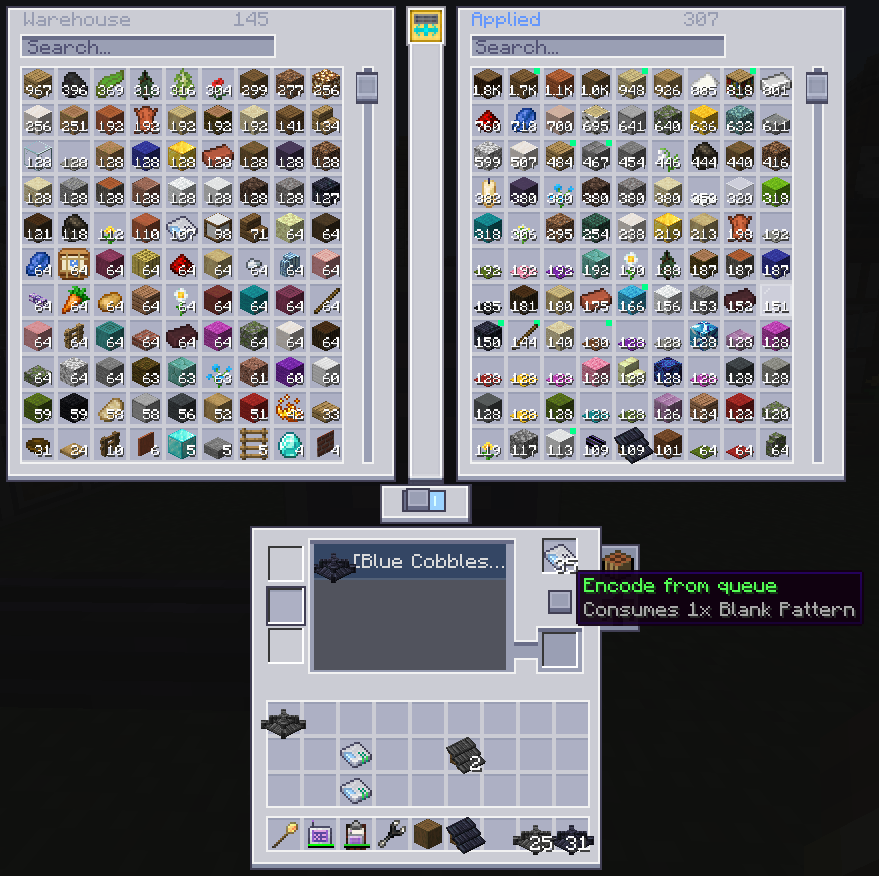 ** - A new AE2 cable part that puts your entire MineColonies Warehouse and ME network side by side in one interface.
Snap it onto any AE2 cable, insert a Warehouse Link Card, and you get a live dual-panel terminal: your Warehouse on the left, your ME network on the right. Browse both inventories simultaneously, move items between them, and craft — all without leaving the screen.
- Pick & drop anywhere — pick from Warehouse or ME, drop into the other panel, your inventory, your hotbar, or directly into the crafting grid. Full AE2-style carried cursor, 16 source/destination combinations
- Integrated crafting grid — full 3×3 vanilla crafting built into the terminal. Shift-click the output to craft the maximum possible amount in one click
- ME craftables — craftable-only items shown with a blue overlay. Middle-click any of them to open AE2's native CraftAmountMenu
- Transfers — shift+click or drag to select multiple items, then push the whole selection WH→ME, ME→WH, or straight to inventory with a single button click
- Search bars — filter both panels independently. Search is preserved when you navigate to AE2's craft screen and come back
- Smart deduplication — double racks counted correctly, no phantom quantities
- Works on dedicated servers — fully server-safe
Domum Pattern Queue
- Clicking "No Pattern" on a Domum item in the Clipboard now sends it to the Warehouse Link Terminal queue
- The Cutter tab displays a scrollable list of all pending Domum recipes imported from the Clipboard
- Hover any entry for full details: item name, variant, and materials
- Select an entry, insert a Blank Pattern, and click Encode — the encoded pattern appears in the output slot ready to pick up
- Encode any pattern imported into the list from the Clipboard
- Duplicate entries are rejected with a clear message
- The queue is shared colony-wide, persisted across restarts, and automatically clears entries once AE2 detects the pattern as craftable
Locate Builder
- New "Locate" button in the Clipboard GUI
- Applies a Glowing effect to the assigned builder NPC — visible through walls and terrain
- Configurable duration (default: 8s) and RF cost (default: 500 RF) — both op-only config options
- 10-second cooldown per player to prevent spam
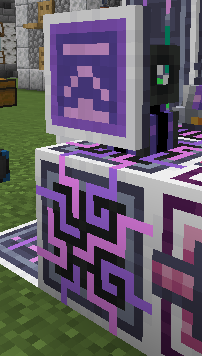
ColonyLink Clipboard
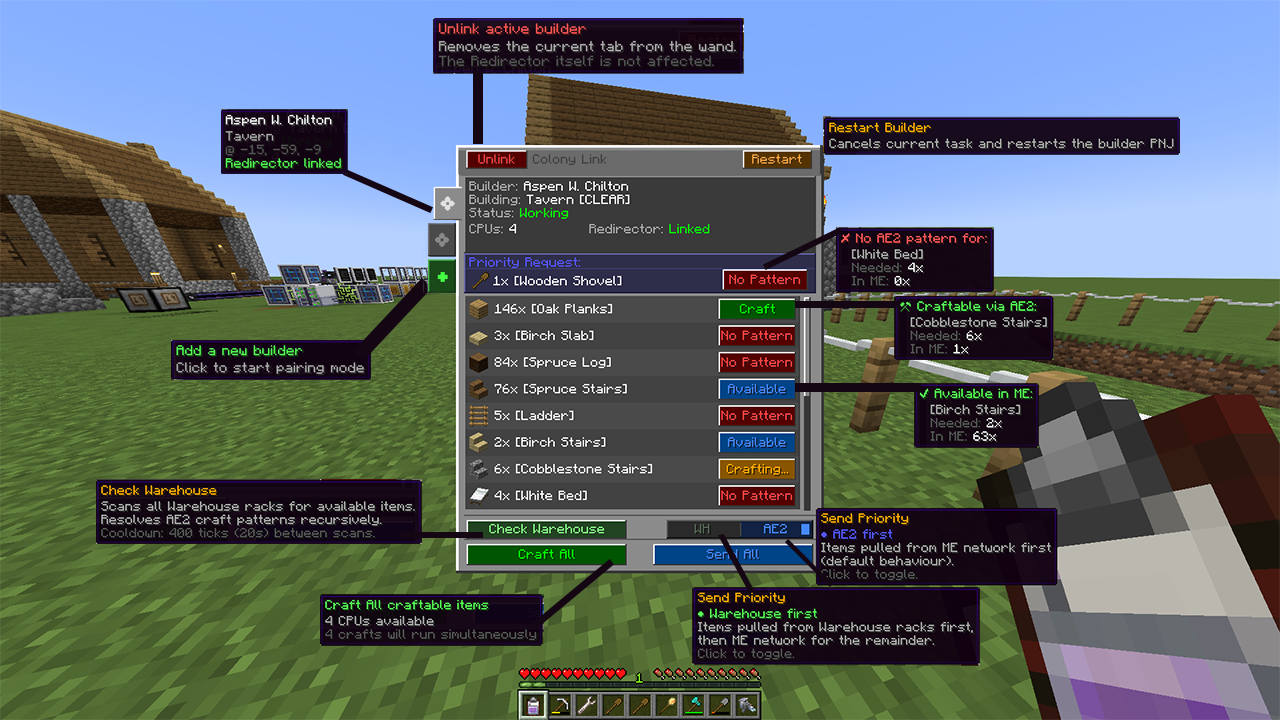
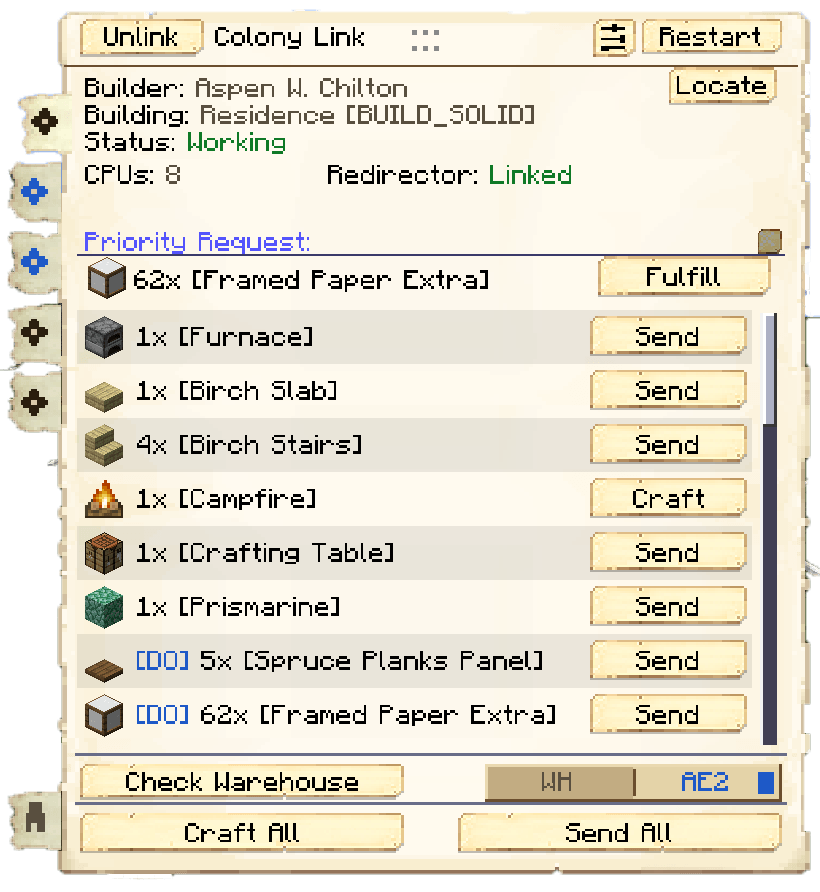
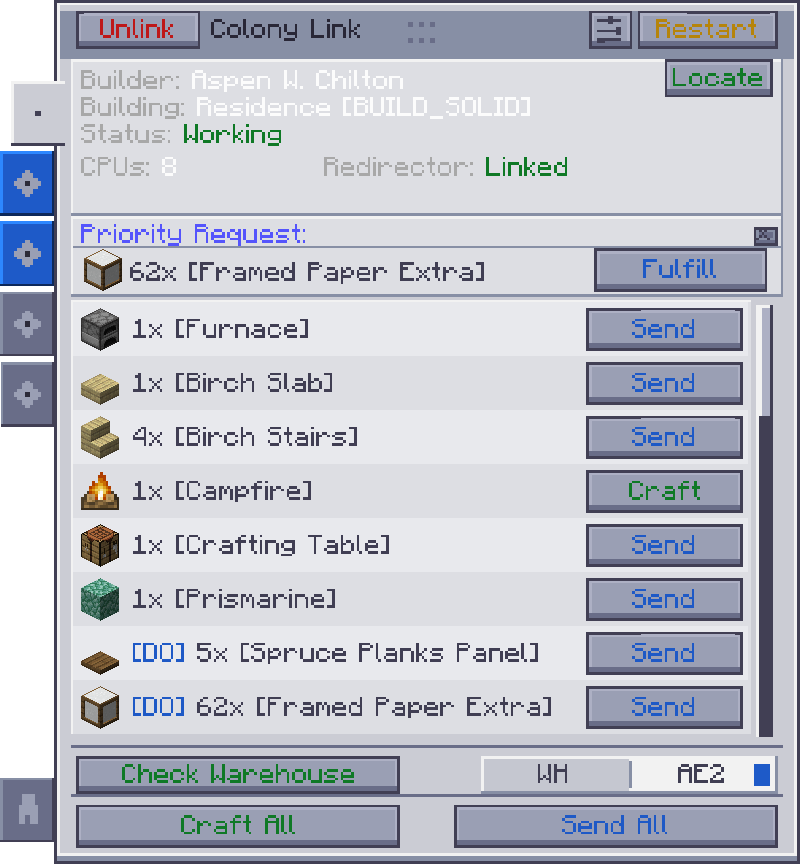
- Track missing resources — see exactly what each builder needs, live, with real-time stock levels from AE2
- Craft on demand — trigger craft jobs for missing items in one click, directly from the resource list
- Send to builder — push available items from your network directly to the builder's inventory via the Redirector block
- Multi-builder support — link up to 5 Builder's Huts to a single wand, switch between them with tabs
- Warehouse integration — scan MineColonies Warehouse racks as a fallback source before pulling from your network
- Tool upgrade system — automatically substitutes tool requests with the best tier available in your network, respecting MineColonies Work Hut level caps
- Builder status — see what your builder is doing, and why they're idle (hungry, sick, sleeping, no home, bad weather…)
- Priority Request — always shows the most urgent item first, with a dedicated Fulfill button
- Craft feedback — tooltips tell you when an item is craftable but missing its primary ingredients, so you know exactly what's blocking the queue
- Customizable GUI — adjust colors, opacity, border thickness and scale directly in-game, saved per client
?? How it works ??
Link the wand to your AE2 (Wireless Access Point)
Sneak + right-click a Builder's Hut to pair it
Sneak + right-click a Colony Link Redirector (placed adjacent to your network) to link it to that builder
Right-click in the air to open the resource GUI
Citizen Tab
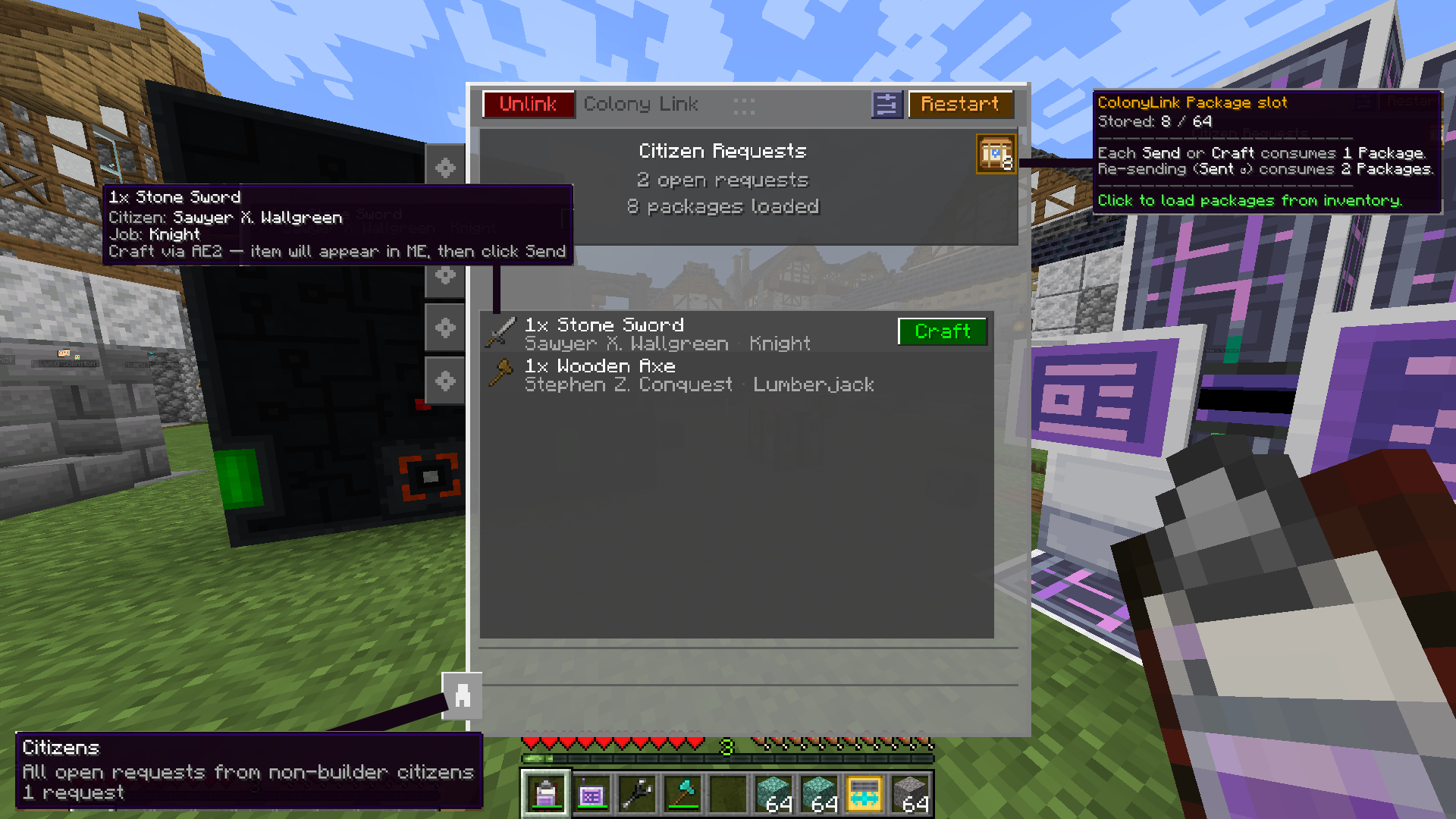
Manage your colony citizen's open requests from the ColonyLink Clipboard. View pending needs for every non-builder citizen, farmers, guards, miners, cooks and more and fulfill them in one click, sending items from your ME network to the colony warehouse.
New — Delivery target (server / modpack setting)
Choose how ColonyLink delivers builder resources, set server-side in colonylink-server.toml under [delivery] send_target:
- BUILDER (default) — inserted straight into the Builder's Hut, bypassing the courier. The classic ColonyLink experience: fast and hands-off.
- WAREHOUSE — placed into the colony Warehouse instead; a MineColonies courier delivers to the builder. Slower, but keeps couriers relevant — great for balanced modpacks.
Set it once as a server owner or modpack author and it applies to everyone on the server — the delivery policy is authoritative and syncs to every client on join. In WAREHOUSE mode, sent resources show a greyed-out "Sent" line until the courier delivers, and tool substitution is disabled so couriers carry exactly what was requested.
Server admins: the config moved from COMMON to SERVER type — a fresh colonylink-server.toml is generated, so re-apply any custom values. Modpacks can ship defaults via defaultconfigs/colonylink-server.toml.
Requirements
- NeoForge 21.1.228+
- MineColonies v1.1.1299+
- Applied Energistics 2 v19.2.17+
- Domum Ornamentum v1.0.233 — full component breakdown for textured blocks, with live stock status per material
Optional compatibility
Flux Networks, Powah, Mekanism, Immersive Engineering — charge the wand wirelessly or via FE chargers
Jade — displays wand charge level and linked builder name on hover

Refined Storage 2 support has been dropped, If you need RS2 support, the last version with full RS2 integration is v1.1.4.1, This version is not server stable, also, that version will not receive further updates.
Project description from CurseForge.
Pick your setup
ColonyLink by Minecraft version and loader
Choose the version and loader you play, then open the matching release.
Minecraft version
1.21.1
1
loader build Check the dependencies, then try the file in a copied instance before changing a world you care about.
Recent files
ColonyLink versions and loaders