Tinkers Survival Optional for Magical Psi: Revival NeoForge 1.21.1-1.1.0.7
optionalNo matching file
CurseForge · Minecraft mod
Magical Psi: Revival replaces every asset and description of Psi with a magic themed counterpart.
Quick answer
Magical Psi: Revival NeoForge 1.21.1-1.1.0.7 targets 1.21.1 with NeoForge. The project page does not say whether this file belongs on the client, dedicated server, or both. 1 required mod needs checking.
Where it goes
The project page does not say whether this file belongs on the client, dedicated server, or both.
The source does not explicitly classify this release as client-only or server-only.
NeoForge 1.21.1-1.1.0.7. Change the file and its required mods may change too.
Install Psi, project pOeA0exL first. 1 required mod still needs checking for this exact setup. 7 come through another mod in the chain.
7 extra mods were pulled in by other dependencies. Indented rows show who needs each one. We only count dependency files that match this setup. A file for another loader does not fill the gap.
Before you install it
Built for Magical Psi: Revival NeoForge 1.21.1-1.1.0.7. Pick another file and the loader, install side or required mods may change.
Use NeoForge 1.21.1-1.1.0.7. It targets 1.21.1 with NeoForge; another release may have different loader, side or dependency requirements.
Install Psi, project pOeA0exL first. 1 required mod still needs checking for this exact setup. 7 come through another mod in the chain.
The project page does not say whether this file belongs on the client, dedicated server, or both.
Use the “Get this file” button beside NeoForge 1.21.1-1.1.0.7. It opens that exact file at the source.
About this project

Magical Psi Revival replaces every asset and description of Psi with a magic-themed counterpart. This mod should be used both client-side and server-side due to the recipe changes to ensure thematic consistency. However, this mod can also be used client-side only if needed. This is a remake of the remake Magical Psi Redux by TheIllusiveC4, distributed under the Psi License.
Requires both Psi and its dependency Patchouli.
Features
Blocks and Items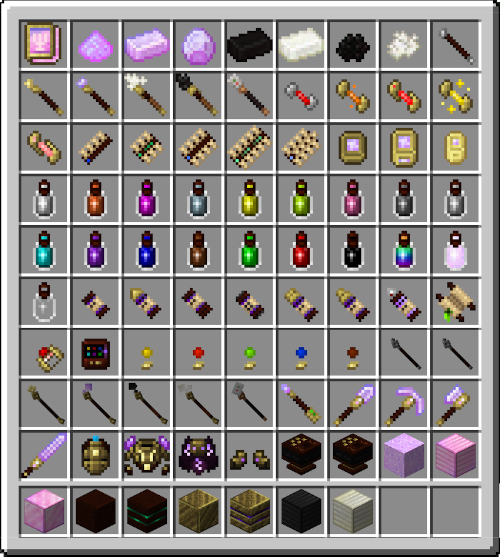
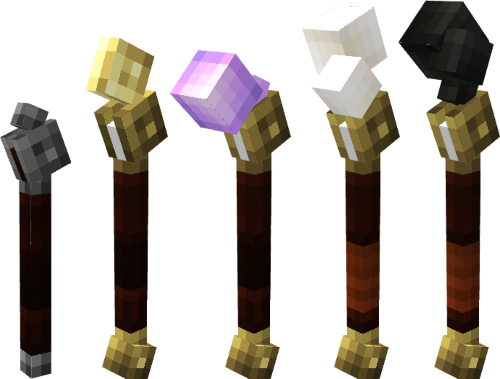
Focusing Rods
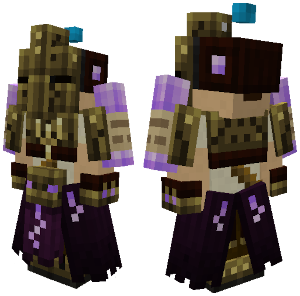
Focusing Plate Armor
Credits
Join us on Discord!
Project description from CurseForge.
Pick your setup
Choose the version and loader you play, then open the matching release.
Check the dependencies, then try the file in a copied instance before changing a world you care about.
Recent files
magipsi-1.21.1-neoforge-1.1.0.7.jar
4 Oct 2026
magipsi-1.21.1-fabric-1.1.0.7.jar
4 Oct 2026
magipsi-1.21.1-neoforge-1.1.0.6.jar
4 Oct 2026
magipsi-1.21.1-fabric-1.1.0.6.jar
4 Oct 2026
MagicalPsiRevival-1.21.1-1.1.0.5.jar
1 Feb 2026
MagicalPsiRevival-1.21.1-1.1.0.4.jar
8 Oct 2025
MagicalPsiRevival-1.20.1-1.1.0.4.jar
1 Oct 2025
MagicalPsiRevival-1.21.1-1.1.0.3.jar
30 Sept 2025
MagicalPsiRevival-1.20.1-1.1.0.3.jar
29 Sept 2025
MagicalPsiRevival-1.21.1-1.1.0.2.jar
20 Sept 2025
MagicalPsiRevival-1.20.1-1.1.0.2.jar
20 Sept 2025
MagicalPsiRevival-1.21.1-1.1.0.1.jar
11 Aug 2025
Looking for an older file? The official CurseForge project page is in Resources.
 mod
Adds naturally spawning Moyai to your game 🗿
 mod
Colony ME Access integrates MineColonies with AE2 for easier resource management, builder request handling, automatic recipe learning, and streamlined colony automation and quality-of-life features.
 mod
This is a mod inspired by the anime Naruto, and adds over 260+ custom jutsus, and over 180 unique missions. This mod is for usage on the official Kageborne server.
 .