Minecraft version
Back to mods 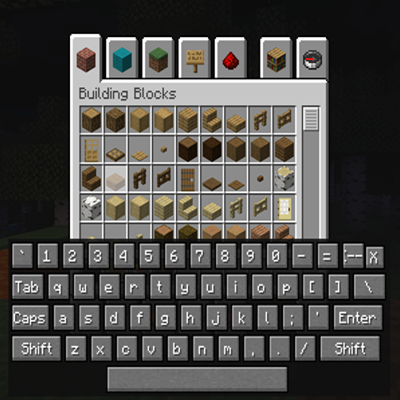
CurseForge · Minecraft mod
On-Screen Keyboard
A client-side keyboard overlay for chat, signs, books, anvils, and supported JEI searches.
Choose a version Pick your version below, then grab the matching file.
Quick answer
Which On-Screen Keyboard release matches 26.2?
beta file onscreenkeyboard-neoforge-26.2-0.4.0.jar
Game version 26.2
Loader NeoForge
On-Screen Keyboard onscreenkeyboard-neoforge-26.2-0.4.0.jar targets 26.2 with NeoForge. The project page does not say whether this file belongs on the client, dedicated server, or both. No extra mods listed for this file.
Where it goes
Is On-Screen Keyboard required on the client, server, or both?
The project page does not say whether this file belongs on the client, dedicated server, or both.
Client Source doesn’t say
Dedicated server Source doesn’t say
Loader for this release NeoForge
Required install it here Optional supported, not mandatory Not supported do not install here Source doesn’t say do not assume
The source does not explicitly classify this release as client-only or server-only.
What else does On-Screen Keyboard onscreenkeyboard-neoforge-26.2-0.4.0.jar need?
onscreenkeyboard-neoforge-26.2-0.4.0.jar on 26.2. Every mod below is checked against that same setup.
This file does not list any required mods. Do not add a library just because a different file uses it.
This file does not list any required or optional mods.
Before you install it
Add On-Screen Keyboard without breaking your instance.
Built for On-Screen Keyboard onscreenkeyboard-neoforge-26.2-0.4.0.jar on 26.2. Pick another file and the loader, install side or required mods may change.
- 01
Stick to this file
Use onscreenkeyboard-neoforge-26.2-0.4.0.jar. It targets 26.2 with NeoForge; another release may have different loader, side or dependency requirements.
- 02
Bring the mods it needs
This file does not list any required mods. Do not add a library just because a different file uses it.
- 03
Put it on the correct side
The project page does not say whether this file belongs on the client, dedicated server, or both.
- 04
Pick the file you checked
Use the “Get this file” button beside onscreenkeyboard-neoforge-26.2-0.4.0.jar. It opens that exact file at the source.
About this project
What does On-Screen Keyboard add?
On-Screen Keyboard
Type in Minecraft using a clickable keyboard that stays right inside the game.
On-Screen Keyboard adds a client-side keyboard overlay for Minecraft Java Edition. Use it to write chat messages, edit signs and books, rename items in an anvil, and search JEI without clicking away from the text you are editing.
Press F10 to open the keyboard, then click its keys. The overlay keeps the active text field available while you type, making it useful for playing with a mouse, a virtual cursor, or custom navigation bindings.
Features
- Clickable US QWERTY keyboard with letters, numbers, punctuation, and a space bar.
- Editing controls including Backspace, Delete, arrow keys, Tab, Enter, and Escape.
- One-shot Shift and Caps Lock for uppercase letters and shifted symbols.
- Focus-preserving overlay that sits over the current screen while you continue editing its text.
- Bindable navigation with a highlighted selection and separate Up, Down, Left, Right, and Activate actions.
- Separate Shift and Caps Lock bindings for custom input setups.
- JEI search support on the tested matching releases.
- Client-side installation with separate builds for supported Minecraft versions and mod loaders.
How to use
- Install the file that matches your Minecraft version and mod loader.
- Open a supported editor, or press F10 during gameplay to open chat with the keyboard.
- Click the keyboard's keys to type into the active text target.
- Use Enter to submit chat or move to another line in supported editors. Use the editor's normal Done button to save books and signs.
- Use Close to hide the keyboard and continue using the current screen.
You can change the toggle key in Minecraft's Controls menu.
The additional OSK Up, Down, Left, Right, Activate, Shift, and Caps Lock actions start unbound. Assign them in Controls, or through a compatible controller mod's binding system, to build your own navigation setup. Physical controller combinations are still part of beta testing.
Supported versions
- Fabric: Minecraft 1.20.1, 1.21.1, 26.2, and 26.3.
- Forge: Minecraft 1.20.1, 1.21.1, 26.2, and 26.3.
- NeoForge: Minecraft 1.21.1, 26.2, and 26.3.
A separate NeoForged legacy Forge build for 1.20.1 is NO LONGER available; it uses Forge 47.4.10.
Each download targets a specific version and loader. Install one matching OSK JAR, rather than combining the different builds.
Requirements and compatibility
Fabric builds require Fabric API. Forge and NeoForge builds use their corresponding loaders. Check the selected file's requirements for the tested loader version.
JEI and controller mods are optional. You do not need to install a controller mod to use the clickable keyboard.
The current beta has verified JEI search input and keyboard toggling on:
- Fabric 1.20.1, 1.21.1, 26.2, and 26.3.
- Forge 1.20.1 and 1.21.1, including the 1.20.1 legacy Forge target.
- NeoForge 1.21.1, 26.2, and 26.3.
JEI compatibility for Forge 26.2 and 26.3 is awaiting a matching release and testing. REI, EMI, and individual controller-mod combinations are also awaiting dedicated validation.
Beta status
All twelve current builds have passed build/package validation and the core singleplayer visual checks for chat, mapped navigation and activation, anvil renaming, multiline books, saved signs, and overlay rendering. JEI checks passed wherever a matching release was available.
Multiplayer, physical controller setups, and the full range of display sizes and GUI scales are still being tested. The NeoForge 26.3 validation used 26.3.0.23-beta.
If you encounter a problem, include your Minecraft version, loader and loader version, OSK version, relevant GUI/controller mods, and the steps needed to reproduce it. A screenshot and relevant section of latest.log are helpful.
Modpacks and license
Modpack inclusion is welcome. On-Screen Keyboard is licensed under the MIT License. You may use, modify, and redistribute it, including in modpacks, while retaining the copyright and license notices.
Copyright © 2026 Sarenian71.
Project description from CurseForge.
Pick your setup
On-Screen Keyboard by Minecraft version and loader
Choose the version and loader you play, then open the matching release.
Minecraft version
26.2
3 loader buildsMinecraft version
1.21.1
3 loader buildsMinecraft version
1.20.1
2 loader buildsCheck the dependencies, then try the file in a copied instance before changing a world you care about.
Recent files
On-Screen Keyboard versions and loaders
onscreenkeyboard-neoforge-26.2-0.4.0.jar
12 Oct 2026
Client Source doesn’t say Server Source doesn’t say Dependencies No extras listed Listed on Release listing
Check the 26.2 · NeoForge setup NeoForge26.2 beta
onscreenkeyboard-forge-26.2-0.4.0.jar
12 Oct 2026
Client Source doesn’t say Server Source doesn’t say Dependencies No extras listed Listed on Release listing
Check the 26.2 · Forge setup Forge26.2 beta
onscreenkeyboard-fabric-26.2-0.4.0.jar
12 Oct 2026
Client Source doesn’t say Server Source doesn’t say Dependencies No extras listed Listed on Release listing
Check the 26.2 · Fabric setup Fabric26.2 beta
Looking for an older file? The official CurseForge project page is in Resources.
 mod
CurseForge + Modrinth · Minecraft
Agritech (AT2)
Farming automation mod. Planters and raised beds grow your crops and trees for you.
 mod
CurseForge · Minecraft
Glamping — The Just Right Campsite
Deploy a quick and cozy, customizable campsite wherever your Minecraft adventures take you, then pack it up and travel on!
 mod
CurseForge · Minecraft
CollectionMaster
Turn gathered resources into rewards through configurable item collections and milestones.