Minecraft version
Back to mods 
CurseForge · Minecraft mod
FlickView
Snap the view to 360°, 180°, 90° or any custom angle. Smooth controls and a stylish UI deliver precise perspective shifts instantly
Choose a version Pick your version below, then grab the matching file.
Quick answer
Which FlickView release should I use?
Latest stable file FlickView 3.6.0 - Quilt
Game version 26.3
Loader Quilt
FlickView 3.6.0 - Quilt targets 26.3 with Quilt. The project page does not say whether this file belongs on the client, dedicated server, or both. No extra mods listed for this file.
Where it goes
Is FlickView required on the client, server, or both?
The project page does not say whether this file belongs on the client, dedicated server, or both.
Client Source doesn’t say
Dedicated server Source doesn’t say
Loader for this release Quilt
Required install it here Optional supported, not mandatory Not supported do not install here Source doesn’t say do not assume
The source does not explicitly classify this release as client-only or server-only.
What else does FlickView 3.6.0 - Quilt need?
FlickView 3.6.0 - Quilt. Change the file and its required mods may change too.
This file does not list any required mods. Do not add a library just because a different file uses it.
This file does not list any required or optional mods.
Before you install it
Add FlickView without breaking your instance.
Built for FlickView 3.6.0 - Quilt. Pick another file and the loader, install side or required mods may change.
- 01
Stick to this file
Use FlickView 3.6.0 - Quilt. It targets 26.3 with Quilt; another release may have different loader, side or dependency requirements.
- 02
Bring the mods it needs
This file does not list any required mods. Do not add a library just because a different file uses it.
- 03
Put it on the correct side
The project page does not say whether this file belongs on the client, dedicated server, or both.
- 04
Pick the file you checked
Use the “Get this file” button beside FlickView 3.6.0 - Quilt. It opens that exact file at the source.
About this project
What does FlickView add?


FlickView - Adjust your view with precision
FlickView makes camera turns and character spins easy to control, with adjustable angles, optional smooth rotation, and simple in-game settings.
✨ Features
- Yaw Rotation
- Turn your view by 180°, 90°, or a custom angle with a single key press.
- Repeated presses replace an unfinished smooth turn instead of queuing more turns.
- Pitch Rotation
- Press once to move to your chosen pitch; press again to return to the starting pitch.
- Smooth Rotation
- Enable smooth yaw turns and adjust their speed. Pitch changes always ease smoothly.
- 360 Spin
- Toggle continuous rotation with one key.
- Choose the rotation direction and adjust its speed in Settings.
- Spin Mode
- Camera + Character: rotate the camera together with the character. This is the default mode.
- Character Only: spin the character while looking around normally. Use third-person view to see the spin.
- Auto Sneak Spin
- Optionally alternate crouching while spinning. Your own crouch input remains available.
- Spin Counter
- Track accumulated full rotations with an optional on-screen counter.
- Choose from six screen positions.
- In-game Settings
- Adjust angles, speed, direction, spin mode, counter placement, and status messages.
- Save changes with Done, discard edits with Cancel, or stop motion and prepare defaults with Reset.
- Client-side Only
- Install FlickView on your client. No server installation is required.
🎬 Preview
360 Spin

Yaw Rotation with Smooth Rotation Enabled
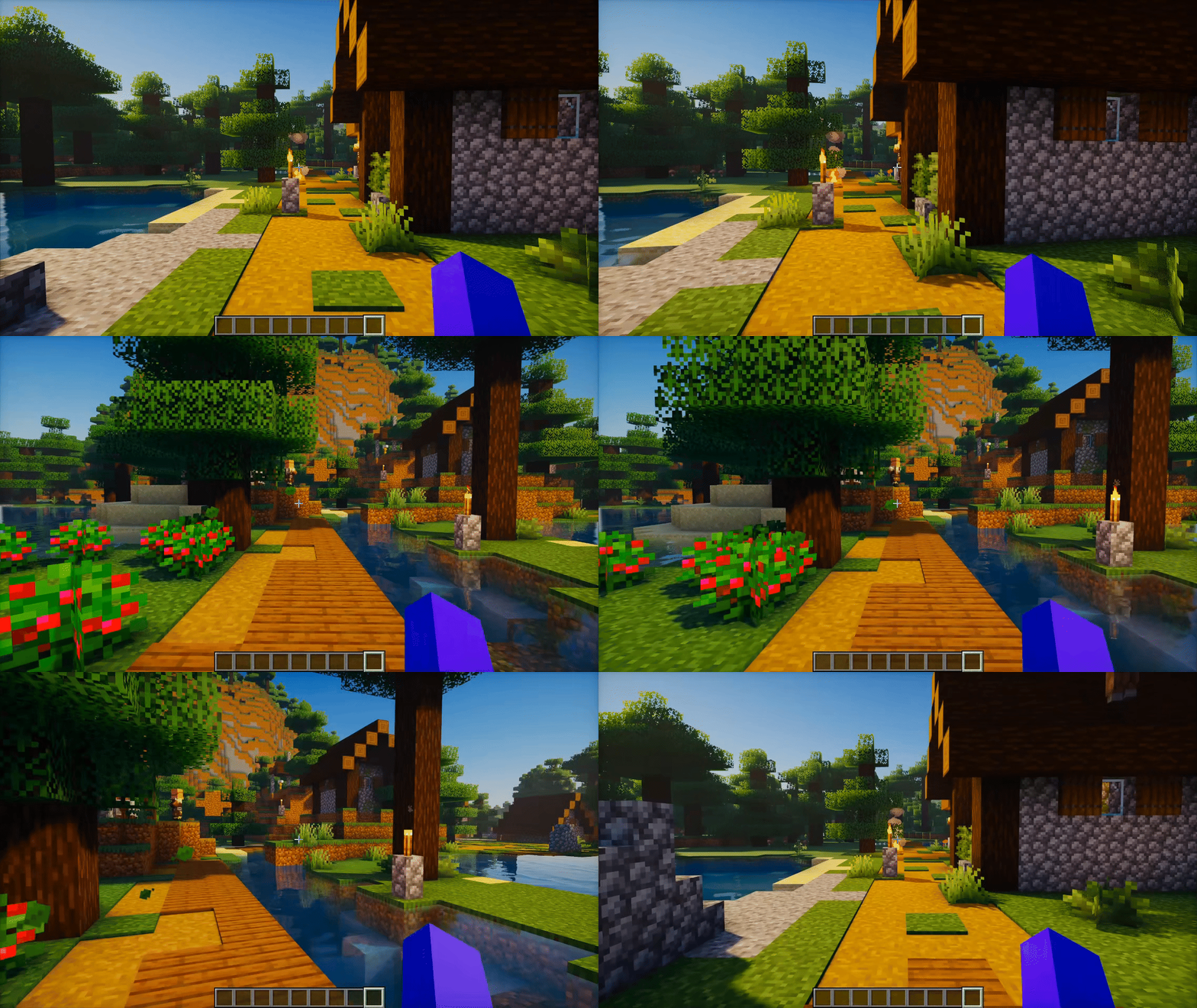
Check the Gallery for more previews.
📖 How to Play
- Press F6 to open Settings and adjust FlickView to your preference.
- Press K to enable or disable FlickView.
- Press U to move to your chosen pitch. Press it again to return to the starting pitch.
- Press Y to turn your view by the configured yaw angle.
- Press I to start continuous spin. Press it again to stop.
Rebind these keys in Minecraft's Controls menu. Existing saved keybindings are preserved when updating.
📜 License and permissions
- All Rights Reserved (ARR). Standalone redistribution and re-uploads require permission.
- Modpacks are allowed when the original mod is unmodified, credited as FlickView by Zynwro, and linked to the official project page.
Project description from CurseForge.
Pick your setup
FlickView by Minecraft version and loader
Choose the version and loader you play, then open the matching release.
Minecraft version
26.2
4 loader buildsMinecraft version
26.1.2
4 loader buildsMinecraft version
26.1.1
4 loader buildsMinecraft version
26.1
4 loader buildsMinecraft version
1.21.11
4 loader buildsMinecraft version
1.21.10
4 loader buildsMinecraft version
1.21.9
4 loader buildsMinecraft version
1.21.8
4 loader buildsMinecraft version
1.21.7
4 loader buildsMinecraft version
1.21.6
4 loader buildsMinecraft version
1.21.5
4 loader buildsShowing the newest 12 of 13 game versions. Older files are in the list below.
Check the dependencies, then try the file in a copied instance before changing a world you care about.
Recent files
FlickView versions and loaders
FlickView 3.6.0 - Quilt
FlickView-3.6.0-Quilt+mc26.3.jar
15 Oct 2026
Client Source doesn’t say Server Source doesn’t say Dependencies No extras listed Listed on Release listing
Check the 26.3 · Quilt setup Quilt26.3 release
FlickView 3.6.0 - NeoForge
FlickView-3.6.0-NeoForge+mc26.3.jar
15 Oct 2026
Client Source doesn’t say Server Source doesn’t say Dependencies No extras listed Listed on Release listing
Check the 26.3 · NeoForge setup NeoForge26.3 release
FlickView 3.6.0 - Forge
FlickView-3.6.0-Forge+mc26.3.jar
15 Oct 2026
Client Source doesn’t say Server Source doesn’t say Dependencies No extras listed Listed on Release listing
Check the 26.3 · Forge setup Forge26.3 release
FlickView 3.6.0 - Fabric
FlickView-3.6.0-Fabric+mc26.3.jar
15 Oct 2026
Client Source doesn’t say Server Source doesn’t say Dependencies 1 required · 1 unchecked Listed on Release listing
Check the 26.3 · Fabric setup Fabric26.3 release
FlickView 3.6.0 - Quilt
FlickView-3.6.0-Quilt+mc26.2.jar
15 Oct 2026
Client Source doesn’t say Server Source doesn’t say Dependencies No extras listed Listed on Release listing
Check the 26.2 · Quilt setup Quilt26.2 release
FlickView 3.6.0 - NeoForge
FlickView-3.6.0-NeoForge+mc26.2.jar
15 Oct 2026
Client Source doesn’t say Server Source doesn’t say Dependencies No extras listed Listed on Release listing
Check the 26.2 · NeoForge setup NeoForge26.2 release
FlickView 3.6.0 - Forge
FlickView-3.6.0-Forge+mc26.2.jar
15 Oct 2026
Client Source doesn’t say Server Source doesn’t say Dependencies No extras listed Listed on Release listing
Check the 26.2 · Forge setup Forge26.2 release
FlickView 3.6.0 - Fabric
FlickView-3.6.0-Fabric+mc26.2.jar
15 Oct 2026
Client Source doesn’t say Server Source doesn’t say Dependencies 1 required · 1 unchecked Listed on Release listing
Check the 26.2 · Fabric setup Fabric26.2 release
FlickView 3.6.0 - Quilt
FlickView-3.6.0-Quilt+mc26.1.2.jar
15 Oct 2026
Client Source doesn’t say Server Source doesn’t say Dependencies No extras listed Listed on Release listing
Check the 26.1.2 · Quilt setup Quilt26.1.2 release
FlickView 3.6.0 - NeoForge
FlickView-3.6.0-NeoForge+mc26.1.2.jar
15 Oct 2026
Client Source doesn’t say Server Source doesn’t say Dependencies No extras listed Listed on Release listing
Check the 26.1.2 · NeoForge setup NeoForge26.1.2 release
FlickView 3.6.0 - Forge
FlickView-3.6.0-Forge+mc26.1.2.jar
15 Oct 2026
Client Source doesn’t say Server Source doesn’t say Dependencies No extras listed Listed on Release listing
Check the 26.1.2 · Forge setup Forge26.1.2 release
FlickView 3.6.0 - Fabric
FlickView-3.6.0-Fabric+mc26.1.2.jar
15 Oct 2026
Client Source doesn’t say Server Source doesn’t say Dependencies 1 required · 1 unchecked Listed on Release listing
Check the 26.1.2 · Fabric setup Fabric26.1.2 release
Looking for an older file? The official CurseForge project page is in Resources.
 mod
CurseForge · Minecraft
Fletching Works
This mod gives vanilla's fletching table a real GUI and nine new arrow types — explosive, lightning-calling, teleporting and more — crafted from a tip, a stick and a feather. For Fabric on Minecraft 1.21.11.
 mod
CurseForge · Minecraft
all villager work
In the vanilla game, only Farmers plant crops. Now, all employed villagers have active duties:
 mod
CurseForge + Modrinth · Minecraft
Coal Explosion
💥 Harvesting coal should be dangerous, now it is!