Minecraft version
Back to mods 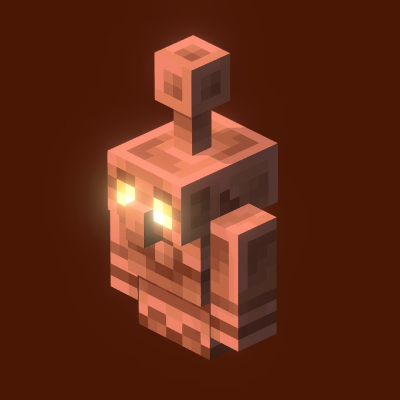
CurseForge · Minecraft mod
Copper CMD
This Mod is made for YouTube Project Of FoamySlime for the 75,000,000 Copper Golem Spawn Event
Choose a version Pick your version below, then grab the matching file.
Quick answer
Which Copper CMD release should I use?
Latest stable file coppercmd-1.0.jar
Game version 1.21.9
Loader Fabric
Copper CMD coppercmd-1.0.jar targets 1.21.9 with Fabric. The project page does not say whether this file belongs on the client, dedicated server, or both. No extra mods listed for this file.
Where it goes
Is Copper CMD required on the client, server, or both?
The project page does not say whether this file belongs on the client, dedicated server, or both.
Client Source doesn’t say
Dedicated server Source doesn’t say
Loader for this release Fabric
Required install it here Optional supported, not mandatory Not supported do not install here Source doesn’t say do not assume
The source does not explicitly classify this release as client-only or server-only.
What else does Copper CMD coppercmd-1.0.jar need?
coppercmd-1.0.jar. Change the file and its required mods may change too.
This file does not list any required mods. Do not add a library just because a different file uses it.
This file does not list any required or optional mods.
Before you install it
Add Copper CMD without breaking your instance.
Built for Copper CMD coppercmd-1.0.jar. Pick another file and the loader, install side or required mods may change.
- 01
Stick to this file
Use coppercmd-1.0.jar. It targets 1.21.9 with Fabric; another release may have different loader, side or dependency requirements.
- 02
Bring the mods it needs
This file does not list any required mods. Do not add a library just because a different file uses it.
- 03
Put it on the correct side
The project page does not say whether this file belongs on the client, dedicated server, or both.
- 04
Pick the file you checked
Use the “Get this file” button beside coppercmd-1.0.jar. It opens that exact file at the source.
About this project
What does Copper CMD add?
⚡ CopperCMD – Infinite Copper Golem Spawner
Version: Fabric 1.21.9
Author: FoamySlime
Project Type: Experimental / Showcase Mod
YouTube: FoamySlime Channel
🎬 About the Project
This mod was created for the FoamySlime YouTube Project as a tool for Minecraft Copper Golem Event.
It allows you to spawn massive rings of Copper Golems around the player — thousands at once — using simple commands.
The mod demonstrates:
- Real-time server tick scheduling
- Batch-based entity spawning (safe multi-tick load)
- Optional invisibility and magma base generation
🧱 Commands
| Command | Description |
|---|---|
/ring_spawn [amount] [distance] [magma] [invisible] |
Starts spawning Copper Golems in a perfect circle around the player. |
/ring_stop |
Stops all active ring spawns in the current world. |
/ring_count |
Counts all Copper Golems currently loaded in the world. |
⚠️ Performance Warning
READ THIS BEFORE USING
- This mod is intended for testing and cinematic experiments, not normal survival gameplay.
- Spawning thousands of entities WILL cause lag, even with AI disabled and invisibility on.
- Every Copper Golem still exists in world memory — invisible ≠ unloaded.
- For massive tests (>100k), run on a dedicated test world or use superflat void presets.
- Adjust
BATCH_PER_TICKin the source if your server cannot handle large bursts.
🧠 Invisible mobs still consume tick cycles for collision and data checks — use responsibly!
⚙️ Features
- 🌀 Circular mob spawning logic
- 🔥 Optional magma block placement under each entity
- 👻 Invisible, silent, and AI-disabled mobs
- 🧩 Configurable per world, runs independently
- 🧮 Real-time counting via
/ring_count
💡 Tips
- Use this mod in Creative Mode only.
- Best used with F3 + Shift + F3 graphs visible for tick profiling.
- Try setting
totalto smaller numbers (e.g., 1000) before pushing limits. - If the world slows down heavily, execute
/ring_stop
🧰 Tech Details
- Built on Fabric API 0.97+
- Written for Minecraft 1.21.9
- Uses
ServerTickEventsandCommandRegistrationCallback - Compatible with most Fabric modpacks (no mixin conflicts)
🧨 Disclaimer
⚠️ Use at your own risk!
This mod intentionally spawns massive entity counts for Event.
Not recommended for use in survival or production servers.
🧡 Support & Credits
Made by FoamySlime
Special thanks to everyone experimenting with extreme Minecraft physics 🧪
Project description from CurseForge.
Pick your setup
Copper CMD by Minecraft version and loader
Choose the version and loader you play, then open the matching release.
Check the dependencies, then try the file in a copied instance before changing a world you care about.
Recent files
Copper CMD versions and loaders
coppercmd-1.0.jar
coppercmd-1.0.1.jar
7 Oct 2025
Client Source doesn’t say Server Source doesn’t say Dependencies No extras listed Listed on Release listing
Check the 1.21.9 · Fabric setup Fabric1.21.9 release
Looking for an older file? The official CurseForge project page is in Resources.
 mod
mod Modrinth · Minecraft
Pets Mod
Adds completely client-sided pets to your game. Supports every vanilla mob, some custom ones, and will work on any server, including in singleplayer!
 mod
mod CurseForge · Minecraft
Edible Chalk
Adds new items and foods.
 mod
mod CurseForge · Minecraft
ExfilCraft
Extraction survival for Minecraft: carry your kit into hostile raid worlds, fight for loot, and survive the extraction channel to bring it home — or die and drop it all. Build a home base, squad up, and risk it for one more chest.