Minecraft version
Back to mods 
CurseForge · Minecraft mod
Friendly & Enemy Nametags
Tag players as friendly or enemy and marks them as so.
Choose a version Pick your version below, then grab the matching file.
Quick answer
Which Friendly & Enemy Nametags release should I use?
Latest stable file 1.21.8 Friendly & Enemy Nametags 1.0.1
Game version 1.21.8
Loader Fabric
Friendly & Enemy Nametags 1.21.8 Friendly & Enemy Nametags 1.0.1 targets 1.21.8 with Fabric. The project page does not say whether this file belongs on the client, dedicated server, or both. No extra mods listed for this file.
Where it goes
Is Friendly & Enemy Nametags required on the client, server, or both?
The project page does not say whether this file belongs on the client, dedicated server, or both.
Client Source doesn’t say
Dedicated server Source doesn’t say
Loader for this release Fabric
Required install it here Optional supported, not mandatory Not supported do not install here Source doesn’t say do not assume
The source does not explicitly classify this release as client-only or server-only.
What else does Friendly & Enemy Nametags 1.21.8 Friendly & Enemy Nametags 1.0.1 need?
1.21.8 Friendly & Enemy Nametags 1.0.1. Change the file and its required mods may change too.
This file does not list any required mods. Do not add a library just because a different file uses it.
This file does not list any required or optional mods.
Before you install it
Add Friendly & Enemy Nametags without breaking your instance.
Built for Friendly & Enemy Nametags 1.21.8 Friendly & Enemy Nametags 1.0.1. Pick another file and the loader, install side or required mods may change.
- 01
Stick to this file
Use 1.21.8 Friendly & Enemy Nametags 1.0.1. It targets 1.21.8 with Fabric; another release may have different loader, side or dependency requirements.
- 02
Bring the mods it needs
This file does not list any required mods. Do not add a library just because a different file uses it.
- 03
Put it on the correct side
The project page does not say whether this file belongs on the client, dedicated server, or both.
- 04
Pick the file you checked
Use the “Get this file” button beside 1.21.8 Friendly & Enemy Nametags 1.0.1. It opens that exact file at the source.
About this project
What does Friendly & Enemy Nametags add?
Only Version Currently is 1.21.8 FABRIC
This client-side mod allows you to mark players on servers as either friendly or enemies. Its great for PvP in large fights because it lets you quickly identify allies or enemies.
It will put a green or red box above their username that indicates their status. This only shows up when their nametag is visible and in render distance, and not when they are invisible or behind walls. Because of this, the mod is generally safe to use on most servers, but you should always check with a staff member! People you tag are saved between sessions.
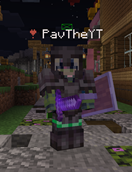
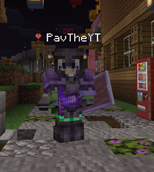
Nametag Commands Help:/nametags – Lists all tagged players/tagfriendly <name> – Tags a player as friendly (green square)/tagenemy <name> – Tags a player as enemy (red square)/untag <name> – Removes a player from tags/nametaghelp – Shows this help messageTags are client-side only and persist between sessions.
Project description from CurseForge.
Pick your setup
Friendly & Enemy Nametags by Minecraft version and loader
Choose the version and loader you play, then open the matching release.
Check the dependencies, then try the file in a copied instance before changing a world you care about.
Recent files
Friendly & Enemy Nametags versions and loaders
1.21.8 Friendly & Enemy Nametags 1.0.1
friendlyenemytags-1.21.8-1.0.1.jar
26 Oct 2025
Client Source doesn’t say Server Source doesn’t say Dependencies No extras listed Listed on Release listing
Check the 1.21.8 · Fabric setup Fabric1.21.8 release
1.21.8 Friendly & Enemy Nametags
friendlyenemytags-1.0.0.jar
26 Oct 2025
Client Source doesn’t say Server Source doesn’t say Dependencies No extras listed Listed on Release listing
Check the 1.21.8 · Fabric setup Fabric1.21.8 release
Looking for an older file? The official CurseForge project page is in Resources.
 mod
mod CurseForge + Modrinth · Minecraft
Polymorph+
(26.1.2 port) No more recipe conflicts! Adds an option to choose the crafting result if more than one is available.
 mod
mod CurseForge + Modrinth · Minecraft
Assorted Discoveries
Experience Minecraft like never before with over 90 new plushies! As well as many other new vanilla style blocks, food, and much much more with Assorted Discoveries!
 mod
mod CurseForge + Modrinth · Minecraft
Modulation
A growing collection of quality-of-life tweaks, bug fixes, and cross-mod integrations for modpack creators!