Quick answer
Which Spellcaster's Archives release should I use?
Latest stable file Spellcaster's Archives 0.5.6
Game version 1.12.2
Loader forge
Spellcaster's Archives 0.5.6 targets 1.12.2. The project page does not say whether this file belongs on the client, dedicated server, or both. All 1 required mods have matching files.
Where it goes
Is Spellcaster's Archives required on the client, server, or both?
The project page does not say whether this file belongs on the client, dedicated server, or both.
Client Source doesn’t say
Dedicated server Source doesn’t say
Loader for this release No loader listed
Required install it here Optional supported, not mandatory Not supported do not install here Source doesn’t say do not assume
The source does not explicitly classify this release as client-only or server-only.
What else does Spellcaster's Archives 0.5.6 need?
Spellcaster's Archives 0.5.6. Change the file and its required mods may change too.
Install Electroblob's Wizardry first. We found matching files for this game-version and loader setup. 3 come through another mod in the chain.
2 listed on this file 3 pulled in by those mods
Matching file found Matched file: Electroblob's Wizardry - 4.3.19 - MC 1.12.2
Matching file found Matched file: enchlib-1.12.2-1.2.1.jar
Baubles Needed by Electroblob's Wizardry pulled inMatching file found Matched file: Baubles-1.12-1.5.2.jar
Matching file found Matched file: antiqueatlas-1.12.2-4.6.3.jar
Matching file found Matched file: MixinBooter 12.5
3
extra mods were pulled in by other dependencies.
Indented rows show who needs each one. We only count dependency files that match this setup. A file for another loader does not fill the gap.
Before you install it
Add Spellcaster's Archives without breaking your instance.
Built for Spellcaster's Archives 0.5.6. Pick another file and the loader, install side or required mods may change.
- 01
Stick to this file
Use Spellcaster's Archives 0.5.6. It targets 1.12.2; another release may have different loader, side or dependency requirements.
- 02
Bring the mods it needs
Install Electroblob's Wizardry first. We found matching files for this game-version and loader setup. 3 come through another mod in the chain.
- 03
Put it on the correct side
The project page does not say whether this file belongs on the client, dedicated server, or both.
- 04
Pick the file you checked
Use the “Get this file” button beside Spellcaster's Archives 0.5.6. It opens that exact file at the source.
About this project
What does Spellcaster's Archives add?
A Minecraft 1.12.2 Forge mod that adds a "Spellcaster's Archives" block: a bottomless, capability-aware storage for Electroblob's Wizardry spell books. It integrates with hoppers/pipes/AE2/etc and provides an in-game GUI for browsing and extracting books.
Features:
- Bottomless Spells storage (up to Max Int per spell; overflow is always voided)
- Item insertion/extraction for automation with stable slot order
- Spells or identification scrolls can be manually inserted via right-clicking on the block with the item
- Spells can be manually extracted by left-clicking on their spine in the GUI (1 on click, 16 on shift-click)
- Undiscovered spells can be discovered by right-clicking on their spine (as long as you have identification scrolls left; can be disabled in config)
- Content is preserved when broken or when spell mods are removed/added (removed spells are lost, but others remain unaffected)
- Configurable GUI with paging (configuration through mod config, with config file hot-reloading)
- Left panel: element-colored spines arranged in shelves by tier
- Right panel: details for the hovered book
- Spell name/description (or glyph if undiscovered)
- Element icon/name, cost/cooldown/charge (? if undiscovered)
- Instructions about click controls
- Spell icon (if discovered)
Project description from CurseForge.
Pick your setup
Spellcaster's Archives by Minecraft version and loader
Choose the version and loader you play, then open the matching release.
Minecraft version
1.12.2
2
loader builds Check the dependencies, then try the file in a copied instance before changing a world you care about.
Recent files
Spellcaster's Archives versions and loaders
spellarchives-0.5.6.jar
17 Mar 2026
Client Source doesn’t say Server Source doesn’t say Dependencies 1 required · matched Listed on Release listing
Check the 1.12.2 setup → spellarchives-0.5.5.jar
29 Jan 2026
Client Source doesn’t say Server Source doesn’t say Dependencies 1 required · 1 unchecked Listed on Release listing
Check the 1.12.2 setup → spellarchives-0.5.4.jar
24 Dec 2025
Client Source doesn’t say Server Source doesn’t say Dependencies 1 required · 1 unchecked Listed on Release listing
Check the 1.12.2 setup → spellarchives-0.5.3.jar
4 Dec 2025
Client Source doesn’t say Server Source doesn’t say Dependencies 1 required · 1 unchecked Listed on Release listing
Check the 1.12.2 setup → spellarchives-0.5.2.jar
25 Nov 2025
Client Source doesn’t say Server Source doesn’t say Dependencies 1 required · 1 unchecked Listed on Release listing
Check the 1.12.2 · Forge setup → spellarchives-0.5.1.jar
23 Nov 2025
Client Source doesn’t say Server Source doesn’t say Dependencies 1 required · 1 unchecked Listed on Release listing
Check the 1.12.2 setup → spellarchives-0.5.0.jar
21 Nov 2025
Client Source doesn’t say Server Source doesn’t say Dependencies 1 required · 1 unchecked Listed on Release listing
Check the 1.12.2 setup → spellarchives-0.4.6.jar
20 Nov 2025
Client Source doesn’t say Server Source doesn’t say Dependencies 1 required · 1 unchecked Listed on Release listing
Check the 1.12.2 setup → spellarchives-0.4.5.jar
17 Nov 2025
Client Source doesn’t say Server Source doesn’t say Dependencies 1 required · 1 unchecked Listed on Release listing
Check the 1.12.2 · Forge setup → spellarchives-0.4.4.jar
17 Nov 2025
Client Source doesn’t say Server Source doesn’t say Dependencies 1 required · 1 unchecked Listed on Release listing
Check the 1.12.2 · Forge setup → spellarchives-0.4.2.jar
16 Nov 2025
Client Source doesn’t say Server Source doesn’t say Dependencies 1 required · 1 unchecked Listed on Release listing
Check the 1.12.2 · Forge setup → spellarchives-0.3.1.jar
15 Nov 2025
Client Source doesn’t say Server Source doesn’t say Dependencies 1 required · 1 unchecked Listed on Release listing
Check the 1.12.2 · Forge setup → 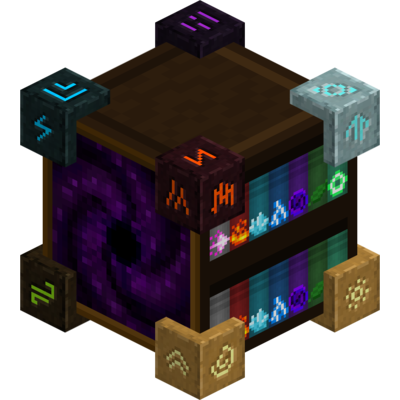
 mod
 mod
 mod