Minecraft version
Back to mods 
CurseForge · Minecraft mod
Petite Inventory
Provides a Resident Evil 4 / Diablo–style inventory layout, where a single item can occupy multiple slots, and adjusts the corresponding replacement and transfer operations.
Choose a version Pick your version below, then grab the matching file.
Quick answer
Which Petite Inventory release should I use?
Latest stable file PetiteInventory 1.1.1 for NeoForge 26.1
Game version 26.1
Loader NeoForge
Petite Inventory PetiteInventory 1.1.1 for NeoForge 26.1 targets 26.1 with NeoForge. The project page does not say whether this file belongs on the client, dedicated server, or both. No extra mods listed for this file.
Where it goes
Is Petite Inventory required on the client, server, or both?
The project page does not say whether this file belongs on the client, dedicated server, or both.
Client Source doesn’t say
Dedicated server Source doesn’t say
Loader for this release NeoForge
Required install it here Optional supported, not mandatory Not supported do not install here Source doesn’t say do not assume
The source does not explicitly classify this release as client-only or server-only.
What else does Petite Inventory PetiteInventory 1.1.1 for NeoForge 26.1 need?
PetiteInventory 1.1.1 for NeoForge 26.1. Change the file and its required mods may change too.
This file does not list any required mods. Do not add a library just because a different file uses it.
This file does not list any required or optional mods.
Before you install it
Add Petite Inventory without breaking your instance.
Built for Petite Inventory PetiteInventory 1.1.1 for NeoForge 26.1. Pick another file and the loader, install side or required mods may change.
- 01
Stick to this file
Use PetiteInventory 1.1.1 for NeoForge 26.1. It targets 26.1 with NeoForge; another release may have different loader, side or dependency requirements.
- 02
Bring the mods it needs
This file does not list any required mods. Do not add a library just because a different file uses it.
- 03
Put it on the correct side
The project page does not say whether this file belongs on the client, dedicated server, or both.
- 04
Pick the file you checked
Use the “Get this file” button beside PetiteInventory 1.1.1 for NeoForge 26.1. It opens that exact file at the source.
About this project
What does Petite Inventory add?
Real Inventory / Petite Inventory
PetiteInventory provides container layouts inspired by games such as Resident Evil 4, Diablo, and Delta Force. A single item can occupy multiple slots, with matching replacement, stacking, and transfer rules. The mod also provides footprint rotation, item background colors, and a visual editor.
Main Features
The editor mode is recommended, but the layout can also be configured directly through the rule files.
On first launch, the default rule files are generated at:
- Item footprints:
config/PetiteInventory/border_items.json - Item colors:
config/PetiteInventory/border_colors.json
The rule format is intentionally simple and supports item IDs, item tags, and exact NBT matches. Rules can be reloaded with /reload.
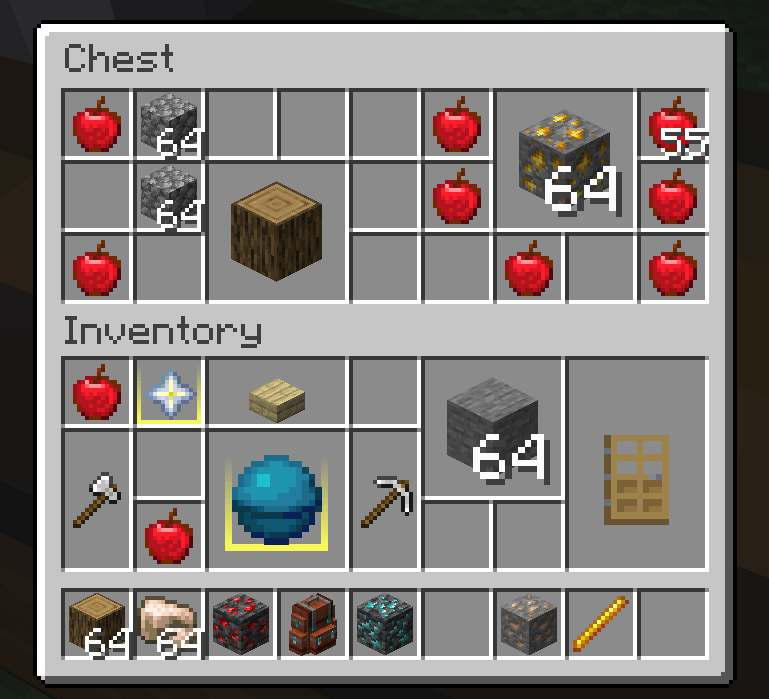
When the layout is enabled, items occupy their configured rectangular footprints. The player inventory is controlled separately for balance. To enable the layout for another container, point at one of its slots and press the copy key (default: U) to copy the screen identifier, then add that identifier to the configuration.
Containers using the layout receive the following operation improvements:
- Moving one item over another allows replacement when the target area has no conflicting item.
- When using a Shift quick transfer, the mod searches for an empty area that can hold the item if stacking is not possible.
- The hotbar is excluded by default so it keeps its conventional vanilla behavior.
- After picking up a non-square item, use the mouse wheel or press
Rto flip the current item instance. This does not change the configured rule.
Edit Mode
Use /petiteinventory edit to toggle edit mode. When the cursor reaches a resizable edge or corner, a highlight border appears and the item can be resized like a Windows window. Changes take effect immediately.
Right-click an item to open the preset color palette and change its background color. The palette currently contains preset colors only. You can also edit border_colors.json directly to assign colors by item ID, tag, or a TACZ GunId.
Hold Ctrl to select multiple items and drag to select an area. Ctrl+Shift extends the selection. With multiple items selected, right-click applies a color to all targets; holding right-click for 0.5 seconds enters batch footprint editing, where the selected rectangle becomes the footprint for every selected item.
In edit mode, each container screen displays a layout toggle at the top. It controls whether that screen uses the Petite layout and takes effect immediately. The player inventory and hotbar remain independently configurable.
Two commands control the default screen behavior:
/petiteinventory blacklist: force blacklist mode, enabling the layout for every container until individual screens are disabled./petiteinventory whitelist: force whitelist mode, disabling the layout for every container until individual screens are enabled.
Compatibility Notes
- Sophisticated Backpacks is specifically adapted, including item footprints, highlights, and footprint-aware quick transfer. TACZ firearms support size and background-color matching through their NBT
GunId. - Item Borders can be used alongside PetiteInventory, and JEI recipe and search behavior is left unchanged.
- Because of the mod's design, sorting, slot-expansion, and other inventory-structure mods may cause compatibility issues.
- Automatic sorting conflicts with PetiteInventory's manual-organization design, so perfect compatibility cannot be guaranteed.
- Click-dragging items is disabled in containers that use the Petite layout. It may return if the interaction problems are solved later.
- If an important container from another mod stops working, report its screen identifier and reproduction steps.
Roadmap
- Port to more Minecraft versions and loaders.
- Support more inventory expansion mechanisms.
- Add dedicated adapters for more third-party container screens.
- Explore irregular, Tetris-like item footprints.
Project description from CurseForge.
Pick your setup
Petite Inventory by Minecraft version and loader
Choose the version and loader you play, then open the matching release.
Minecraft version
1.21.1
1 loader buildMinecraft version
1.20.6
1 loader buildMinecraft version
1.20.5
1 loader buildMinecraft version
1.20.4
1 loader buildMinecraft version
1.20.3
1 loader buildMinecraft version
1.20.2
1 loader buildMinecraft version
1.20.1
1 loader buildCheck the dependencies, then try the file in a copied instance before changing a world you care about.
Recent files
Petite Inventory versions and loaders
PetiteInventory 1.1.1 for NeoForge 26.1
PetiteInventory-neoforge-26.1-1.1.1.jar
4 Sept 2026
Client Source doesn’t say Server Source doesn’t say Dependencies No extras listed Listed on Release listing
Check the 26.1 · NeoForge setup NeoForge26.1 release
PetiteInventory 1.1.1 for Forge 1.20.1
petiteinventory-1.1.1.jar
4 Sept 2026
Client Source doesn’t say Server Source doesn’t say Dependencies No extras listed Listed on Release listing
Check the 1.20.1 · Forge setup 1.20.1Forge release
PetiteInventory 1.1.1 for NeoForge 1.21.1
PetiteInventory-neoforge-1.21.1-1.1.1.jar
4 Sept 2026
Client Source doesn’t say Server Source doesn’t say Dependencies No extras listed Listed on Release listing
Check the 1.21.1 · NeoForge setup 1.21.1NeoForge release
petiteinventory-1.1.0.jar
4 Aug 2026
Client Source doesn’t say Server Source doesn’t say Dependencies No extras listed Listed on Release listing
Check the 1.20.6 · Forge setup 1.20.1Forge1.20.21.20.3 release
petiteinventory-1.0.8.jar
20 Mar 2026
Client Source doesn’t say Server Source doesn’t say Dependencies No extras listed Listed on Release listing
Check the 1.20.1 · Forge setup 1.20.1Forge release
petiteinventory-1.0.7.jar
2 Mar 2026
Client Source doesn’t say Server Source doesn’t say Dependencies No extras listed Listed on Release listing
Check the 1.20.1 · Forge setup 1.20.1Forge release
petiteinventory-1.0.6.jar
27 Feb 2026
Client Source doesn’t say Server Source doesn’t say Dependencies No extras listed Listed on Release listing
Check the 1.20.1 · Forge setup 1.20.1Forge release
petiteinventory-1.0.5.jar
21 Dec 2025
Client Source doesn’t say Server Source doesn’t say Dependencies No extras listed Listed on Release listing
Check the 1.20.6 · Forge setup 1.20.1Forge1.20.21.20.3 release
petiteinventory-1.0.4.jar
22 Nov 2025
Client Source doesn’t say Server Source doesn’t say Dependencies No extras listed Listed on Release listing
Check the 1.20.6 · Forge setup 1.20.1Forge1.20.21.20.3 release
petiteinventory-1.0.3.jar
20 Nov 2025
Client Source doesn’t say Server Source doesn’t say Dependencies No extras listed Listed on Release listing
Check the 1.20.1 · Forge setup 1.20.1Forge release
petiteinventory-1.0.2.jar
19 Nov 2025
Client Source doesn’t say Server Source doesn’t say Dependencies No extras listed Listed on Release listing
Check the 1.20.1 · Forge setup 1.20.1Forge release
petiteinventory-1.0.1.jar
17 Nov 2025
Client Source doesn’t say Server Source doesn’t say Dependencies No extras listed Listed on Release listing
Check the 1.20.6 · Forge setup 1.20.1Forge1.20.21.20.3 release
Looking for an older file? The official CurseForge project page is in Resources.
 mod
mod CurseForge + Modrinth · Minecraft
TNTimer
Countdown timer on top of screen to know exactly when that TNT is going to explode without need to see the TNT client-side. Renders a timer over primed TNT (starting from v2.0)
 mod
mod CurseForge · Minecraft
Better Resolution
Better Resolution improves GPU performance by lowering Minecraft’s internal world render resolution and then reconstructing it back to native resolution using smart and lightweight algorithms.
 mod
mod CurseForge · Minecraft
Economy: Currency & Chunks ("FTB Chunks/OPAC" & "Lightman/Numismatics")
Turns claiming into a living, self-managing economy with the help of currency mods: claiming costs money, protection is billed per region, wars have a price, and players can buy and sell land from each other — all fully configurable.