Configured Needed by Apocalyptic Meteors meteors-1.6.0.jar
requiredMatching file found Matched file: Configured 2.6.3
CurseForge · Minecraft mod
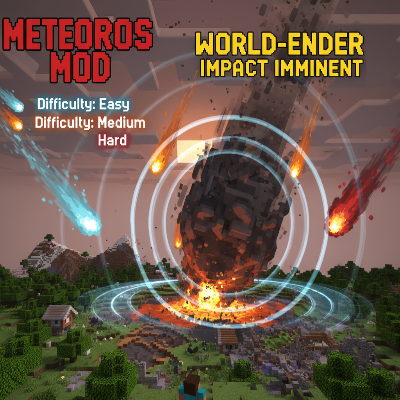
Adds falling meteors that leave craters and fires, with adjustable spawn rates and a command to summon a giant destructive meteor.
Quick answer
Apocalyptic Meteors meteors-1.6.0.jar targets 1.21.1 with NeoForge. The project page does not say whether this file belongs on the client, dedicated server, or both. All 2 required mods have matching files.
Where it goes
The project page does not say whether this file belongs on the client, dedicated server, or both.
The source does not explicitly classify this release as client-only or server-only.
meteors-1.6.0.jar. Change the file and its required mods may change too.
Install Configured, GeckoLib first. We found matching files for this game-version and loader setup. 2 come through another mod in the chain.
2 extra mods were pulled in by other dependencies. Indented rows show who needs each one. We only count dependency files that match this setup. A file for another loader does not fill the gap.
Before you install it
Built for Apocalyptic Meteors meteors-1.6.0.jar. Pick another file and the loader, install side or required mods may change.
Use meteors-1.6.0.jar. It targets 1.21.1 with NeoForge; another release may have different loader, side or dependency requirements.
Install Configured, GeckoLib first. We found matching files for this game-version and loader setup. 2 come through another mod in the chain.
The project page does not say whether this file belongs on the client, dedicated server, or both.
Use the “Get this file” button beside meteors-1.6.0.jar. It opens that exact file at the source.
About this project
Apocalyptic Meteors adds falling meteors that explode on impact, leaving craters, fire, and obsidian behind. Flaming projectiles spawn randomly near players, with smoke trails that give you a chance to spot them before they land.
Use /meteors [easy | medium | hard] to change how often meteors spawn.
/meteors destructive summons a giant meteor aimed at a random player. Its impact creates a 300-block shockwave and causes extensive terrain damage, so keep it away from builds you want to save.
Requires Minecraft 1.21.1 with NeoForge.
Interested in making your own mod? Join the Discord server.
Project description from CurseForge.
Pick your setup
Choose the version and loader you play, then open the matching release.
Check the dependencies, then try the file in a copied instance before changing a world you care about.
Recent files
meteors-1.0.0.jar
22 Jan 2026
meteors-1.0.0.jar
9 Dec 2025
meteors-1.0.0.jar
19 Nov 2025
meteors-1.0.0.jar
19 Nov 2025
Looking for an older file? The official CurseForge project page is in Resources.
 mod
The Earth in Minecraft at 1:1 scale
 mod
A Research Funnel turns Create's output into FTB team research points, quests and unlocks.
 mod
Totems of Undying that still save your life, but leave a curse behind: lost hearts, a zombie body, a rampage, a melon diet and more. Evokers drop them.