Riding Helmet Optional for Riding Equipment RidingEquipmentMOD_byS_Dreamalway_1.21NeoForge_1.1.1.jar
optionalMatching file found Matched file: RidingHelmetMOD_byS_Dreamalway_1.21NeoForge_2.1.jar
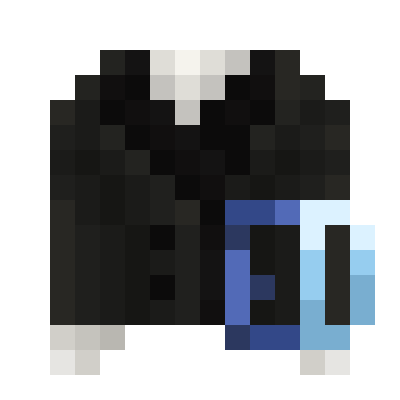
CurseForge · Minecraft mod
This mod adds clothing for horseback riding!
Quick answer
Riding Equipment RidingEquipmentMOD_byS_Dreamalway_1.21NeoForge_1.1.1.jar targets 1.21.1 with NeoForge. The project page does not say whether this file belongs on the client, dedicated server, or both. No extra mods listed for this file.
Where it goes
The project page does not say whether this file belongs on the client, dedicated server, or both.
The source does not explicitly classify this release as client-only or server-only.
RidingEquipmentMOD_byS_Dreamalway_1.21NeoForge_1.1.1.jar. Change the file and its required mods may change too.
This file does not list any required mods. Do not add a library just because a different file uses it.
1 extra mod was pulled in by another dependency. Indented rows show who needs each one. We only count dependency files that match this setup. A file for another loader does not fill the gap.
Before you install it
Built for Riding Equipment RidingEquipmentMOD_byS_Dreamalway_1.21NeoForge_1.1.1.jar. Pick another file and the loader, install side or required mods may change.
Use RidingEquipmentMOD_byS_Dreamalway_1.21NeoForge_1.1.1.jar. It targets 1.21.1 with NeoForge; another release may have different loader, side or dependency requirements.
This file does not list any required mods. Do not add a library just because a different file uses it.
The project page does not say whether this file belongs on the client, dedicated server, or both.
Use the “Get this file” button beside RidingEquipmentMOD_byS_Dreamalway_1.21NeoForge_1.1.1.jar. It opens that exact file at the source.
About this project
This mod adds clothing for horseback riding!
This mod expands your rider's wardrobe by adding stylish tailcoats, elegant riding coats, classic breeches, and boots. (Please note: the mod does not contain helmets from RidingHelmetMOD; they will be added in a future update).
What's added:
You can use the "empty" textures by replacing them, thereby expanding the mod with new colors and designs!
Future updates will add even more empty textures, and a general resource pack with new design sets will be released. For now, you can order custom designs!
🔧 How to replace a texture?
File names:
Boots - boots(n) | icon - boots(n)_icon
Frac - frac(n) | icon - frac(n)_icon
Riding coat - rid(n) | icon - rid(n)_icon
Gloves - g(n) | icon - g(n)_icon
Vest - v(n) | icon - v(n)_icon
Breeches - b(n)__layer_2 | icon - b(n)_icon
1. Replacing the main texture:
Right-click on the mod file -> Open archive.
Navigate to:
assets -> riding_equipment_mod -> textures -> entities (Breeches - assets -> riding_equipment_mod -> textures -> models -> armor)
Select the texture with the matching name Name(n) (where n is any number: 1, 2, 3...) that you want to replace.
Rename your texture to match the selected slot (e.g., boots5.png) and move it into the resource pack folder, replacing the original.
2. Replacing the icon:
Right-click on the mod file -> Open archive.
Navigate to:
assets -> riding_equipment_mod -> textures -> items
Select the texture named Name(n)_icon (where n is any number: 1, 2, 3...) that you want to replace.
Rename your texture to match the selected slot (e.g., boots5_icon.png) and move it into the resource pack folder, replacing the original.
🔧 Other ways to add new textures
Through the shared resource pack:
https://boosty.to/samecreation/posts/1436b6fa-6bb9-4de5-ab4e-8a25caee3c53
Download and install the resource pack - it works for all mod versions and game versions accordingly. It won't add new equipment on its own.
Replacing main textures:
Open the resource pack folder.
Navigate to:
assets -> riding_equipment_mod -> textures -> entities (Breeches - assets -> riding_equipment_mod -> textures -> models -> armor)
Select the texture with the matching name Name(n) (where n is any number: 1, 2, 3...) that you want to replace.
Rename your texture to match the selected slot (e.g., boots5.png) and move it into the resource pack folder, replacing the original.
Replacing the icon:
Open the resource pack folder.
Navigate to:
assets -> riding_equipment_mod -> textures -> items
Select the texture named Name(n)_icon (where n is any number: 1, 2, 3...) that you want to replace.
Rename your texture to match the selected slot (e.g., boots5_icon.png) and move it into the resource pack folder, replacing the original.
Through separate resource packs with sets:
These packs contain pre-configured textures.
Each set replaces textures starting from the first empty slot (Name(1).png, Name(2).png, etc., depending on the number of equipment pieces in the pack).
Replacing the main texture:
Open the resource pack folder.
Navigate to: assets -> riding_equipment_mod -> textures -> entities. (Breeches - assets -> riding_equipment_mod -> textures -> models -> armor)
Select the texture named Name(n). If using multiple packs, check which slots are empty/available.
Rename the texture accordingly (e.g., boots5.png).
Replacing the icon:
Open the resource pack folder.
Navigate to: assets -> riding_equipment_mod -> textures -> items.
Select the texture named Name(n)_icon. If using multiple packs, check which slots are empty/available.
Rename the texture accordingly (e.g., boots5_icon.png).
Important notes:
Always make sure your textures are in .png format and match the original sizes.
If you're using multiple resource packs, check for conflicting textures in the same slots.
Done!
Free and paid kits, as well as the opportunity to order your own unique designs (or your modest support) - Boosty https://boosty.to/samecreation
Discord - same1202
Project description from CurseForge.
Pick your setup
Choose the version and loader you play, then open the matching release.
Check the dependencies, then try the file in a copied instance before changing a world you care about.
Recent files
26 Jun 2026
26 Jun 2026
26 Jun 2026
9 Jun 2026
28 May 2026
28 May 2026
21 Nov 2025
21 Nov 2025
Looking for an older file? The official CurseForge project page is in Resources.
 mod
Mbd2 is an extremely flexible yet vanilla-esque multiblock mod, that embraces aspects of MultiblockTweaker and Modular Machinery.
 mod
The all-in-one Christmas mod: gingerbread houses and decorated trees in the snow, presents you wrap for friends, an advent calendar, reindeer (watch for the red-nosed one), gingerbread men, Krampus, festive food, lights and decorations.
 mod
Create visible, operator-controlled barriers that lock and protect restricted SMP areas until they are ready to open.