Minecraft version
Back to mods 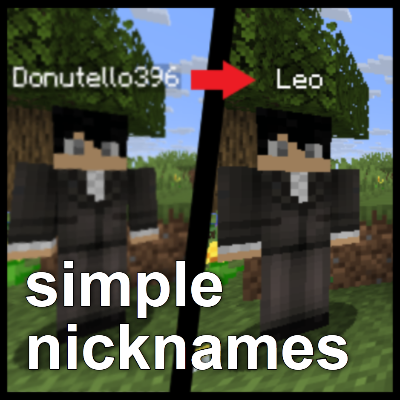
CurseForge · Minecraft mod
Simple Nicknames
A configurable nickname mod that lets players change the name above their head and in other places!
Choose a version Pick your version below, then grab the matching file.
Quick answer
Which Simple Nicknames release should I use?
Latest stable file 26.2-neoforge-0.7.1
Game version 26.2
Loader NeoForge
Simple Nicknames 26.2-neoforge-0.7.1 targets 26.2 with NeoForge. The project page does not say whether this file belongs on the client, dedicated server, or both. No extra mods listed for this file.
Where it goes
Is Simple Nicknames required on the client, server, or both?
The project page does not say whether this file belongs on the client, dedicated server, or both.
Client Source doesn’t say
Dedicated server Source doesn’t say
Loader for this release NeoForge
Required install it here Optional supported, not mandatory Not supported do not install here Source doesn’t say do not assume
The source does not explicitly classify this release as client-only or server-only.
What else does Simple Nicknames 26.2-neoforge-0.7.1 need?
26.2-neoforge-0.7.1. Change the file and its required mods may change too.
This file does not list any required mods. Do not add a library just because a different file uses it.
This file does not list any required or optional mods.
Before you install it
Add Simple Nicknames without breaking your instance.
Built for Simple Nicknames 26.2-neoforge-0.7.1. Pick another file and the loader, install side or required mods may change.
- 01
Stick to this file
Use 26.2-neoforge-0.7.1. It targets 26.2 with NeoForge; another release may have different loader, side or dependency requirements.
- 02
Bring the mods it needs
This file does not list any required mods. Do not add a library just because a different file uses it.
- 03
Put it on the correct side
The project page does not say whether this file belongs on the client, dedicated server, or both.
- 04
Pick the file you checked
Use the “Get this file” button beside 26.2-neoforge-0.7.1. It opens that exact file at the source.
About this project
What does Simple Nicknames add?
Simple Nicknames
A straightforward nickname system for your Minecraft server that allows players to customize their display names across the game.
Beta Notice
This mod is currently in beta. While it's functional, you may encounter bugs or unexpected behavior. Please report any issues you find so I can continue improving the mod!
Installation
Both client and server installations are required.
Make sure to install the mod on both sides for it to work properly.
!!! The Fabric version also requires Fabric API on both sides !!!
Usage
Set your nickname with a simple command:
/nick <nickname>
To remove your nickname and return to your original name:
/unnick
Admins are able to set nicknames for other users or assign random nicks:
/setnick Donutello396 Leo
/randomnick @a
They can also unnick other users as well as list all nicked users:
/unnick all
/unnick username Donutello396
/unnick nickname Leo
/listnicknames
Features
Display Name Changes
Simple Nicknames changes your display name in the following locations:
- Nametag - The name displayed above your character
- Chat - Your name in chat messages
- Tab List - The player list accessible via Tab key
- Scoreboard - Your name on any scoreboards
You can configure how and where your name appears in the config file.
Colored Names
Simple Nicknames supports MiniMessage formatting. If enabled, players will be able to color/format their nickname (disabled by default).
Even without MiniMessage, your nickname will still respect existing formatting, such as team colors set for members.
Flashback
Simple Nicknames can be used with the Flashback mod on supported Fabric versions.
If you notice your nickname not appearing somewhere it should, please report it so I can add support!
Known incompatibilities
- Entity Culling - When viewing players through walls, sometimes their normal username appears as their nametag. To fix this, blacklist
minecraft:playerin the Entity Culling configs.
Third-party libraries
The mod files bundle third-party libraries using jar-in-jar:
- Kyori Adventure / MiniMessage / Option, licensed under the MIT License
- JetBrains Annotations, licensed under the Apache License 2.0
- JSpecify, licensed under the Apache License 2.0
- Konfig, licensed under the MIT License
Support
Found a bug or have a feature request? You can reach out through:
- CurseForge mod page comments
- Discord:
donutello_
Please make sure you have read this page, changelogs and the config file before reporting!
Please include as much detail as possible when reporting issues!
Project description from CurseForge.
Pick your setup
Simple Nicknames by Minecraft version and loader
Choose the version and loader you play, then open the matching release.
Minecraft version
26.1.2
2 loader buildsMinecraft version
26.1.1
2 loader buildsMinecraft version
26.1
2 loader buildsMinecraft version
1.21.11
2 loader buildsMinecraft version
1.21.10
2 loader buildsMinecraft version
1.21.9
2 loader buildsMinecraft version
1.21.8
2 loader buildsMinecraft version
1.21.7
2 loader buildsMinecraft version
1.21.6
2 loader buildsMinecraft version
1.21.5
2 loader buildsMinecraft version
1.21.4
2 loader buildsShowing the newest 12 of 16 game versions. Older files are in the list below.
Check the dependencies, then try the file in a copied instance before changing a world you care about.
Recent files
Simple Nicknames versions and loaders
26.2-neoforge-0.7.1
simplenicknames-26.2-neoforge-0.7.1.jar
19 Aug 2026
Client Source doesn’t say Server Source doesn’t say Dependencies No extras listed Listed on Release listing
Check the 26.2 · NeoForge setup NeoForge26.2 release
26.2-fabric-0.7.1
simplenicknames-26.2-fabric-0.7.1.jar
19 Aug 2026
Client Source doesn’t say Server Source doesn’t say Dependencies 1 required · 1 unchecked Listed on Release listing
Check the 26.2 · Fabric setup Fabric26.2 release
26.1.2-neoforge-0.7.1
simplenicknames-26.1.2-neoforge-0.7.1.jar
19 Aug 2026
Client Source doesn’t say Server Source doesn’t say Dependencies No extras listed Listed on Release listing
Check the 26.1.2 · NeoForge setup NeoForge26.126.1.126.1.2 release
26.1.2-fabric-0.7.1
simplenicknames-26.1.2-fabric-0.7.1.jar
19 Aug 2026
Client Source doesn’t say Server Source doesn’t say Dependencies 1 required · 1 unchecked Listed on Release listing
Check the 26.1.2 · Fabric setup Fabric26.126.1.126.1.2 release
1.21.11-neoforge-0.7.1
simplenicknames-1.21.11-neoforge-0.7.1.jar
19 Aug 2026
Client Source doesn’t say Server Source doesn’t say Dependencies No extras listed Listed on Release listing
Check the 1.21.11 · NeoForge setup NeoForge1.21.11 release
1.21.11-fabric-0.7.1
simplenicknames-1.21.11-fabric-0.7.1.jar
19 Aug 2026
Client Source doesn’t say Server Source doesn’t say Dependencies 1 required · 1 unchecked Listed on Release listing
Check the 1.21.11 · Fabric setup Fabric1.21.11 release
1.21.9-neoforge-0.7.1
simplenicknames-1.21.9-neoforge-0.7.1.jar
19 Aug 2026
Client Source doesn’t say Server Source doesn’t say Dependencies No extras listed Listed on Release listing
Check the 1.21.10 · NeoForge setup NeoForge1.21.91.21.10 release
1.21.9-fabric-0.7.1
simplenicknames-1.21.9-fabric-0.7.1.jar
19 Aug 2026
Client Source doesn’t say Server Source doesn’t say Dependencies 1 required · 1 unchecked Listed on Release listing
Check the 1.21.10 · Fabric setup Fabric1.21.91.21.10 release
1.21.5-neoforge-0.7.1
simplenicknames-1.21.5-neoforge-0.7.1.jar
19 Aug 2026
Client Source doesn’t say Server Source doesn’t say Dependencies No extras listed Listed on Release listing
Check the 1.21.8 · NeoForge setup 1.21.81.21.51.21.61.21.7 release
1.21.5-fabric-0.7.1
simplenicknames-1.21.5-fabric-0.7.1.jar
19 Aug 2026
Client Source doesn’t say Server Source doesn’t say Dependencies 1 required · 1 unchecked Listed on Release listing
Check the 1.21.8 · Fabric setup Fabric1.21.81.21.51.21.6 release
1.21.2-neoforge-0.7.1
simplenicknames-1.21.2-neoforge-0.7.1.jar
19 Aug 2026
Client Source doesn’t say Server Source doesn’t say Dependencies No extras listed Listed on Release listing
Check the 1.21.4 · NeoForge setup 1.21.41.21.3NeoForge1.21.2 release
1.21.2-fabric-0.7.1
simplenicknames-1.21.2-fabric-0.7.1.jar
19 Aug 2026
Client Source doesn’t say Server Source doesn’t say Dependencies 1 required · 1 unchecked Listed on Release listing
Check the 1.21.4 · Fabric setup Fabric1.21.41.21.31.21.2 release
Looking for an older file? The official CurseForge project page is in Resources.
 mod
mod CurseForge · Minecraft
Expensive Zombies
This mod improves Zombies and the interaction with them in the vanilla world!
 mod
mod CurseForge · Minecraft
EnchantStats: Enchantment Descriptions +Tooltip+Inventory HUD+ + Monster HP+Damage Indicator+Tool Info Hub
EnchantStats is the combat & magic sequel to AppleStats — enchanting your HUD with exact enchantment values, advanced tooltips, and monster combat stats.
 mod
mod CurseForge · Minecraft
Invisible Item Frame
Make itemframes inivisble/visible by right clicking on theme