Minecraft version
Back to mods 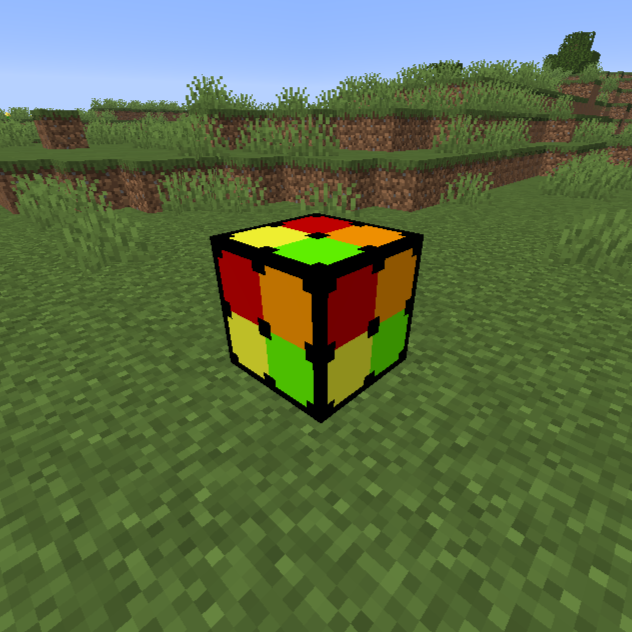
CurseForge · Minecraft mod
Nate's Custom Blocks
This mod adds newly colored & created blocks for you to build with!
Choose a version Pick your version below, then grab the matching file.
Quick answer
Which Nate's Custom Blocks release should I use?
Latest stable file Nate's Custom Blocks (Pastels+) [Neoforge-Beta 1.2.10]
Game version 26.1.2
Loader NeoForge
Nate's Custom Blocks (Pastels+) [Neoforge-Beta 1.2.10] targets 26.1.2 with NeoForge. The project page does not say whether this file belongs on the client, dedicated server, or both. No extra mods listed for this file.
Where it goes
Is Nate's Custom Blocks required on the client, server, or both?
The project page does not say whether this file belongs on the client, dedicated server, or both.
Client Source doesn’t say
Dedicated server Source doesn’t say
Loader for this release NeoForge
Required install it here Optional supported, not mandatory Not supported do not install here Source doesn’t say do not assume
The source does not explicitly classify this release as client-only or server-only.
What else does Nate's Custom Blocks (Pastels+) [Neoforge-Beta 1.2.10] need?
Nate's Custom Blocks (Pastels+) [Neoforge-Beta 1.2.10]. Change the file and its required mods may change too.
This file does not list any required mods. Do not add a library just because a different file uses it.
This file does not list any required or optional mods.
Before you install it
Add Nate's Custom Blocks without breaking your instance.
Built for Nate's Custom Blocks (Pastels+) [Neoforge-Beta 1.2.10]. Pick another file and the loader, install side or required mods may change.
- 01
Stick to this file
Use Nate's Custom Blocks (Pastels+) [Neoforge-Beta 1.2.10]. It targets 26.1.2 with NeoForge; another release may have different loader, side or dependency requirements.
- 02
Bring the mods it needs
This file does not list any required mods. Do not add a library just because a different file uses it.
- 03
Put it on the correct side
The project page does not say whether this file belongs on the client, dedicated server, or both.
- 04
Pick the file you checked
Use the “Get this file” button beside Nate's Custom Blocks (Pastels+) [Neoforge-Beta 1.2.10]. It opens that exact file at the source.
About this project
What does Nate's Custom Blocks add?
This mod adds all new colors and blocks! Create with the new Pastel-themed blocks to add a soft look to your builds! The Pastel-themed blocks are in all 16 colors for the following blocks: Concrete, planks, stairs, and slabs. The crafting recipes for these blocks will be shown in the media tab!
There will be future updates to this mod! I am currently working on a Christmas-themed palette of blocks! I would love suggestions for other blocks as well!
Time to add a festive look with the new Christmas update as it brings a bottom, middle, and top of a Christmas tree along with hang up Christmas lights! I apologize the update isn't as much as the initial release but that won't stop me from adding more in the future!
July 2026 brings much more pastel blocks as wool now has a new look. All of the wool blocks now have a pastel varient and wool chairs. They are currently unmountable for the time being. Please enjoy!
August 2026 introduces newly-colored wood blocks! It brings planks, stairs, and slabs! It also brings mountable wool chairs, finally!!
Project description from CurseForge.
Pick your setup
Nate's Custom Blocks by Minecraft version and loader
Choose the version and loader you play, then open the matching release.
Minecraft version
1.21.8
1 loader buildMinecraft version
1.20.1
1 loader buildCheck the dependencies, then try the file in a copied instance before changing a world you care about.
Recent files
Nate's Custom Blocks versions and loaders
Nate's Custom Blocks (Pastels+) [Neoforge-Beta 1.2.10]
nates_custom_blocks_beta-1.2.10-neoforge-26.1.2.jar
27 Aug 2026
Client Source doesn’t say Server Source doesn’t say Dependencies No extras listed Listed on Release listing
Check the 26.1.2 · NeoForge setup NeoForge26.1.2 release
Nate's Custom Blocks (Pastels+) [Fabric-Beta 1.2.10]
nates_custom_blocks_beta-1.2.10-fabric-26.1.2.jar
27 Aug 2026
Client Source doesn’t say Server Source doesn’t say Dependencies No extras listed Listed on Release listing
Check the 26.1.2 · Fabric setup Fabric26.1.2 release
Nate's Custom Blocks [Fabric-Beta 1.2.7]
nates_custom_blocks_beta-1.2.7-fabric-26.1.2.jar
23 Aug 2026
Client Source doesn’t say Server Source doesn’t say Dependencies No extras listed Listed on Release listing
Check the 26.1.2 · Fabric setup Fabric26.1.2 release
Nate's Custom Blocks [Neoforge-Beta 1.2.7]
nates_custom_blocks_beta-1.2.7-neoforge-26.1.2.jar
23 Aug 2026
Client Source doesn’t say Server Source doesn’t say Dependencies No extras listed Listed on Release listing
Check the 26.1.2 · NeoForge setup NeoForge26.1.2 release
Nate's Custom Blocks [Neoforge-Beta 1.2.6]
nates_custom_blocks_beta-1.2.6-neoforge-26.1.2.jar
5 Aug 2026
Client Source doesn’t say Server Source doesn’t say Dependencies No extras listed Listed on Release listing
Check the 26.1.2 · NeoForge setup NeoForge26.1.2 release
Nate's Custom Blocks [Fabric-Beta 1.2.6]
nates_custom_blocks_beta-1.2.6-fabric-26.1.2.jar
5 Aug 2026
Client Source doesn’t say Server Source doesn’t say Dependencies No extras listed Listed on Release listing
Check the 26.1.2 · Fabric setup Fabric26.1.2 release
Nate's Custom Blocks [Neoforge-Beta 1.2.4]
nates_custom_blocks_beta-1.2.4-neoforge-26.1.2.jar
17 Jul 2026
Client Source doesn’t say Server Source doesn’t say Dependencies No extras listed Listed on Release listing
Check the 26.1.2 · NeoForge setup NeoForge26.1.2 release
Nate's Custom Blocks [Fabric-Beta 1.2.4]
nates_custom_blocks_beta-1.2.4-fabric-26.1.2.jar
17 Jul 2026
Client Source doesn’t say Server Source doesn’t say Dependencies No extras listed Listed on Release listing
Check the 26.1.2 · Fabric setup Fabric26.1.2 release
Nate's Custom Blocks [Neoforge-Beta 1.2.3]
nates_custom_blocks_beta-1.2.3-neoforge-26.1.2.jar
10 Jul 2026
Client Source doesn’t say Server Source doesn’t say Dependencies No extras listed Listed on Release listing
Check the 26.1.2 · NeoForge setup NeoForge26.1.2 release
Nate's Custom Blocks [Fabric-Beta 1.2.3]
nates_custom_blocks_beta-1.2.3-fabric-26.1.2.jar
10 Jul 2026
Client Source doesn’t say Server Source doesn’t say Dependencies No extras listed Listed on Release listing
Check the 26.1.2 · Fabric setup Fabric26.1.2 release
Nate's Custom Blocks [Neoforge-Beta 1.2.2]
nates_custom_blocks_beta-1.2.2-neoforge-26.1.2.jar
8 Jul 2026
Client Source doesn’t say Server Source doesn’t say Dependencies No extras listed Listed on Release listing
Check the 26.1.2 · NeoForge setup NeoForge26.1.2 release
Nate's Custom Blocks [Fabric-Beta 1.2.2]
nates_custom_blocks_beta-1.2.2-fabric-26.1.2.jar
8 Jul 2026
Client Source doesn’t say Server Source doesn’t say Dependencies No extras listed Listed on Release listing
Check the 26.1.2 · Fabric setup Fabric26.1.2 release
Looking for an older file? The official CurseForge project page is in Resources.
 mod
mod CurseForge · Minecraft
Tyler's Weaponry
Combines stuff from all my other mods, as well as adds some extra stuff
 mod
mod CurseForge + Modrinth · Minecraft
More Than Apples
This mod adds new apples and carrot and some unique effects that grant stronger buffs than normal golden foods and It also introduces a new biome and a set of new advancements
 mod
mod CurseForge + Modrinth · Minecraft
UnlimitedPeripheralWorks
Peripheral mod, that provides a lot extra features, new peripherals and even some items