Minecraft version
Back to mods 
CurseForge · Minecraft mod
Playsound_Pro - 音频播放专业版
This mod is an enhanced version of the vanilla /playsound command, adding features such as distance attenuation and looping playback.
Choose a version Pick your version below, then grab the matching file.
Quick answer
Which Playsound_Pro - 音频播放专业版 release should I use?
Latest stable file Playsound_Pro 1.20.1 Forge- 1.0.0
Game version 1.21.1
Loader Forge
Playsound_Pro - 音频播放专业版 Playsound_Pro 1.20.1 Forge- 1.0.0 targets 1.21.1 with Forge. The project page does not say whether this file belongs on the client, dedicated server, or both. No extra mods listed for this file.
Where it goes
Is Playsound_Pro - 音频播放专业版 required on the client, server, or both?
The project page does not say whether this file belongs on the client, dedicated server, or both.
Client Source doesn’t say
Dedicated server Source doesn’t say
Loader for this release Forge
Required install it here Optional supported, not mandatory Not supported do not install here Source doesn’t say do not assume
The source does not explicitly classify this release as client-only or server-only.
What else does Playsound_Pro - 音频播放专业版 Playsound_Pro 1.20.1 Forge- 1.0.0 need?
Playsound_Pro 1.20.1 Forge- 1.0.0. Change the file and its required mods may change too.
This file does not list any required mods. Do not add a library just because a different file uses it.
This file does not list any required or optional mods.
Before you install it
Add Playsound_Pro - 音频播放专业版 without breaking your instance.
Built for Playsound_Pro - 音频播放专业版 Playsound_Pro 1.20.1 Forge- 1.0.0. Pick another file and the loader, install side or required mods may change.
- 01
Stick to this file
Use Playsound_Pro 1.20.1 Forge- 1.0.0. It targets 1.21.1 with Forge; another release may have different loader, side or dependency requirements.
- 02
Bring the mods it needs
This file does not list any required mods. Do not add a library just because a different file uses it.
- 03
Put it on the correct side
The project page does not say whether this file belongs on the client, dedicated server, or both.
- 04
Pick the file you checked
Use the “Get this file” button beside Playsound_Pro 1.20.1 Forge- 1.0.0. It opens that exact file at the source.
About this project
What does Playsound_Pro - 音频播放专业版 add?
Core Features: 中国用户可以前往:Summer_XTJL - 个人作者 - MC百科|最大的Minecraft中文MOD百科
Can be used together with this mod. F5 Camera control - F5视角控制器 - Minecraft Mods - CurseForge
🎵 Read audio files directly from resource pack
🗺️ Support area audio playback (dynamically adjust volume based on player position)
👥 Multiplayer compatibility (audio calculated independently for each player)
🔧 Rich command system
🌐 Full multi-language support (English & Chinese)
📁 Audio file location
Place your WAV format audio files into the following directory of the resource pack: assets/summer_xtjl_audio/audio/
File Requirements:
Only supports .wav format files
File naming is recommended to use English or numbers
Supports all standard WAV audio parameters
Normal Audio Playback Command
Normal audio playback: /playsound_pro play <category> <loop> <filename>
Parameter Description:
Category: Sound category (controls which in-game volume setting affects the volume)
unlimited - Not affected by in-game volume settings (always maximum volume)
master - Affected by master volume
music - Affected by music volume
record - Affected by jukebox/record volume
weather - Affected by weather volume
block - Affected by block volume
hostile - Affected by hostile mob volume
neutral - Affected by neutral mob volume
player - Affected by player volume
ambient - Affected by ambient volume
voice - Affected by voice volume
Loop: true (loop playback) or false (play once)
Filename: Audio filename (the .wav extension can be omitted)
Example: /playsound_pro play master false test
Area Audio Playback Command
Area audio playback: /playsound_pro play <category> <loop> <filename> x=<x> y=<y> z=<z> dx=<dx> dy=<dy> dz=<dz> center cx=<cx> cy=<cy> cz=<cz> cdx=<cdx> cdy=<cdy> cdz=<cdz> mv=<Minimum volume>
[The farther away from the sound core area, the smaller the volume. Outside the range defined by x y z dx dy dz, no sound can be heard.]
Category: Sound category (controls which in-game volume setting affects the volume)
unlimited - Not affected by in-game volume settings (always maximum volume)
master - Affected by master volume
music - Affected by music volume
record - Affected by jukebox/record volume
weather - Affected by weather volume
block - Affected by block volume
hostile - Affected by hostile mob volume
neutral - Affected by neutral mob volume
player - Affected by player volume
ambient - Affected by ambient volume
voice - Affected by voice volume
Loop: true (loop playback) or false (play once)
Filename: Audio filename (the .wav extension can be omitted)
x=, y=, z=: Starting coordinates of the area
dx=, dy=, dz=: Area dimensions (can be negative, but cannot be 0)
center cx=, cy=, cz=: Starting coordinates of the sound core area [volume is always 100% within the sound core area]
cdx=, cdy=, cdz=: Dimensions of the sound core area
mv=: Minimum volume percentage (0-100), default is 0
Area Audio Features:
Audio only plays when the player is within the detection area
Volume changes dynamically based on player position:
Inside the sound core area: 100% volume
Inside the detection area but outside the core area: Volume gradually decreases with distance Outside the detection area: No sound
The mv parameter sets the minimum volume, ensuring distant players can still hear faint sound [within the detection area range]
Area Audio Logic
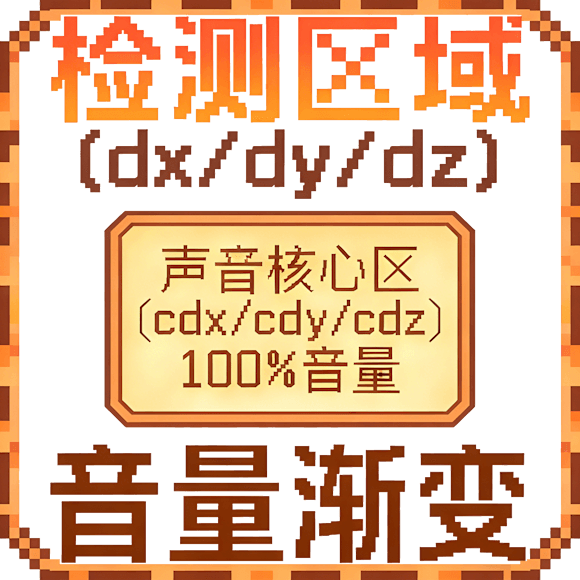
Project description from CurseForge.
Pick your setup
Playsound_Pro - 音频播放专业版 by Minecraft version and loader
Choose the version and loader you play, then open the matching release.
Minecraft version
1.20.1
1 loader buildCheck the dependencies, then try the file in a copied instance before changing a world you care about.
Recent files
Playsound_Pro - 音频播放专业版 versions and loaders
Playsound_Pro 1.20.1 Forge- 1.0.0
summer_xtjl_audio-1.0.0.jar
20 Jan 2026
Client Source doesn’t say Server Source doesn’t say Dependencies No extras listed Listed on Release listing
Check the 1.21.1 · Forge setup Forge1.21.1 release
Playsound_Pro 1.20.1 Forge- 1.0.0.jar
16 Dec 2025
Client Source doesn’t say Server Source doesn’t say Dependencies No extras listed Listed on Release listing
Check the 1.20.1 · Forge setup 1.20.1Forge release
Looking for an older file? The official CurseForge project page is in Resources.
 mod
mod CurseForge · Minecraft
Chunk Cycle
Survive on a single void chunk that renews into a new biome every few minutes. Expand it, defend it from themed invasions, earn Exchange Coins and trade with random merchants — in the Overworld, Nether and End.
 mod
mod CurseForge · Minecraft
APSO Aicarino
A simple mod with cars and stuff, hehehe.
 mod
mod CurseForge · Minecraft
Haki Realm
Haki Realm is a big addon for Mine Mine no Mi (Forge 1.20.1). It reworks Haki from the ground up, then builds a whole world around it