Minecraft version
Back to mods 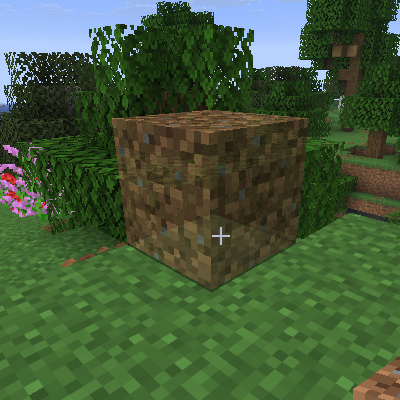
CurseForge · Minecraft mod
Preview Placement
Renders placement previews for block items specified in resource pack files
Choose a version Pick your version below, then grab the matching file.
Quick answer
Which Preview Placement release should I use?
Latest stable file preview_placement-26.1.2.0.jar
Game version 26.1.2
Loader NeoForge
Preview Placement preview_placement-26.1.2.0.jar targets 26.1.2 with NeoForge. The project page does not say whether this file belongs on the client, dedicated server, or both. No extra mods listed for this file.
Where it goes
Is Preview Placement required on the client, server, or both?
The project page does not say whether this file belongs on the client, dedicated server, or both.
Client Source doesn’t say
Dedicated server Source doesn’t say
Loader for this release NeoForge
Required install it here Optional supported, not mandatory Not supported do not install here Source doesn’t say do not assume
The source does not explicitly classify this release as client-only or server-only.
What else does Preview Placement preview_placement-26.1.2.0.jar need?
preview_placement-26.1.2.0.jar. Change the file and its required mods may change too.
This file does not list any required mods. Do not add a library just because a different file uses it.
This file does not list any required or optional mods.
Before you install it
Add Preview Placement without breaking your instance.
Built for Preview Placement preview_placement-26.1.2.0.jar. Pick another file and the loader, install side or required mods may change.
- 01
Stick to this file
Use preview_placement-26.1.2.0.jar. It targets 26.1.2 with NeoForge; another release may have different loader, side or dependency requirements.
- 02
Bring the mods it needs
This file does not list any required mods. Do not add a library just because a different file uses it.
- 03
Put it on the correct side
The project page does not say whether this file belongs on the client, dedicated server, or both.
- 04
Pick the file you checked
Use the “Get this file” button beside preview_placement-26.1.2.0.jar. It opens that exact file at the source.
About this project
What does Preview Placement add?
Preview Placement is a minecraft/neoforge mod which renders previews of blocks about to be placed for specific items specified in resource packs.
This mod is entirely client side, installing it on a server will do nothing (but it won't crash the server either, so it's safe to embed this mod in content mods that exist on both sides).
The purpose of this is so blocks with complicated orientation-placement behavior (like More Red's logic gates or Hyperbox's hyperboxes, which can be oriented 24 different ways depending on where the player clicks) can show the player how the block will be placed.
Placement Preview Files
Placement Preview files specify which items should render placement previews and what model should be rendered for each blockstate which can be placed.
Placement Preview files must have file paths of the form assets/<modid>/preview_placement/placement_preview/<item>.json, where modid:item is the id of a BlockItem item.
They have a json format similar to variant blockstate files, mapping blocks to blockstate selectors to rotated item models. For example:
// assets/minecraft/preview_placement/placement_preview/dirt.json
{
    "minecraft:dirt": { // block id
        "": {"model": "preview_placement:dirt_preview"} // model field refers to an *item json*, not a model json
    }
}
Multiple block ids can be specified, for items such as torches that can place different kinds of blocks.
Another example:
// assets/morered/preview_placement/placement_preview/and_gate.json
{
    "morered:and_gate": {
        "facing=down,rotation=0": {
            "model": "morered:and_gate_preview"
        },
        "facing=down,rotation=1": {
            "model": "morered:and_gate_preview",
            "y": 90
        },
        "facing=down,rotation=2": {
            "model": "morered:and_gate_preview",
            "y": 180
        },
        "facing=down,rotation=3": {
            "model": "morered:and_gate_preview",
            "y": 270
        },
        "facing=east,rotation=0": {
            "model": "morered:and_gate_preview",
            "x": 270,
            "y": 90
        },
        "facing=east,rotation=1": {
            "model": "morered:and_gate_preview",
            "y": 180,
            "z": 270
        },
        "facing=east,rotation=2": {
            "model": "morered:and_gate_preview",
            "x": 90,
            "y": 270
        },
        "facing=east,rotation=3": {
            "model": "morered:and_gate_preview",
            "z": 270
        }
    }
}
Model fields refer to item jsons, not model jsons.
Blockstate selectors do not need to be exhaustive, states not covered by any selector will have no previews rendered.
Placement Preview jsons can only be created for items which extend BlockItem.
Only variants format is supported, not multipart, and random models are not currently supported.
Referenced item jsons do not have to refer to any registered item:
// assets/preview_placement/item/dirt_preview.json
{
  "model": {
    "type": "model",
    "model": "preview_placement:block/dirt_preview"
  }
}
Placement Preview Models
Preview Placement provides a preview_placement:placement_preview model loader which can take an existing model and render it translucently:
// assets/preview_placement/models/item/dirt_preview.json
{
    "loader": "preview_placement:placement_preview",
    "model": {
        "parent": "block/dirt"
    }
}
Config
A config file is created in the (minecraft instance)/config/preview-placement-client.toml which has the following values by default:
#Render preview of items specified in preview_placement/placement_preview asset folder before placing them
showPlacementPreview = true
#Opacity of the render preview for models using the preview_placement:placement_preview model loader. Higher value = less transparent, lower = more transparent
# Default: 0.5
# Range: 0.0 ~ 1.0
previewPlacementOpacity = 0.5
Depending on the Mod
Mods that wish to depend on Preview Placement can view the dependency setup on github: https://github.com/Commoble/preview_placement
Project description from CurseForge.
Pick your setup
Preview Placement by Minecraft version and loader
Choose the version and loader you play, then open the matching release.
Minecraft version
26.1.1
1 loader buildMinecraft version
26.1
1 loader buildMinecraft version
1.21.11
1 loader buildCheck the dependencies, then try the file in a copied instance before changing a world you care about.
Recent files
Preview Placement versions and loaders
preview_placement-26.1.2.0.jar
14 May 2026
Client Source doesn’t say Server Source doesn’t say Dependencies No extras listed Listed on Release listing
Check the 26.1.2 · NeoForge setup NeoForge26.1.2 release
preview_placement-26.1.0.0.jar
29 Mar 2026
Client Source doesn’t say Server Source doesn’t say Dependencies No extras listed Listed on Release listing
Check the 26.1.2 · NeoForge setup NeoForge26.126.1.126.1.2 release
preview_placement-21.11.2.jar
26 Dec 2025
Client Source doesn’t say Server Source doesn’t say Dependencies No extras listed Listed on Release listing
Check the 1.21.11 · NeoForge setup NeoForge1.21.11 release
preview_placement-21.11.1.jar
23 Dec 2025
Client Source doesn’t say Server Source doesn’t say Dependencies No extras listed Listed on Release listing
Check the 1.21.11 · NeoForge setup NeoForge1.21.11 release
preview_placement-21.11.0.jar
22 Dec 2025
Client Source doesn’t say Server Source doesn’t say Dependencies No extras listed Listed on Release listing
Check the 1.21.11 · NeoForge setup NeoForge1.21.11 release
Looking for an older file? The official CurseForge project page is in Resources.
 mod
CurseForge · Minecraft
Build Blueprint
See any build as see-through ghost blocks in your world, with a materials list, layers and build copying.
 mod
CurseForge · Minecraft
QDC Quantum Potion Overload
Remove, Add and Extend duration of potion effects. Can only use potions discovered by the Core Mod, QDC CORE 4.5, which is required for the mod.