Minecraft version
Back to mods 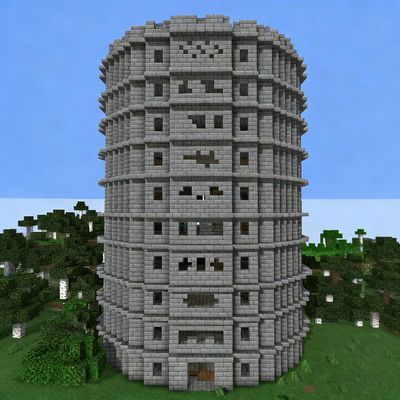
CurseForge · Minecraft mod
Roguelike tower
A tall tower with random monster-slacking cages and loot boxes
Choose a version Pick your version below, then grab the matching file.
Quick answer
Which Roguelike tower release should I use?
Latest stable file roguelike_tower-1.21.1-1.21.3-1.2.jar
Game version 1.21.2-Snapshot, 1.21.1-Snapshot, 1.21.1
Loader Fabric, Forge, NeoForge
Roguelike tower roguelike_tower-1.21.1-1.21.3-1.2.jar targets 1.21.2-Snapshot, 1.21.1-Snapshot, 1.21.1 with Fabric, Forge, NeoForge. The project page does not say whether this file belongs on the client, dedicated server, or both. No extra mods listed for this file.
Where it goes
Is Roguelike tower required on the client, server, or both?
The project page does not say whether this file belongs on the client, dedicated server, or both.
Client Source doesn’t say
Dedicated server Source doesn’t say
Loader for this release Fabric, Forge, NeoForge
Required install it here Optional supported, not mandatory Not supported do not install here Source doesn’t say do not assume
The source does not explicitly classify this release as client-only or server-only.
What else does Roguelike tower roguelike_tower-1.21.1-1.21.3-1.2.jar need?
roguelike_tower-1.21.1-1.21.3-1.2.jar. Change the file and its required mods may change too.
This file does not list any required mods. Do not add a library just because a different file uses it.
This file does not list any required or optional mods.
Before you install it
Add Roguelike tower without breaking your instance.
Built for Roguelike tower roguelike_tower-1.21.1-1.21.3-1.2.jar. Pick another file and the loader, install side or required mods may change.
- 01
Stick to this file
Use roguelike_tower-1.21.1-1.21.3-1.2.jar. It targets 1.21.2-Snapshot, 1.21.1-Snapshot, 1.21.1 with Fabric, Forge, NeoForge; another release may have different loader, side or dependency requirements.
- 02
Bring the mods it needs
This file does not list any required mods. Do not add a library just because a different file uses it.
- 03
Put it on the correct side
The project page does not say whether this file belongs on the client, dedicated server, or both.
- 04
Pick the file you checked
Use the “Get this file” button beside roguelike_tower-1.21.1-1.21.3-1.2.jar. It opens that exact file at the source.
About this project
What does Roguelike tower add?
A brand-new tower, instead of featuring fixed spawners and predetermined loot tables like other structures, randomly generates from a selection of 10 spawners and 11 types of loot tables. This means each exploration of the Rogue Tower will offer a uniquely arranged experience, rather than being limited to just a few predefined layouts.
- Generated in the forest biome.
- The tower has 11 floors in total, with the 11th floor being the open-air top level, while floors 1 to 10 are all randomized floors.
- Each randomized floor contains 8 random points (except for the entrance on the 1st floor, which has 7).
- At each random point, there is a three-fifths chance of spawning a monster spawner and a two-fifths chance of spawning a loot barrel.
- The monster spawners randomly select from 10 types of hostile mobs from the Overworld, while the loot barrels randomly draw from 11 different types of loot tables.
There might be 8 spawners per layer, or there could be 8 loot barrels per layer, but in any case, good luck!
Project description from CurseForge.
Pick your setup
Roguelike tower by Minecraft version and loader
Choose the version and loader you play, then open the matching release.
Minecraft version
1.21.2-Snapshot
3 loader buildsMinecraft version
1.21.2
3 loader buildsMinecraft version
1.21.1-Snapshot
3 loader buildsMinecraft version
1.21.1
3 loader buildsMinecraft version
1.20.6
2 loader buildsMinecraft version
1.20.5-Snapshot
2 loader buildsMinecraft version
1.20.5
2 loader buildsMinecraft version
1.20.4
2 loader buildsMinecraft version
1.20.3-Snapshot
2 loader buildsMinecraft version
1.20.3
2 loader buildsMinecraft version
1.20.2-Snapshot
2 loader buildsShowing the newest 12 of 14 game versions. Older files are in the list below.
Check the dependencies, then try the file in a copied instance before changing a world you care about.
Recent files
Roguelike tower versions and loaders
roguelike_tower-1.21.1-1.21.3-1.2.jar
18 Sept 2026
Client Source doesn’t say Server Source doesn’t say Dependencies No extras listed Listed on Release listing
Check the 1.21.3 · Fabric setup 1.21.2-Snapshot1.21.1-SnapshotFabricForge release
roguelike_tower-1.20.1-1.20.6-1.2.jar
31 Aug 2026
Client Source doesn’t say Server Source doesn’t say Dependencies No extras listed Listed on Release listing
Check the 1.20.6 · Fabric setup 1.20.2-Snapshot1.20.5-Snapshot1.20.2Fabric release
roguelike_tower-1.20.1-1.20.6-1.1.jar
22 May 2026
Client Source doesn’t say Server Source doesn’t say Dependencies No extras listed Listed on Release listing
Check the 1.20.6 · Fabric setup 1.20.2-Snapshot1.20.5-Snapshot1.20.2Fabric release
roguelike_tower-1.20.1-1.20.6-1.0.jar
1 Jan 2026
Client Source doesn’t say Server Source doesn’t say Dependencies No extras listed Listed on Release listing
Check the 1.20.6 · Fabric setup 1.20.2-Snapshot1.20.5-Snapshot1.20.2Fabric release
Looking for an older file? The official CurseForge project page is in Resources.
 mod
mod CurseForge · Minecraft
Fungal Infection: Spore AI
Introduce ai to the spore and make it smarter.
 mod
mod CurseForge · Minecraft
Moog's Structure Lib (moogs_structures)
This is a library mod for the Moogs Structure series
 mod
mod CurseForge · Minecraft
Soccer Nicktale
A realistic soccer mod with 3D physics, instant stadiums, wearable jerseys, referee tools, and automatic scoreboards.