Minecraft version
Back to mods 
CurseForge · Minecraft mod
Stardew HUD
Adds a stardew-style HUD display for Minecraft
Choose a version Pick your version below, then grab the matching file.
Quick answer
Which Stardew HUD release should I use?
Latest stable file StardewHUD-1.21.1-neoforge-1.2.5.jar
Game version 1.21.1
Loader NeoForge
Stardew HUD StardewHUD-1.21.1-neoforge-1.2.5.jar targets 1.21.1 with NeoForge. The project page does not say whether this file belongs on the client, dedicated server, or both. No extra mods listed for this file.
Where it goes
Is Stardew HUD required on the client, server, or both?
The project page does not say whether this file belongs on the client, dedicated server, or both.
Client Source doesn’t say
Dedicated server Source doesn’t say
Loader for this release NeoForge
Required install it here Optional supported, not mandatory Not supported do not install here Source doesn’t say do not assume
The source does not explicitly classify this release as client-only or server-only.
What else does Stardew HUD StardewHUD-1.21.1-neoforge-1.2.5.jar need?
StardewHUD-1.21.1-neoforge-1.2.5.jar. Change the file and its required mods may change too.
This file does not list any required mods. Do not add a library just because a different file uses it.
This file does not list any required or optional mods.
Before you install it
Add Stardew HUD without breaking your instance.
Built for Stardew HUD StardewHUD-1.21.1-neoforge-1.2.5.jar. Pick another file and the loader, install side or required mods may change.
- 01
Stick to this file
Use StardewHUD-1.21.1-neoforge-1.2.5.jar. It targets 1.21.1 with NeoForge; another release may have different loader, side or dependency requirements.
- 02
Bring the mods it needs
This file does not list any required mods. Do not add a library just because a different file uses it.
- 03
Put it on the correct side
The project page does not say whether this file belongs on the client, dedicated server, or both.
- 04
Pick the file you checked
Use the “Get this file” button beside StardewHUD-1.21.1-neoforge-1.2.5.jar. It opens that exact file at the source.
About this project
What does Stardew HUD add?
 Adds a stardew-style HUD display for Minecraft!
In the upper right corner of the game interface, a Stardew Valley-like HUD component is displayed, including a clock, game day, day, time of day, weather, season (Adapted to most of the season mods), custom item counter, and a display of fortune information that can be linked to Every Single Day! Supports a wide range of fonts.
Highly customizable configuration interface
Configurable options:
- Whether to enable the HUD
- Number of days each season lasts
- Custom item ID for counting
- HUD transparency
- HUD position and zoom size
- Individual switches for each component
- Hide vanilla effect icon
- Tips
In the configuration screen, you can adjust the number of days of the season and use it with different season mods (28 days by default).
Fabric Season / Forge Season: 28 days
Ecliptic Seasons: 30 days
serene seasons: 32 days
When using the Daily Fortune mod, you need to turn off "Show Season" in the mod menu to display the fortune icon.
Currently supported versions:
Fabric 1.20.1 (requires Fabric Loader 0.16.14 or higher, Modmenu 7.2.2 or higher,any version of Fabric API).
Recommended combinations:
Stardew Valley style UI:


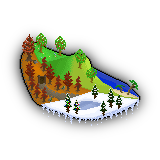
Seasonal changes :
Project description from CurseForge.
Pick your setup
Stardew HUD by Minecraft version and loader
Choose the version and loader you play, then open the matching release.
Minecraft version
1.20.1
2 loader buildsCheck the dependencies, then try the file in a copied instance before changing a world you care about.
Recent files
Stardew HUD versions and loaders
StardewHUD-1.21.1-neoforge-1.2.5.jar
17 Aug 2026
Client Source doesn’t say Server Source doesn’t say Dependencies No extras listed Listed on Release listing
Check the 1.21.1 · NeoForge setup 1.21.1NeoForge release
StardewHUD-1.21.1-fabric-1.2.5.jar
17 Aug 2026
Client Source doesn’t say Server Source doesn’t say Dependencies No extras listed Listed on Release listing
Check the 1.21.1 · Fabric setup Fabric1.21.1 release
StardewHUD-1.20.1-forge-1.2.5.jar
17 Aug 2026
Client Source doesn’t say Server Source doesn’t say Dependencies No extras listed Listed on Release listing
Check the 1.20.1 · Forge setup 1.20.1Forge release
StardewHUD-1.20.1-fabric-1.2.5.jar
17 Aug 2026
Client Source doesn’t say Server Source doesn’t say Dependencies No extras listed Listed on Release listing
Check the 1.20.1 · Fabric setup Fabric1.20.1 release
StardewHUD-1.21.1-neoforge
StardewHUD-1.21.1-neoforge-1.2.4.jar
2 Feb 2026
Client Source doesn’t say Server Source doesn’t say Dependencies No extras listed Listed on Release listing
Check the 1.21.1 · NeoForge setup 1.21.1NeoForge release
StardewHUD-1.21.1-neoforge
StardewHUD-1.21.1-neoforge-1.2.3.jar
20 Jan 2026
Client Source doesn’t say Server Source doesn’t say Dependencies No extras listed Listed on Release listing
Check the 1.21.1 · NeoForge setup 1.21.1NeoForge release
StardewHUD-1.21.1-fabric
StardewHUD-1.21.1-fabric-1.2.3.jar
20 Jan 2026
Client Source doesn’t say Server Source doesn’t say Dependencies No extras listed Listed on Release listing
Check the 1.21.1 · Fabric setup Fabric1.21.1 release
StardewHUD-1.20.1-fabric
StardewHUD-1.20.1-fabric-1.2.3.jar
20 Jan 2026
Client Source doesn’t say Server Source doesn’t say Dependencies No extras listed Listed on Release listing
Check the 1.20.1 · Fabric setup Fabric1.20.1 release
StardewHUD-1.20.1-forge
StardewHUD-1.20.1-forge-1.2.3.jar
20 Jan 2026
Client Source doesn’t say Server Source doesn’t say Dependencies No extras listed Listed on Release listing
Check the 1.20.1 · Forge setup 1.20.1Forge release
StardewHUD-1.20.1-forge
StardewHUD-1.20.1-forge-1.2.2.jar
17 Jan 2026
Client Source doesn’t say Server Source doesn’t say Dependencies No extras listed Listed on Release listing
Check the 1.20.1 · Forge setup 1.20.1Forge release
StardewHUD-1.21.1-fabric
StardewHUD-1.21.1-fabric-1.2.1.jar
11 Jan 2026
Client Source doesn’t say Server Source doesn’t say Dependencies No extras listed Listed on Release listing
Check the 1.21.1 · Fabric setup Fabric1.21.1 release
StardewHUD-1.20.1-fabric
StardewHUD-1.20.1-fabric-1.2.1.jar
11 Jan 2026
Client Source doesn’t say Server Source doesn’t say Dependencies No extras listed Listed on Release listing
Check the 1.20.1 · Fabric setup Fabric1.20.1 release
Looking for an older file? The official CurseForge project page is in Resources.
 mod
CurseForge + Modrinth · Minecraft
Iron's Arms 'n Artifice
Historical-Fantasy Firearms meet Artificer Buildcrafting (Gun Mod)
 mod
CurseForge + Modrinth · Minecraft
Doom Block
Doom Block adds a deadly block with instant damage to the game. Flexible settings and full compatibility with NeoForge.
 mod
CurseForge + Modrinth · Minecraft
Create Simurail
A train mod using Create Aeronautics.