Enhanced Celestials - Blood, Blue, & Harvest (Super) Moons Needed by Enhanced Celestials Shader Support (Major Update) ECSS 2.1.0 (NeoForge 1.21.1)
requiredMatching file found Matched file: Enhanced_Celestials-neoforge-6.0.2.5
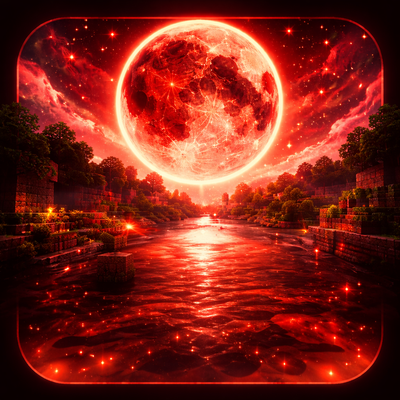
CurseForge · Minecraft mod
Adds full shader compatibility to Enhanced Celestials, allowing lunar events and custom moons to render correctly with modern shader packs.
Quick answer
Enhanced Celestials Shader Support (Major Update) ECSS 2.1.0 (NeoForge 1.21.1) targets 1.21.1 with NeoForge. The project page does not say whether it belongs on the client. The project page does not say whether it belongs on the dedicated server. All 3 required mods have matching files.
Where it goes
The project page does not say whether it belongs on the client. The project page does not say whether it belongs on the dedicated server.
The source does not explicitly classify this release as client-only or server-only.
ECSS 2.1.0 (NeoForge 1.21.1). Change the file and its required mods may change too.
Install Enhanced Celestials - Blood, Blue, & Harvest (Super) Moons, CorgiLib, Data Anchor first. We found matching files for this game-version and loader setup. 2 come through another mod in the chain.
2 extra mods were pulled in by other dependencies. Indented rows show who needs each one. We only count dependency files that match this setup. A file for another loader does not fill the gap.
Before you install it
Built for Enhanced Celestials Shader Support (Major Update) ECSS 2.1.0 (NeoForge 1.21.1). Pick another file and the loader, install side or required mods may change.
Use ECSS 2.1.0 (NeoForge 1.21.1). It targets 1.21.1 with NeoForge; another release may have different loader, side or dependency requirements.
Install Enhanced Celestials - Blood, Blue, & Harvest (Super) Moons, CorgiLib, Data Anchor first. We found matching files for this game-version and loader setup. 2 come through another mod in the chain.
The project page does not say whether it belongs on the client. The project page does not say whether it belongs on the dedicated server.
Use the “Get this file” button beside ECSS 2.1.0 (NeoForge 1.21.1). It opens that exact file at the source.
About this project
Makes Enhanced Celestials lunar events visible when you're running Iris, Oculus, or any other shader pack.
Shader packs replace Minecraft's vanilla sky rendering, which normally hides the red / blue / gold tint Enhanced Celestials paints on during Blood Moon, Blue Moon, Harvest Moon, Eclipse, Super Moon, and Crimson Moon. This mod draws a fullscreen post-process color tint on top of the shader's output, so lunar events still read clearly no matter which shader pack you use.
config/lunarshaders-client.toml (Forge / NeoForge) or config/lunarshaders.json (Fabric) always works as a fallback.Please contact me on Discord: (46v) <--- thats the username. Please include your Minecraft version, loader, the shader pack you're using, and any [LunarShaders] lines from your latest.log.
Project description from CurseForge.
Pick your setup
Choose the version and loader you play, then open the matching release.
Check the dependencies, then try the file in a copied instance before changing a world you care about.
Recent files
lunarshaders-neoforge-1.21.1-2.1.0.jar
19 Apr 2026
lunarshaders-fabric-1.21.1-2.1.0.jar
19 Apr 2026
lunarshaders-fabric-1.20.1-2.1.0.jar
19 Apr 2026
lunarshaders-forge-1.20.1-2.1.0.jar
19 Apr 2026
Looking for an older file? The official CurseForge project page is in Resources.
 mod
modLibrary and in game configuration for Eruannie_9's mods
 mod
modAn infection mod that adds a parasitic organism called the necro and it eventually destroys the entire world. Fight infected farm animals and stop them from becoming too strong.
 mod
modA standalone library which adds animatable banners to the creative mode tab