
Minecraft version
Back to mods 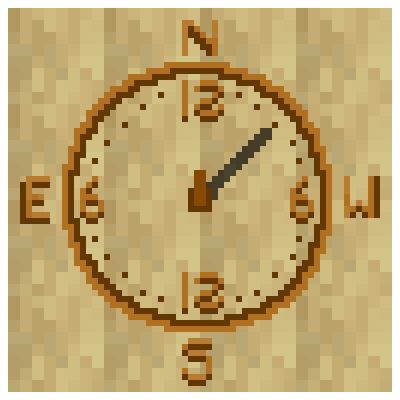
CurseForge · Minecraft mod
Sun Compass
A primitive navigation tool that determines direction using the sun's projected shadow and time.
Choose a version Pick your version below, then grab the matching file.
Quick answer
Which Sun Compass release should I use?
Latest stable file suncompassmod-0.2.0-beta.jar
Game version 1.21.1
Loader NeoForge
Sun Compass suncompassmod-0.2.0-beta.jar targets 1.21.1 with NeoForge. The project page does not say whether this file belongs on the client, dedicated server, or both. No extra mods listed for this file.
Where it goes
Is Sun Compass required on the client, server, or both?
The project page does not say whether this file belongs on the client, dedicated server, or both.
Client Source doesn’t say
Dedicated server Source doesn’t say
Loader for this release NeoForge
Required install it here Optional supported, not mandatory Not supported do not install here Source doesn’t say do not assume
The source does not explicitly classify this release as client-only or server-only.
What else does Sun Compass suncompassmod-0.2.0-beta.jar need?
suncompassmod-0.2.0-beta.jar. Change the file and its required mods may change too.
This file does not list any required mods. Do not add a library just because a different file uses it.
This file does not list any required or optional mods.
Before you install it
Add Sun Compass without breaking your instance.
Built for Sun Compass suncompassmod-0.2.0-beta.jar. Pick another file and the loader, install side or required mods may change.
- 01
Stick to this file
Use suncompassmod-0.2.0-beta.jar. It targets 1.21.1 with NeoForge; another release may have different loader, side or dependency requirements.
- 02
Bring the mods it needs
This file does not list any required mods. Do not add a library just because a different file uses it.
- 03
Put it on the correct side
The project page does not say whether this file belongs on the client, dedicated server, or both.
- 04
Pick the file you checked
Use the “Get this file” button beside suncompassmod-0.2.0-beta.jar. It opens that exact file at the source.
About this project
What does Sun Compass add?
Sun Compass
A vanilla-friendly survival tool for finding your way.
The Sun Compass is a utility item that uses the position of the sun to cast a shadow on the board, helping you navigate during the day without relying on "magic" coordinate systems or debug screens.

🧭 Manual & Usage Guide
The Sun Compass is not a magic item. Unlike a standard compass that points to World Spawn, the Sun Compass works similarly to a real-world sun dial. It is a navigational tool that requires you to understand the position of the sun and the time of day.
The Core Concept
The compass displays a shadow cast by the central stick. This shadow is fixed to the world's sun position. As you turn or as time passes, the shadow moves around the board. To find North, you must align the shadow correctly based on the current time.
How to Find North 1. The Sunrise Baseline (6:00 AM / Tick 0)
Vanilla Minecraft days start at 6:00 AM. At this specific time:
- The Sun is rising in the East.
- Instruction: Rotate yourself until the shadow points to the East marker on the compass board.
- Result: You are now facing North.
2. Compensating for Time (The Clockwise Shift)
As the day progresses, the sun moves across the sky. To keep finding North, you must manually compensate for the time passed since 6:00 AM.
- The Rule: For every in-game hour that passes, you must shift the compass by 1 hour clockwise.
- Example:
- Time: 8:00 AM (2 hours after sunrise).
- Action: Align the shadow to East, then rotate yourself (and the compass) roughly 30 degrees clockwise (2 "hours" on a clock face) to find True North.
Summary Table
| In-Game Time | Shadow Alignment for North |
|---|---|
| 6:00 AM (Sunrise) | Align shadow to left 6 hour mark or East (E) |
| 12:00 PM (Noon) | 6 hours has passed, so align shadow to the upper 12 hour mark or North (N) |
| 6:00 PM (Sunset) | 12 hours has passed, so align shadow to right 6 hour mark or West (W) |
Note: This tool requires practice. Direction accuracy is entirely based on time estimation. To find other directions than north, simply rotate by some degrees after finding north. For example, west would be 90 degrees, or 6 hours right, from north.
📦 Obtaining
There is 4 ways to craft this item in survival

To craft the Sun Compass, align any of these 4 different layouts from bottom to top:
- Any plank + torch
- Any plank + coal + stick
- Any plank + charcoal + stick
- Any plank + ink sac + stick
Why is East and West swapped?
This serves the function of time shifting easier than if it was the other way around. For example, at noon (tick time 6000, or 12 PM), to find North you simply point to N (or the upper 12) then to find west you would also simply move the shadow to point W (or the right 6). This way, shifting clockwise perserves directionality. Having it the "correct" way around would introduce extra mental calculations for no reason.
⚠️ Compatibility & Status
- Version: 0.2.0 (Pre-release)
- Loader: NeoForge (1.21.1)
- Possible issues: potentially might fail in situations where there is no sun or otherwise time logic has been modified.
- Mod Compatibility: There has no tests with other mods yet. Please suggest mods to pair this with and I will do my best to add compatibility (currently looking to add compatibility with TerraFirmaCraft).
🤝 Acknowledgements
Special thanks to David Canterbury for the original concept and for naming the "Sun Compass.".
- This is the video by him that specifically inspired this project: https://www.youtube.com/watch?v=7EfDYFDCl14&t=131s
Final note
I'm new to modding, github, and while I'm familiar with programming, this is an entirely new level for me. But I'm looking to improve and hopefully keep adding new mods in the future!
Built with NeoForge for Minecraft 1.21.1
Project description from CurseForge.
Pick your setup
Sun Compass by Minecraft version and loader
Choose the version and loader you play, then open the matching release.
Check the dependencies, then try the file in a copied instance before changing a world you care about.
Recent files
Sun Compass versions and loaders
suncompassmod-0.2.0-beta.jar
suncompassmod-0.2.0.jar
6 Jan 2026
Client Source doesn’t say Server Source doesn’t say Dependencies No extras listed Listed on Release listing
Check the 1.21.1 · NeoForge setup 1.21.1NeoForge release
0.1.1
suncompassmod-0.1.1.jar
3 Jan 2026
Client Optional Server Optional Dependencies No extras listed Listed on Release listing
Check the 1.21.1 · NeoForge setup 1.21.1NeoForge beta
Looking for an older file? The official CurseForge project page is in Resources.
 mod
mod CurseForge + Modrinth · Minecraft
Create: Waterparked
Build real Waterparks with fully customizable slides!
 mod
mod CurseForge · Minecraft
Realistic Falls
Make falling in Minecraft realistic!
 mod
mod CurseForge · Minecraft
Sweety's Archaeology
🏺 A simple update to Archaeology, bringing new structures and relics. Vanilla style.