
Minecraft version
Back to mods 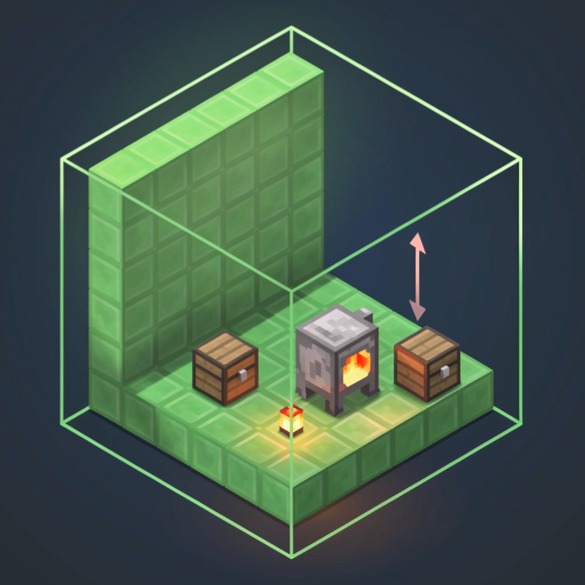
CurseForge · Minecraft mod
JustMoveIt
Cut structures from the world and move them with a live placement preview and precise positioning tools.
Choose a version Pick your version below, then grab the matching file.
Quick answer
Which JustMoveIt release should I use?
Latest stable file justmoveit-3.0.0.jar
Game version 1.21.1
Loader NeoForge
justmoveit-3.0.0.jar targets 1.21.1 with NeoForge. The project page does not say whether this file belongs on the client, dedicated server, or both. No extra mods listed for this file.
Where it goes
Is JustMoveIt required on the client, server, or both?
The project page does not say whether this file belongs on the client, dedicated server, or both.
Client Source doesn’t say
Dedicated server Source doesn’t say
Loader for this release NeoForge
Required install it here Optional supported, not mandatory Not supported do not install here Source doesn’t say do not assume
The source does not explicitly classify this release as client-only or server-only.
What else does justmoveit-3.0.0.jar need?
justmoveit-3.0.0.jar. Change the file and its required mods may change too.
This file does not list any required mods. Do not add a library just because a different file uses it.
This file does not list any required or optional mods.
Before you install it
Add JustMoveIt without breaking your instance.
Built for justmoveit-3.0.0.jar. Pick another file and the loader, install side or required mods may change.
- 01
Stick to this file
Use justmoveit-3.0.0.jar. It targets 1.21.1 with NeoForge; another release may have different loader, side or dependency requirements.
- 02
Bring the mods it needs
This file does not list any required mods. Do not add a library just because a different file uses it.
- 03
Put it on the correct side
The project page does not say whether this file belongs on the client, dedicated server, or both.
- 04
Pick the file you checked
Use the “Get this file” button beside justmoveit-3.0.0.jar. It opens that exact file at the source.
About this project
What does JustMoveIt add?
🧩 JustMoveIt
JustMoveIt is a powerful and intuitive building utility mod that allows you to copy, cut, move, and edit structures directly in the world.
It brings schematic-like functionality into normal gameplay, making large builds and precise edits fast and effortless.
Perfect for both Survival and Creative players
⚙️ Features
🔹 Two Operation Modes
Copy Mode
Cut Mode
🔹 Full Data Preservation
Complete NBT data support
🔹 Advanced Configuration
Detailed and user-friendly mod settings menu
Supports both resource-based usage and cheat mode
Controls
M — Activate the mod
Select two corners to define an area
Ctrl + Mouse Wheel — Edit selection size
Right Click — Cut selected area
C — Copy selected area
Place anywhere in the world
Edit placement before printing
Print the structure
G — Open detailed mod menu
Now works with Create: Pattern Schematics
Project description from CurseForge.
Pick your setup
JustMoveIt by Minecraft version and loader
Choose the version and loader you play, then open the matching release.
Check the dependencies, then try the file in a copied instance before changing a world you care about.
Recent files
JustMoveIt versions and loaders
justmoveit-3.0.0.jar
10 Jul 2026
Client Source doesn’t say Server Source doesn’t say Dependencies No extras listed Listed on Release listing
Check the 1.21.1 · NeoForge setup 1.21.1NeoForge release
justmoveit-2.1.0.jar
8 Feb 2026
Client Source doesn’t say Server Source doesn’t say Dependencies No extras listed Listed on Release listing
Check the 1.21.1 · NeoForge setup 1.21.1NeoForge release
justmoveit-2.0.jar
4 Feb 2026
Client Source doesn’t say Server Source doesn’t say Dependencies No extras listed Listed on Release listing
Check the 1.21.1 · NeoForge setup 1.21.1NeoForge release
justmoveit-1.0.5.jar
31 Jan 2026
Client Source doesn’t say Server Source doesn’t say Dependencies No extras listed Listed on Release listing
Check the 1.21.1 · NeoForge setup 1.21.1NeoForge release
justmoveit-1.0.4.jar
30 Jan 2026
Client Source doesn’t say Server Source doesn’t say Dependencies No extras listed Listed on Release listing
Check the 1.21.1 · NeoForge setup 1.21.1NeoForge release
justmoveit-1.0.3.jar
29 Jan 2026
Client Source doesn’t say Server Source doesn’t say Dependencies 1 required · 1 unchecked Listed on Release listing
Check the 1.21.1 · NeoForge setup 1.21.1NeoForge release
justmoveit-1.0.1.jar
27 Jan 2026
Client Source doesn’t say Server Source doesn’t say Dependencies 1 required · 1 unchecked Listed on Release listing
Check the 1.21.1 · NeoForge setup 1.21.1NeoForge release
justmoveit-1.0.0.jar
12 Jan 2026
Client Source doesn’t say Server Source doesn’t say Dependencies No extras listed Listed on Release listing
Check the 1.21.1 · NeoForge setup 1.21.1NeoForge release
Looking for an older file? The official CurseForge project page is in Resources.
 mod
mod CurseForge + Modrinth · Minecraft
TNTimer
Countdown timer on top of screen to know exactly when that TNT is going to explode without need to see the TNT client-side. Renders a timer over primed TNT (starting from v2.0)
 mod
mod CurseForge · Minecraft
Create: Envelope
A fork of multyfora's Create: Envelope Compat with some fixes and compat with newer envelope versions - automates Envelope's pigeon mail with Create's logistics, with a fix for undeliverable plain-name addresses.
 mod
mod CurseForge · Minecraft
Better Resolution
Better Resolution improves GPU performance by lowering Minecraft’s internal world render resolution and then reconstructing it back to native resolution using smart and lightweight algorithms.