Minecraft version
Back to mods 
CurseForge · Minecraft mod
Item Rarity
ItemRarity is a rarity display mod. It allows players to visually edit item rarities and display them through background rendering.
Choose a version Pick your version below, then grab the matching file.
Quick answer
Which Item Rarity release should I use?
Latest stable file ItemRarity-1.20.1-forge-1.2.0.jar
Game version 1.20.1
Loader Forge
Item Rarity ItemRarity-1.20.1-forge-1.2.0.jar targets 1.20.1 with Forge. The project page does not say whether it belongs on the client. The project page does not say whether it belongs on the dedicated server. No extra mods listed for this file.
Where it goes
Is Item Rarity required on the client, server, or both?
The project page does not say whether it belongs on the client. The project page does not say whether it belongs on the dedicated server.
Client Source doesn’t say
Dedicated server Source doesn’t say
Loader for this release Forge
Required install it here Optional supported, not mandatory Not supported do not install here Source doesn’t say do not assume
The source does not explicitly classify this release as client-only or server-only.
What else does Item Rarity ItemRarity-1.20.1-forge-1.2.0.jar need?
ItemRarity-1.20.1-forge-1.2.0.jar. Change the file and its required mods may change too.
This file does not list any required mods. Do not add a library just because a different file uses it.
This file does not list any required or optional mods.
Before you install it
Add Item Rarity without breaking your instance.
Built for Item Rarity ItemRarity-1.20.1-forge-1.2.0.jar. Pick another file and the loader, install side or required mods may change.
- 01
Stick to this file
Use ItemRarity-1.20.1-forge-1.2.0.jar. It targets 1.20.1 with Forge; another release may have different loader, side or dependency requirements.
- 02
Bring the mods it needs
This file does not list any required mods. Do not add a library just because a different file uses it.
- 03
Put it on the correct side
The project page does not say whether it belongs on the client. The project page does not say whether it belongs on the dedicated server.
- 04
Pick the file you checked
Use the “Get this file” button beside ItemRarity-1.20.1-forge-1.2.0.jar. It opens that exact file at the source.
About this project
What does Item Rarity add?
ItemRarity is a rarity display mod. It allows players to visually edit item rarities and display them through background rendering.
Features
1. Visual Editing & Standardized Config Files
This mod allows players to visually edit the rarity of items directly in the Creative inventory. All configurations are stored per mod inside the config folder, making them easy to share with others.

2. Customizable Backgrounds
ItemRarity supports custom rarity backgrounds. Two styles are provided by default.
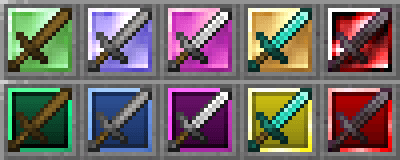

3. NBT Compatibility
This mod provides compatibility for vanilla NBT-based items such as potions, as well as certain modded NBT items (e.g., TACZ). This allows players to edit these items visually just like normal items.
In the future, support for more complex NBT items (such as enchanted books) may also be added.
4. Mod Integrations
ItemRarity currently supports integration with Petite Inventory and TACZ. In the future, it will also integrate with OEV, allowing players to determine rarity directly based on item value.
Plans
The team plans to provide default configuration presets for vanilla content and several popular mods in the future. Download links will be available in the related links section at the top of the page, and players can choose what they need.
Besides adding more default configs, the mod will continue improving NBT compatibility and introducing more integration features in future updates.
Project description from CurseForge.
Pick your setup
Item Rarity by Minecraft version and loader
Choose the version and loader you play, then open the matching release.
Check the dependencies, then try the file in a copied instance before changing a world you care about.
Recent files
Item Rarity versions and loaders
ItemRarity-1.20.1-forge-1.2.0.jar
13 Mar 2026
Client Source doesn’t say Server Source doesn’t say Dependencies No extras listed Listed on Release listing
Check the 1.20.1 · Forge setup 1.20.1Forge release
ItemRarity-1.20.1-forge-1.1.0.jar
18 Jan 2026
Client Source doesn’t say Server Source doesn’t say Dependencies No extras listed Listed on Release listing
Check the 1.20.1 · Forge setup 1.20.1Forge release
ItemRarity-1.20.1-forge-1.0.0.jar
17 Jan 2026
Client Source doesn’t say Server Source doesn’t say Dependencies No extras listed Listed on Release listing
Check the 1.20.1 · Forge setup 1.20.1Forge release
Looking for an older file? The official CurseForge project page is in Resources.
 mod
mod CurseForge · Minecraft
Other Stage
Complete stage-based progression system that blocks Minecraft content until specific conditions are met, featuring automatic configuration tools and advanced optimization.
 mod
mod CurseForge · Minecraft
Mob Loot Booster
Mob Loot Booster is a loot enhancement mod for Minecraft 1.20.1 (Forge) that boosts entity drop rates, restores dropped mob gear to full durability, and adds high-value rewards to bosses.
 mod
mod CurseForge · Minecraft
chiseledEnchants-multi
Targeted enchanting via chiseled bookshelves — guarantee specific enchants at the enchanting table. Fabric + NeoForge