Minecraft version
Back to mods 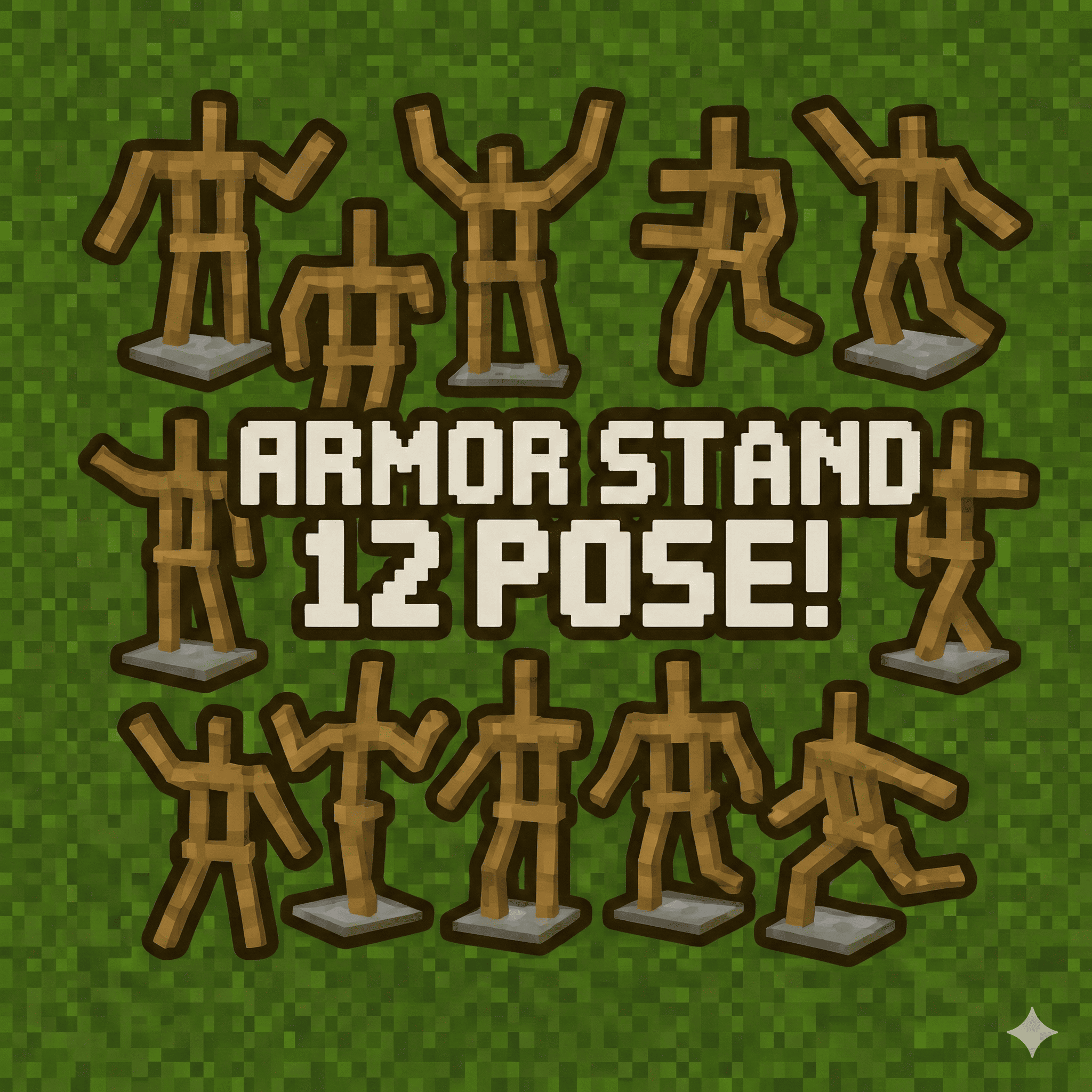
CurseForge · Minecraft mod
Armor Stand 12 Poses
Armors Stand 12 Poses For Java
Choose a version Pick your version below, then grab the matching file.
Quick answer
Which Armor Stand 12 Poses release should I use?
Latest stable file armor-stand-12-poses-1.jar
Game version 1.21.8, 1.21.5, 1.21.6
Loader Fabric, Forge, NeoForge
Armor Stand 12 Poses armor-stand-12-poses-1.jar targets 1.21.8, 1.21.5, 1.21.6 with Fabric, Forge, NeoForge. The project page does not say whether this file belongs on the client, dedicated server, or both. No extra mods listed for this file.
Where it goes
Is Armor Stand 12 Poses required on the client, server, or both?
The project page does not say whether this file belongs on the client, dedicated server, or both.
Client Source doesn’t say
Dedicated server Source doesn’t say
Loader for this release Fabric, Forge, NeoForge
Required install it here Optional supported, not mandatory Not supported do not install here Source doesn’t say do not assume
The source does not explicitly classify this release as client-only or server-only.
What else does Armor Stand 12 Poses armor-stand-12-poses-1.jar need?
armor-stand-12-poses-1.jar. Change the file and its required mods may change too.
This file does not list any required mods. Do not add a library just because a different file uses it.
This file does not list any required or optional mods.
Before you install it
Add Armor Stand 12 Poses without breaking your instance.
Built for Armor Stand 12 Poses armor-stand-12-poses-1.jar. Pick another file and the loader, install side or required mods may change.
- 01
Stick to this file
Use armor-stand-12-poses-1.jar. It targets 1.21.8, 1.21.5, 1.21.6 with Fabric, Forge, NeoForge; another release may have different loader, side or dependency requirements.
- 02
Bring the mods it needs
This file does not list any required mods. Do not add a library just because a different file uses it.
- 03
Put it on the correct side
The project page does not say whether this file belongs on the client, dedicated server, or both.
- 04
Pick the file you checked
Use the “Get this file” button beside armor-stand-12-poses-1.jar. It opens that exact file at the source.
About this project
What does Armor Stand 12 Poses add?
Java Armor Stand Poses (12 Poses)
Bedrock Armor Stand Poses is a Minecraft Java data pack that brings 12 unique armor stand poses from Bedrock Edition to Java Edition.
✨ Features
Adds 12 Bedrock-style armor stand poses

Manual interaction: Right-click on the leg section of the armor stand while directly facing the block it is standing on

Redstone compatible: Any redstone signal exactly 1 block away from the stand triggers a pose change

Works in both single-player and multiplayer worlds
⚠️ For Redstone activation to work properly, the signal must be exactly 1 block away from the armor stand. Even the slightest misplacement can cause the system to malfunction.
🛠️ How does it work?
Each pose change cycles through 12 different positions.
Players can manually trigger it by interacting with it.
Redstone blocks, torches, redstones, repeaters, comparators, buttons, levers, and more are supported (as long as they are active and properly placed). It works on the same principle as redstone systems in Minecraft. When sending signals, you can set up the system as if you were sending signals to normal systems.
Notes:
Automatically creates arms for all armor stands, allowing you to add any shield and sword you want to the armor stands. (All armor stands spawn with arms.)
**📦 Installation ** Download the Datapack .zip file.
Place it in your world's datapacks folder.
Enter your world and run the
/reload
command. You are now ready to use the new armor stand placement system!
🧱 Compatibility
Minecraft Java Edition 1.21.5+

No mod or resource pack required
👤 Creator
Created by egementoni0922 ❤️
💬 Feedback and Requests
If you have any requests or feedback, please message EgemenKaragoz on Discord.
Project description from CurseForge.
Pick your setup
Armor Stand 12 Poses by Minecraft version and loader
Choose the version and loader you play, then open the matching release.
Minecraft version
1.21.10
4 loader buildsMinecraft version
1.21.9
4 loader buildsMinecraft version
1.21.8
4 loader buildsMinecraft version
1.21.7
4 loader buildsMinecraft version
1.21.6
4 loader buildsMinecraft version
1.21.5
4 loader buildsCheck the dependencies, then try the file in a copied instance before changing a world you care about.
Recent files
Armor Stand 12 Poses versions and loaders
armor-stand-12-poses-1.jar
21 Jan 2026
Client Source doesn’t say Server Source doesn’t say Dependencies No extras listed Listed on Release listing
Check the 1.21.11 · Fabric setup Fabric1.21.81.21.5Forge release
Looking for an older file? The official CurseForge project page is in Resources.
 mod
CurseForge + Modrinth · Minecraft
Cloth Config API (Fabric/Forge/NeoForge)
Configuration Library for Minecraft Mods
 mod
Modrinth · Minecraft
Create: Aeronet
Adds a programmable network of devices to Create: Aeronautics. Build your own automation systems using visual Blender like nodes.
 mod
CurseForge · Minecraft
Bubie
The little CRT robot from bubie.gg as your helper: it chops trees, digs, quarries, farms and mines, then stores everything in your chest.