Minecraft version
Back to mods 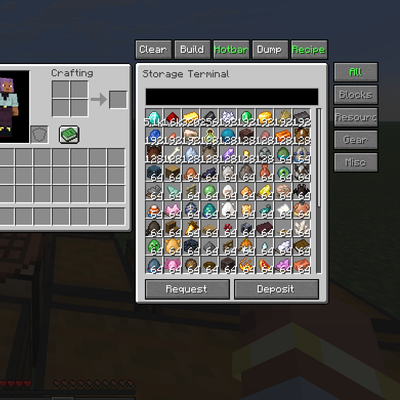
CurseForge · Minecraft mod
Storage Terminal
Storage Terminal in your vanilla world! Totally clientside!
Choose a version Pick your version below, then grab the matching file.
Quick answer
Which Storage Terminal release should I use?
Latest stable file storagemanager-2.0.2-fabric-26.3.jar
Game version 26.3
Loader Fabric
Storage Terminal storagemanager-2.0.2-fabric-26.3.jar targets 26.3 with Fabric. The project page does not say whether this file belongs on the client, dedicated server, or both. No extra mods listed for this file.
Where it goes
Is Storage Terminal required on the client, server, or both?
The project page does not say whether this file belongs on the client, dedicated server, or both.
Client Source doesn’t say
Dedicated server Source doesn’t say
Loader for this release Fabric
Required install it here Optional supported, not mandatory Not supported do not install here Source doesn’t say do not assume
The source does not explicitly classify this release as client-only or server-only.
What else does Storage Terminal storagemanager-2.0.2-fabric-26.3.jar need?
storagemanager-2.0.2-fabric-26.3.jar. Change the file and its required mods may change too.
This file does not list any required mods. Do not add a library just because a different file uses it.
This file does not list any required or optional mods.
Before you install it
Add Storage Terminal without breaking your instance.
Built for Storage Terminal storagemanager-2.0.2-fabric-26.3.jar. Pick another file and the loader, install side or required mods may change.
- 01
Stick to this file
Use storagemanager-2.0.2-fabric-26.3.jar. It targets 26.3 with Fabric; another release may have different loader, side or dependency requirements.
- 02
Bring the mods it needs
This file does not list any required mods. Do not add a library just because a different file uses it.
- 03
Put it on the correct side
The project page does not say whether this file belongs on the client, dedicated server, or both.
- 04
Pick the file you checked
Use the “Get this file” button beside storagemanager-2.0.2-fabric-26.3.jar. It opens that exact file at the source.
About this project
What does Storage Terminal add?
New Update: Support Sophisticated Storage!
Storage Terminal – Client-Side Storage Management Mod
Have you ever seen Applied Energistics or Refined Storage?
Those storage systems are highly functional. This mod provides a comparable lightweight alternative.
Overview
Storage Terminal adds a client-side storage interface that enables store/request operations for all nearby chests from a single GUI.
Key feature: In the vanilla crafting table, clicking any recipe automatically requests the required ingredients from connected chests.
The mod operates entirely client-side and is compatible with any vanilla or modded server without server-side installation.
Setup
- Press Right Shift to open the Keybind Configuration menu.
- Assign keys for:
- AutoStash
- Storage Manager
Alternatively, configure keys via Options → Controls.
Default keybinds
- AutoStash: B
- Storage Manager: V
Usage
Scanning Chests
- Press the Storage Manager key (V by default).
- Click BUILD.
- The mod will automatically scan and register all nearby chests.
- A chat notification confirms when the scan is complete.
Item Controls
| Action | Result |
|---|---|
| Right click | Request +1 item |
| Left click | Request +64 items (full stack) |
| Shift + Click | Subtract equivalent quantity |
While holding an item, clicking an empty slot in the terminal GUI stores it in the nearest registered chest.
Crafting Integration
| Action | Result |
|---|---|
| Click recipe | Request ingredients for 1 craft |
| Shift + Click recipe | Request ingredients for 1 full stack |
The mod automatically pulls exact quantities from connected chests and performs the craft.
Technical Specifications
- Side: Client-side only (no server installation required)
- Compatibility: Fabric and NeoForge
- Minecraft versions: 1.20+ / 1.21.1 / 1.21+ / 26.1+ / 26.2 /26.3
- Performance: Lightweight, minimal impact on FPS or TPS
Download: CurseForge – Storage Terminal
Support: Discord
If you encounter any issues, please leave a comment or join the Discord server for assistance.
Project description from CurseForge.
Pick your setup
Storage Terminal by Minecraft version and loader
Choose the version and loader you play, then open the matching release.
Minecraft version
26.2
2 loader buildsMinecraft version
26.1.1
2 loader buildsMinecraft version
26.1
2 loader buildsMinecraft version
1.21.11
1 loader buildMinecraft version
1.21.1
2 loader buildsCheck the dependencies, then try the file in a copied instance before changing a world you care about.
Recent files
Storage Terminal versions and loaders
storagemanager-2.0.2-fabric-26.3.jar
13 Nov 2026
Client Source doesn’t say Server Source doesn’t say Dependencies No extras listed Listed on Release listing
Check the 26.3 · Fabric setup Fabric26.3 release
storagemanager-2.0.2-fabric-1.21.1.jar
13 Nov 2026
Client Source doesn’t say Server Source doesn’t say Dependencies No extras listed Listed on Release listing
Check the 1.21.1 · Fabric setup Fabric1.21.1 release
storagemanager-2.0.2-neoforge-1.21.1.jar
13 Nov 2026
Client Source doesn’t say Server Source doesn’t say Dependencies No extras listed Listed on Release listing
Check the 1.21.1 · NeoForge setup 1.21.1NeoForge release
storagemanager-2.0.2-neoforge-26.3.jar
13 Nov 2026
Client Source doesn’t say Server Source doesn’t say Dependencies No extras listed Listed on Release listing
Check the 26.3 · NeoForge setup NeoForge26.3 release
storagemanager-2.0.1-neoforge-26.3.jar
7 Nov 2026
Client Source doesn’t say Server Source doesn’t say Dependencies No extras listed Listed on Release listing
Check the 26.3 · NeoForge setup NeoForge26.3 release
storagemanager-2.0.0-neoforge-26.3.jar
6 Nov 2026
Client Source doesn’t say Server Source doesn’t say Dependencies No extras listed Listed on Release listing
Check the 26.3 · NeoForge setup NeoForge26.3 release
storagemanager-1.0.3-neoforge-26.2.jar
10 Aug 2026
Client Source doesn’t say Server Source doesn’t say Dependencies No extras listed Listed on Release listing
Check the 26.2 · NeoForge setup NeoForge26.2 release
storagemanager-1.0.3-fabric-26.2.jar
storagemanager-1.0.3-fabric-26.1.jar
10 Aug 2026
Client Source doesn’t say Server Source doesn’t say Dependencies No extras listed Listed on Release listing
Check the 26.2 · Fabric setup Fabric26.2 release
storagemanager-1.0.3-neoforge-1.21.1.jar
28 Apr 2026
Client Source doesn’t say Server Source doesn’t say Dependencies No extras listed Listed on Release listing
Check the 1.21.1 · NeoForge setup 1.21.1NeoForge release
storagemanager-1.0.3-neoforge-26.1.jar
1 Apr 2026
Client Source doesn’t say Server Source doesn’t say Dependencies No extras listed Listed on Release listing
Check the 26.1.1 · NeoForge setup NeoForge26.126.1.1 release
storagemanager-1.0.3-neoforge-1.21.11.jar
1 Apr 2026
Client Source doesn’t say Server Source doesn’t say Dependencies No extras listed Listed on Release listing
Check the 1.21.11 · NeoForge setup NeoForge1.21.11 release
storagemanager-1.0.3-fabric-26.1.jar
1 Apr 2026
Client Source doesn’t say Server Source doesn’t say Dependencies 1 required · 1 unchecked Listed on Release listing
Check the 26.1.1 · Fabric setup Fabric26.126.1.1 release
Looking for an older file? The official CurseForge project page is in Resources.
 mod
CurseForge · Minecraft
DarkPvP
DarkPvP is an advanced Minecraft Fabric PvP client featuring a premium ClickGUI, Crystal and Sword PvP tools, AutoTotem, AutoClicker, aim training, ESP, fast item swapping, custom HUDs, movement utilities and extensive customisation.
 mod
CurseForge · Minecraft
Trenzalore
Small Util Mod with a few tweaks
 mod
CurseForge · Minecraft
Universal Recycler
Recycle items back into the ingredients used to craft them.