Minecraft version
Back to mods 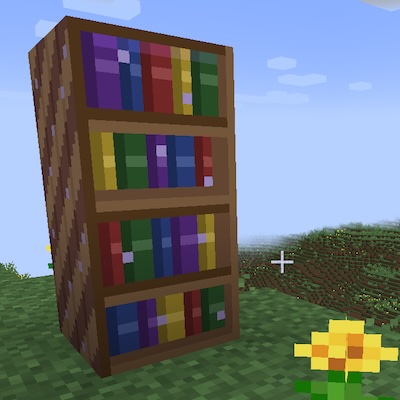
CurseForge · Minecraft mod
Enchanted BookShelf
A magical bookshelf that can store up to 1000 enchanted books!
Choose a version Pick your version below, then grab the matching file.
Quick answer
Which Enchanted BookShelf release should I use?
Latest stable file enchantedbookshelf-1.1.2+1.21.1-neoforge.jar
Game version 1.21.1
Loader NeoForge
Enchanted BookShelf enchantedbookshelf-1.1.2+1.21.1-neoforge.jar targets 1.21.1 with NeoForge. The project page does not say whether this file belongs on the client, dedicated server, or both. No extra mods listed for this file.
Where it goes
Is Enchanted BookShelf required on the client, server, or both?
The project page does not say whether this file belongs on the client, dedicated server, or both.
Client Source doesn’t say
Dedicated server Source doesn’t say
Loader for this release NeoForge
Required install it here Optional supported, not mandatory Not supported do not install here Source doesn’t say do not assume
The source does not explicitly classify this release as client-only or server-only.
What else does Enchanted BookShelf enchantedbookshelf-1.1.2+1.21.1-neoforge.jar need?
enchantedbookshelf-1.1.2+1.21.1-neoforge.jar. Change the file and its required mods may change too.
This file does not list any required mods. Do not add a library just because a different file uses it.
This file does not list any required or optional mods.
Before you install it
Add Enchanted BookShelf without breaking your instance.
Built for Enchanted BookShelf enchantedbookshelf-1.1.2+1.21.1-neoforge.jar. Pick another file and the loader, install side or required mods may change.
- 01
Stick to this file
Use enchantedbookshelf-1.1.2+1.21.1-neoforge.jar. It targets 1.21.1 with NeoForge; another release may have different loader, side or dependency requirements.
- 02
Bring the mods it needs
This file does not list any required mods. Do not add a library just because a different file uses it.
- 03
Put it on the correct side
The project page does not say whether this file belongs on the client, dedicated server, or both.
- 04
Pick the file you checked
Use the “Get this file” button beside enchantedbookshelf-1.1.2+1.21.1-neoforge.jar. It opens that exact file at the source.
About this project
What does Enchanted BookShelf add?
Enchanted BookShelf
Store, search, and split your enchanted books with ease.
Enchanted BookShelf adds a single powerful block to Minecraft: a magical bookshelf capable of holding up to 1,000 enchanted books with a built-in search engine and an enchantment extraction system.
Features
Massive Enchanted Book Storage
The Enchanted Bookshelf is a tall, double-block structure that stores up to 1,000 enchanted books in a single place. No more chests full of unsorted books — place them all in one bookshelf and find exactly what you need.
Real-Time Localized Search
A search bar at the top of the GUI lets you filter your collection instantly as you type. Search by enchantment name (e.g. "Protection", "Sharpness") or by level using Roman numerals ("IV", "V"). The search uses your client's language, so it works in English, Spanish, or any language your resource pack supports.
Enchantment Index Panel
A side panel lists every unique enchantment stored in the bookshelf at a glance. Click any enchantment name to instantly filter the storage to only books containing that enchantment. Matching entries are highlighted in yellow.
Enchantment Extraction
Got a book with multiple enchantments and only need one? Right-click the book to open the extraction panel. Click the enchantment you want to separate, and it will be split into its own individual enchanted book.
Extraction requires three tools in the tool panel:
- Ink Bottle — 5 uses per bottle
- Writing Quill — 5 uses per quill
- Blank Book — 1 consumed per extraction
Each extraction consumes one use of Ink and Quill, one blank Book, and rewards the player with experience points (enchantment level × 3 XP).
Always-Visible Tool Panel
The tool panel sits below the enchantment index and is always accessible — you can insert your Ink Bottle, Writing Quill, and blank Books at any time, not just during extraction. Ghost silhouettes show which items go in each slot when empty.
Crafting Recipes
Enchanted Bookshelf
| Diamond | Bookshelf | Diamond |
| Bookshelf | Chest | Bookshelf |
| Diamond | Bookshelf | Diamond |
Ink Bottle (Shapeless)
Glass Bottle + Ink Sac + Lapis Lazuli
Writing Quill (Shapeless)
Feather + Stick + Gold Nugget
How It Works
- Craft the Enchanted Bookshelf and place it — it occupies two blocks vertically.
- Store enchanted books by placing them in the 54-slot grid (scrollable up to 1,000 books).
- Search for any enchantment using the search bar or click an entry in the side panel.
- Extract individual enchantments from multi-enchanted books:
- Insert an Ink Bottle, Writing Quill, and blank Books into the tool panel.
- Right-click a multi-enchanted book to open the extraction panel.
- Click the enchantment you want — a new single-enchantment book is created and added to your inventory.
Details
- Double block with horizontal rotation — faces the player when placed.
- Breaking either half drops the block and all stored books.
- Shift-click support for quickly moving books and tools in/out.
- Scrollbar with mouse wheel support and drag-to-scroll.
- Supports Minecraft 1.21 and 1.21.1 on NeoForge.
- Available in English and Spanish.
Requirements
- Minecraft 1.21 or 1.21.1
- NeoForge (21.0.167+ for 1.21, 21.1.84+ for 1.21.1)
- No other mod dependencies
Project description from CurseForge.
Pick your setup
Enchanted BookShelf by Minecraft version and loader
Choose the version and loader you play, then open the matching release.
Check the dependencies, then try the file in a copied instance before changing a world you care about.
Recent files
Enchanted BookShelf versions and loaders
enchantedbookshelf-1.1.2+1.21.1-neoforge.jar
26 Jan 2026
Client Source doesn’t say Server Source doesn’t say Dependencies No extras listed Listed on Release listing
Check the 1.21.1 · NeoForge setup 1.21.1NeoForge release
Looking for an older file? The official CurseForge project page is in Resources.
 mod
mod CurseForge · Minecraft
Gemstone Protection
Protect your lands using customizable gemstone wards with an intuitive GUI to manage players, flags, and visual borders.
 mod
mod CurseForge + Modrinth · Minecraft
Easy Hopper
Speed up Hoppers and add classification function to it!
 mod
mod Modrinth · Minecraft
Functional Storage Legacy
Backport of Functional Storage features for Minecraft 1.12.2.