FTB Quests (NeoForge) Needed by Curvy Quests curvyquests-1.0.1.jar
requiredMatching file found Matched file: ftb-quests-forge-2001.4.22.jar
CurseForge · Minecraft mod
An addon for FTB Quests mod that adds dependency curves
Quick answer
Curvy Quests curvyquests-1.0.1.jar targets 1.20.1 with Forge. The project page does not say whether this file belongs on the client, dedicated server, or both. All 4 required mods have matching files.
Where it goes
The project page does not say whether this file belongs on the client, dedicated server, or both.
The source does not explicitly classify this release as client-only or server-only.
curvyquests-1.0.1.jar. Change the file and its required mods may change too.
Install FTB Quests (NeoForge), FTB Teams (NeoForge), Architectury API, FTB Library (NeoForge) first. We found matching files for this game-version and loader setup. 17 come through another mod in the chain.
17 extra mods were pulled in by other dependencies. Indented rows show who needs each one. We only count dependency files that match this setup. A file for another loader does not fill the gap.
Before you install it
Built for Curvy Quests curvyquests-1.0.1.jar. Pick another file and the loader, install side or required mods may change.
Use curvyquests-1.0.1.jar. It targets 1.20.1 with Forge; another release may have different loader, side or dependency requirements.
Install FTB Quests (NeoForge), FTB Teams (NeoForge), Architectury API, FTB Library (NeoForge) first. We found matching files for this game-version and loader setup. 17 come through another mod in the chain.
The project page does not say whether this file belongs on the client, dedicated server, or both.
Use the “Get this file” button beside curvyquests-1.0.1.jar. It opens that exact file at the source.
About this project
The parameters of each curve are listed in a config file of a quest chapter, which is usually located at /path/to/minecraft/config/ftbquests/quests/chapters/.
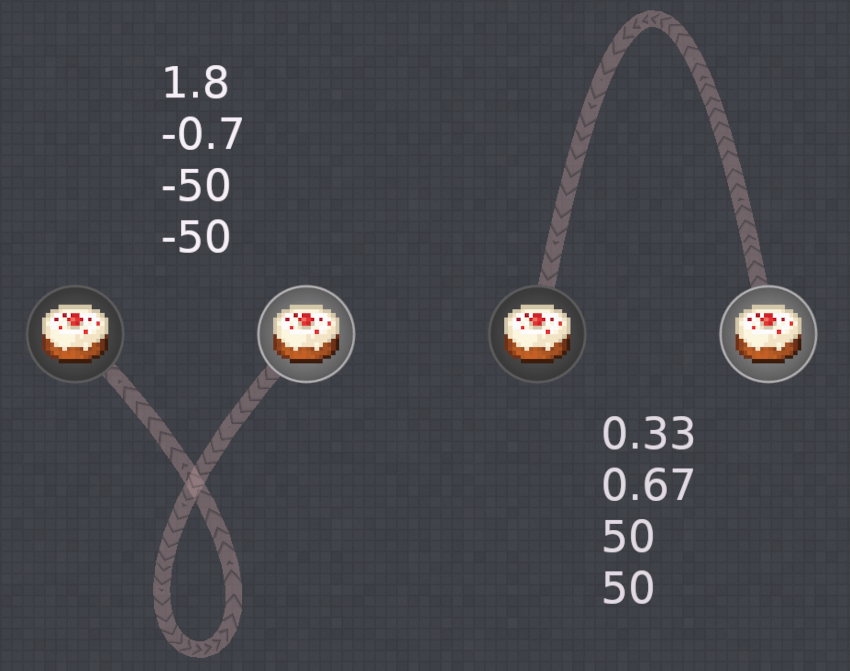
When you create a dependency between two quests, the mod automatically creates a curve with parameters [0, 0, 0, 0] and writes it to the config file. Just try to change the parameters and see what will happen to the curve, or look at the picture below. To make the changes appear in the game you may need to reload ftbquests with the command: /ftbquests reload.
Dependencies are represented as cubic Bezier curves.
Each curve has four parameters. The first two of them represent the X-coordinates along the line between two quests in units of a distance between these quests. The zero-point is located at the position of the dependant quest. The last two parameters represent the Y-coordinates along the line perpendicular to the X axis, in units of a half-width of a dependency line and with a zero-point also located at the position of the dependant quest.
Project description from CurseForge.
Pick your setup
Choose the version and loader you play, then open the matching release.
Check the dependencies, then try the file in a copied instance before changing a world you care about.
Recent files
4 Feb 2026
27 Jan 2026
Looking for an older file? The official CurseForge project page is in Resources.
 mod
Farming automation mod. Planters and raised beds grow your crops and trees for you.
 mod
One recipe viewer for everything: EMI's interface, JEI's plugins, and where every item really comes from.
 mod
This mod adds new accessories to Terra Curio that originate from the Terraria Calamity Mod