Minecraft version
Back to mods 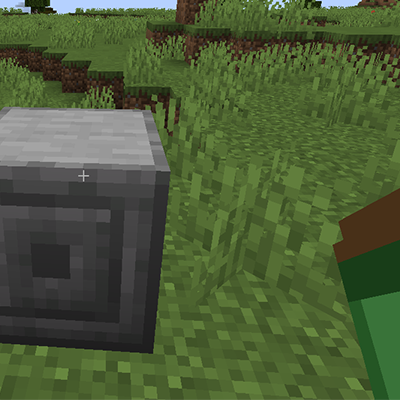
CurseForge · Minecraft mod
Infinite Inventory
A Minecraft mod that adds a magical sack with truly infinite storage capacity.
Choose a version Pick your version below, then grab the matching file.
Quick answer
Which Infinite Inventory release should I use?
Latest stable file infinite_inventory-1.2.0.jar
Game version 26.1, 26.1.1, 26.1.2
Loader NeoForge
Infinite Inventory infinite_inventory-1.2.0.jar targets 26.1, 26.1.1, 26.1.2 with NeoForge. The project page does not say whether this file belongs on the client, dedicated server, or both. No extra mods listed for this file.
Where it goes
Is Infinite Inventory required on the client, server, or both?
The project page does not say whether this file belongs on the client, dedicated server, or both.
Client Source doesn’t say
Dedicated server Source doesn’t say
Loader for this release NeoForge
Required install it here Optional supported, not mandatory Not supported do not install here Source doesn’t say do not assume
The source does not explicitly classify this release as client-only or server-only.
What else does Infinite Inventory infinite_inventory-1.2.0.jar need?
infinite_inventory-1.2.0.jar. Change the file and its required mods may change too.
This file does not list any required mods. Do not add a library just because a different file uses it.
This file does not list any required or optional mods.
Before you install it
Add Infinite Inventory without breaking your instance.
Built for Infinite Inventory infinite_inventory-1.2.0.jar. Pick another file and the loader, install side or required mods may change.
- 01
Stick to this file
Use infinite_inventory-1.2.0.jar. It targets 26.1, 26.1.1, 26.1.2 with NeoForge; another release may have different loader, side or dependency requirements.
- 02
Bring the mods it needs
This file does not list any required mods. Do not add a library just because a different file uses it.
- 03
Put it on the correct side
The project page does not say whether this file belongs on the client, dedicated server, or both.
- 04
Pick the file you checked
Use the “Get this file” button beside infinite_inventory-1.2.0.jar. It opens that exact file at the source.
About this project
What does Infinite Inventory add?
Infinite Inventory
A Minecraft NeoForge mod (1.21.1+) that adds a magical sack with truly infinite storage capacity.
Overview
The Infinite Sack solves your inventory problems forever. Unlike other storage mods that just give you more slots, this sack offers:
- Unlimited unique item slots - Store as many different items as you want
- Unlimited stack sizes - Uses BigInteger internally, so there's literally no cap
- Built-in crafting - Craft directly from your sack's contents
- Full automation support - Works with hoppers and item pipes
Features
🎒 Infinite Storage
Store any number of unique items with truly unlimited stack sizes. Items persist across game sessions and never get lost.
🔨 Built-in Crafting
- Floating 3x3 crafting grid (draggable)
- Full JEI integration - click the [+] button to transfer recipes
- Pulls ingredients from both your player inventory AND the sack
🔍 Search & Sort
- Item name search - Type to filter items
- Mod filter - Use
@modname(e.g.,@minecraft sword) - Tag filter - Use
#tagname(e.g.,#logs) - Sort modes - Click the sort button to cycle between:
- Count (highest first)
- Mod (alphabetical by mod)
- Name (alphabetical by item name)
⚡ Quick Deposit
- Deposit All button - Deposits entire inventory (excludes hotbar)
- Shift-click - Deposit a single stack
- Shift-right-click - Deposit one item
- Shift-double-click - Deposit all items of that type
- Space+click - Deposit all items at once
🧲 Magnet Mode
Toggle the magnet feature to automatically pick up items within a 6-block range directly into your sack. The magnet status is shown in the item tooltip.
🏛️ Sack Pedestal
Place your sack on a pedestal block for:
- Stationary access without holding the sack
- Automation support - Hoppers and pipes can insert/extract items from any side
- Shared access point for your base
💎 Curios Integration (Optional)
When Curios is installed:
- Wear the sack in your charm slot
- Magnet feature works while worn
- Hotkey still opens the inventory
⌨️ Hotkey
Press X (configurable) to open your sack inventory from anywhere - works whether the sack is in your inventory or equipped in a Curios slot.
Recipes
Infinite Sack
L L L
L C L
L L L
- L = Leather
- C = Chest
Sack Pedestal
S S S
S S
S S S
- S = Stone Bricks
Installation
- Install NeoForge for Minecraft 1.21.1
- Download the mod JAR file
- Place it in your
modsfolder - (Optional) Install JEI for recipe integration
- (Optional) Install Curios for charm slot support
Dependencies
- Required: NeoForge 21.1.77+
- Optional: JEI 19.21.0+ (recipe integration)
- Optional: Curios 9.0.0+ (charm slot support)
Usage Tips
- First time: Craft the sack and right-click to open
- Depositing: Shift-click items from your inventory to deposit them
- Extracting: Click items in the sack to pull them out (shift-click for full stacks)
- Crafting: Drag the crafting window to a convenient position; it remembers its location
- Searching: Combine filters like
@minecraft #logsto find oak/birch/etc logs from vanilla - Automation: Place sack in pedestal, connect hoppers to insert/extract items automatically
License
MIT License
Credits
Created with ❤️ for the Minecraft modding community.
Project description from CurseForge.
Pick your setup
Infinite Inventory by Minecraft version and loader
Choose the version and loader you play, then open the matching release.
Minecraft version
26.1.2
1 loader buildMinecraft version
26.1.1
1 loader buildMinecraft version
26.1
1 loader buildMinecraft version
1.21.11-snapshot
1 loader buildMinecraft version
1.21.11
1 loader buildMinecraft version
1.21.10
1 loader buildMinecraft version
1.21.9-snapshot
1 loader buildMinecraft version
1.21.9
1 loader buildMinecraft version
1.21.8
1 loader buildMinecraft version
1.21.7
1 loader buildMinecraft version
1.21.6-snapshot
1 loader buildShowing the newest 12 of 21 game versions. Older files are in the list below.
Check the dependencies, then try the file in a copied instance before changing a world you care about.
Recent files
Infinite Inventory versions and loaders
infinite_inventory-1.2.0.jar
17 Jul 2026
Client Source doesn’t say Server Source doesn’t say Dependencies No extras listed Listed on Release listing
Check the 26.2 · NeoForge setup NeoForge26.126.1.126.1.2 release
infinite_inventory-1.1.3.jar
8 May 2026
Client Source doesn’t say Server Source doesn’t say Dependencies No extras listed Listed on Release listing
Check the 26.1.2 · NeoForge setup NeoForge26.126.1.126.1.2 release
infinite_inventory-1.1.2.jar
infinite_inventory-1.1.0.jar
8 May 2026
Client Source doesn’t say Server Source doesn’t say Dependencies No extras listed Listed on Release listing
Check the 26.1.2 · NeoForge setup NeoForge26.126.1.126.1.2 release
infinite_inventory-1.1.0.jar
8 May 2026
Client Source doesn’t say Server Source doesn’t say Dependencies No extras listed Listed on Release listing
Check the 26.1.2 · NeoForge setup NeoForge26.126.1.126.1.2 release
infinite_inventory-1.0.2.jar
29 Jan 2026
Client Source doesn’t say Server Source doesn’t say Dependencies No extras listed Listed on Release listing
Check the 1.21.11-snapshot · NeoForge setup 1.21.2-Snapshot1.21.6-snapshot1.21.81.21.5 release
infinite_inventory-1.0.1.jar
29 Jan 2026
Client Source doesn’t say Server Source doesn’t say Dependencies No extras listed Listed on Release listing
Check the 1.21.11-snapshot · NeoForge setup 1.21.2-Snapshot1.21.6-snapshot1.21.81.21.5 release
infinite_inventory-1.0.0.jar
27 Jan 2026
Client Source doesn’t say Server Source doesn’t say Dependencies No extras listed Listed on Release listing
Check the 1.21.11-snapshot · NeoForge setup 1.21.2-Snapshot1.21.6-snapshot1.21.81.21.5 release
Looking for an older file? The official CurseForge project page is in Resources.
 mod
CurseForge + Modrinth · Minecraft
Chapters
GameStages-style chapter progression for NeoForge. Lock items, fluids, recipes, and more behind named stages. For Minecraft 1.21 and 26.
 mod
CurseForge · Minecraft
Anima: Total Movement
Slide under beams, roll out of falls, and bring your Minecraft character to life with new movement, combat, and facial animations.
 mod
CurseForge · Minecraft
Trial Keyrings
Store all of your Trial Keys in a convienent ring!