Cloth Config API (Fabric/Forge/NeoForge) Optional for Inventory Item Groups Neoforge 26.3 v1.5.3
optionalNo matching file
CurseForge · Minecraft mod
Adds groups of items to the inventory in the creative game mode
Quick answer
Inventory Item Groups Neoforge 26.3 v1.5.3 targets 26.3 with NeoForge. The project page does not say whether this file belongs on the client, dedicated server, or both. No extra mods listed for this file.
Where it goes
The project page does not say whether this file belongs on the client, dedicated server, or both.
The source does not explicitly classify this release as client-only or server-only.
Inventory Item Groups Neoforge 26.3 v1.5.3. Change the file and its required mods may change too.
This file does not list any required mods. Do not add a library just because a different file uses it.
We only count dependency files that match this setup. A file for another loader does not fill the gap.
Before you install it
Built for Inventory Item Groups Neoforge 26.3 v1.5.3. Pick another file and the loader, install side or required mods may change.
Use Inventory Item Groups Neoforge 26.3 v1.5.3. It targets 26.3 with NeoForge; another release may have different loader, side or dependency requirements.
This file does not list any required mods. Do not add a library just because a different file uses it.
The project page does not say whether this file belongs on the client, dedicated server, or both.
Use the “Get this file” button beside Inventory Item Groups Neoforge 26.3 v1.5.3. It opens that exact file at the source.
About this project
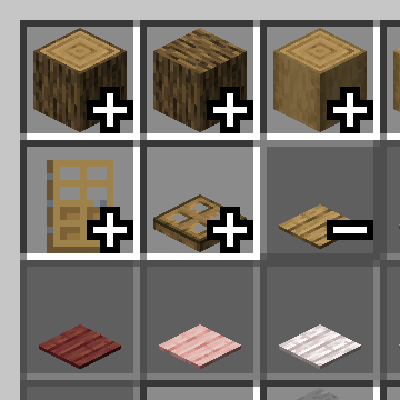
This mod adds item groups to the Creative mode menu. It's based on a feature from the Bedrock edition.

To use the mod, simply install it in the mods folder. In Creative mode, press the plus sign to open a group and the minus sign to close it.
The mod has a configuration option. It allows you to customize item sorting within groups and create your own custom item groups that can be used without the default ones.
To add a group to a specific menu tab, find the menu tab IDs on the group settings page, copy the desired one, and enter it in the "Tab ID" field. To add items to this group, enter the item ID displayed in the tooltip (when F3+H is enabled) or part of the ID contained in the item.
Below is an example of adding an item group to the blocks tab in the Cobllemon mod:

Configuration Settings

If desired, you can completely disable the default groups by unchecking the "Add all groups" option.
Another customization option is item sorting within a group. Currently, there are two modes: default and alphabetical.
You can translate the created group. The "Translate Groups" option must be enabled. To do this, create a resource pack and write a translation using the translation key from the example, then change the group name and ID to your own.
Translation example

File path: assets\minecraft\lang\en_us.json
{
  "group_name.inventory_item_groups.random_items": "Randoms"
}

Project description from CurseForge.
Pick your setup
Choose the version and loader you play, then open the matching release.
Showing the newest 12 of 24 game versions. Older files are in the list below.
Check the dependencies, then try the file in a copied instance before changing a world you care about.
Recent files
inventory-item-groups-1.5.3-neoforge+26.3.jar
2 Oct 2026
inventory-item-groups-1.5.3-forge+26.3.jar
2 Oct 2026
inventory-item-groups-1.5.3-fabric+26.3.jar
2 Oct 2026
inventory-item-groups-1.5.3-forge+26.2.jar
2 Oct 2026
inventory-item-groups-1.5.3-neoforge+26.2.jar
2 Oct 2026
inventory-item-groups-1.5.3-fabric+26.2.jar
2 Oct 2026
inventory-item-groups-1.5.3-neoforge+26.1.jar
2 Oct 2026
inventory-item-groups-1.5.3-forge+26.1.jar
2 Oct 2026
inventory-item-groups-1.5.3-fabric+26.1.jar
2 Oct 2026
inventory-item-groups-1.5.3-neoforge+1.21.6.jar
2 Oct 2026
inventory-item-groups-1.5.3-forge+1.21.6-all.jar
2 Oct 2026
inventory-item-groups-1.5.3-fabric+1.21.6.jar
2 Oct 2026
Looking for an older file? The official CurseForge project page is in Resources.
 mod
Torches, lanterns, candles, campfires and fire flicker softly, each flame on its own rhythm. Client-side, for Fabric, NeoForge and Forge. Works with Sodium and Embeddium. Compatible with shaders!
 mod
Give your chests filters, then sort your whole inventory into them with one click.
 mod
Added Infinity Range Card and Dimension Card to AE2