Minecraft version
Back to mods 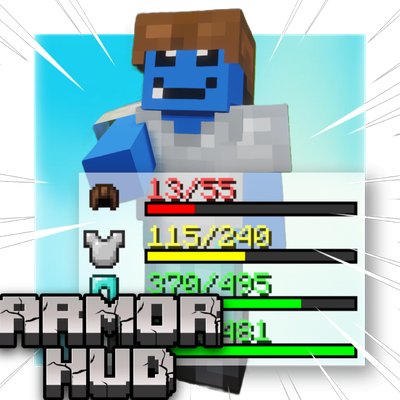
CurseForge · Minecraft mod
DuraView
A lightweight HUD mod that displays real-time durability for your armor and items.
Choose a version Pick your version below, then grab the matching file.
Quick answer
Which DuraView release should I use?
Latest stable file duraview-1.0.2-fabric-1.21.11.jar
Game version 1.21.11-snapshot, 1.21.11
Loader Fabric
duraview-1.0.2-fabric-1.21.11.jar targets 1.21.11-snapshot, 1.21.11 with Fabric. The project page does not say whether this file belongs on the client, dedicated server, or both. No extra mods listed for this file.
Where it goes
Is DuraView required on the client, server, or both?
The project page does not say whether this file belongs on the client, dedicated server, or both.
Client Source doesn’t say
Dedicated server Source doesn’t say
Loader for this release Fabric
Required install it here Optional supported, not mandatory Not supported do not install here Source doesn’t say do not assume
The source does not explicitly classify this release as client-only or server-only.
What else does duraview-1.0.2-fabric-1.21.11.jar need?
duraview-1.0.2-fabric-1.21.11.jar. Change the file and its required mods may change too.
This file does not list any required mods. Do not add a library just because a different file uses it.
This file does not list any required or optional mods.
Before you install it
Add DuraView without breaking your instance.
Built for duraview-1.0.2-fabric-1.21.11.jar. Pick another file and the loader, install side or required mods may change.
- 01
Stick to this file
Use duraview-1.0.2-fabric-1.21.11.jar. It targets 1.21.11-snapshot, 1.21.11 with Fabric; another release may have different loader, side or dependency requirements.
- 02
Bring the mods it needs
This file does not list any required mods. Do not add a library just because a different file uses it.
- 03
Put it on the correct side
The project page does not say whether this file belongs on the client, dedicated server, or both.
- 04
Pick the file you checked
Use the “Get this file” button beside duraview-1.0.2-fabric-1.21.11.jar. It opens that exact file at the source.
About this project
What does DuraView add?
DuraView
DuraView is a lightweight client-side mod that provides a clean and intuitive way to monitor your equipment's durability in real-time.
Features
- Real-time Durability Display: Shows durability bars for all six equipment slots — helmet, chestplate, leggings, boots, main hand, and off hand
- Smart Layout: Only shows slots with a damageable item equipped, and the display automatically compacts with no gaps as you swap gear in and out
- Clean HUD Design: Minimalist icon + bar + number layout that doesn't clutter your screen
- Color-coded Warnings: Bars change color as durability decreases (green → yellow → red)
- Fully Customizable Colors: Set your own color for each durability threshold (high/mid/low) with RGB sliders — handy for horror/atmospheric modpacks that want muted colors
- Adjustable Opacity: A global transparency slider lets you blend the HUD into your interface exactly how you like it
- Drag-and-Drop Editor: An "editing software"-style config screen — drag the whole display to move it, drag a corner to resize everything at once, drag the handle on the right to change bar length, and scroll the mouse wheel over the icon, number, or bar to resize each individually
- Snapping Guides: Guide lines appear when you drag near the center or edges of the screen, so lining things up is effortless
- Easy Access: Open the configuration menu with a simple key press (default: K)
- Lightweight Performance: Minimal impact on game performance
- Client-side Only: No server installation required — install it and it just works, even on servers that don't have it
How It Works
DuraView displays durability information directly on your HUD, making it easy to see when your equipment needs repair at a glance. The mod automatically detects all equipped items and updates the display in real-time as you play.
Press K (configurable) to open the settings menu where you can:
- Toggle the HUD on/off
- Drag to move the display, or drag a corner to resize it
- Scroll over the icon, number, or bar to resize each independently
- Open the color screen to customize the high/mid/low durability colors and overall opacity
Perfect For
- Players who want to avoid unexpected equipment breakage
- Survival mode enthusiasts who need to manage resources carefully
- Anyone who prefers visual feedback over checking inventory manually
- Modpack authors who want a durability HUD that matches their pack's exact color palette
Wide Version & Loader Support
DuraView is built for Forge, NeoForge, and Fabric across a very wide range of Minecraft versions, from 1.12.2 all the way up through the latest releases — check the Files tab for the full list.
All my mods are completely free to use. If you'd like to support development, consider buying me a coffee! ☕ https://ko-fi.com/nekozame_garo
Project description from CurseForge.
Pick your setup
DuraView by Minecraft version and loader
Choose the version and loader you play, then open the matching release.
Minecraft version
26.2
2 loader buildsMinecraft version
26.1.2
2 loader buildsMinecraft version
26.1.1
2 loader buildsMinecraft version
26.1
2 loader buildsMinecraft version
1.21.11-snapshot
2 loader buildsMinecraft version
1.21.11
2 loader buildsMinecraft version
1.21.10
2 loader buildsMinecraft version
1.21.8
3 loader buildsMinecraft version
1.21.5-Snapshot
3 loader buildsMinecraft version
1.21.5
3 loader buildsMinecraft version
1.21.4-Snapshot
3 loader buildsShowing the newest 12 of 28 game versions. Older files are in the list below.
Check the dependencies, then try the file in a copied instance before changing a world you care about.
Recent files
DuraView versions and loaders
duraview-1.0.2-fabric-1.21.11.jar
3 Oct 2026
Client Source doesn’t say Server Source doesn’t say Dependencies No extras listed Listed on Release listing
Check the 1.21.11-snapshot · Fabric setup Fabric1.21.11-snapshot1.21.11 release
duraview-1.0.2-fabric-1.21.10.jar
3 Oct 2026
Client Source doesn’t say Server Source doesn’t say Dependencies No extras listed Listed on Release listing
Check the 1.21.10 · Fabric setup Fabric1.21.10 release
duraview-1.0.2-fabric-1.21.8.jar
3 Oct 2026
Client Source doesn’t say Server Source doesn’t say Dependencies No extras listed Listed on Release listing
Check the 1.21.8 · Fabric setup Fabric1.21.8 release
duraview-1.0.2-neoforge-26.2.jar
3 Oct 2026
Client Source doesn’t say Server Source doesn’t say Dependencies No extras listed Listed on Release listing
Check the 26.2 · NeoForge setup NeoForge26.2 release
duraview-1.0.2-neoforge-26.1.jar
3 Oct 2026
Client Source doesn’t say Server Source doesn’t say Dependencies No extras listed Listed on Release listing
Check the 26.1 · NeoForge setup NeoForge26.1 release
duraview-1.0.2-neoforge-1.21.11.jar
3 Oct 2026
Client Source doesn’t say Server Source doesn’t say Dependencies No extras listed Listed on Release listing
Check the 1.21.11-snapshot · NeoForge setup NeoForge1.21.11-snapshot1.21.11 release
duraview-1.0.2-neoforge-1.21.10.jar
3 Oct 2026
Client Source doesn’t say Server Source doesn’t say Dependencies No extras listed Listed on Release listing
Check the 1.21.10 · NeoForge setup NeoForge1.21.10 release
duraview-1.0.2-neoforge-1.21.8.jar
3 Oct 2026
Client Source doesn’t say Server Source doesn’t say Dependencies No extras listed Listed on Release listing
Check the 1.21.8 · NeoForge setup 1.21.8NeoForge release
duraview-1.0.2-forge-1.21.8.jar
3 Oct 2026
Client Source doesn’t say Server Source doesn’t say Dependencies No extras listed Listed on Release listing
Check the 1.21.8 · Forge setup 1.21.8Forge release
duraview-1.0.2-fabric-26.2.jar
3 Oct 2026
Client Source doesn’t say Server Source doesn’t say Dependencies No extras listed Listed on Release listing
Check the 26.2 · Fabric setup Fabric26.2 release
duraview-1.0.2-fabric-26.1.jar
3 Oct 2026
Client Source doesn’t say Server Source doesn’t say Dependencies No extras listed Listed on Release listing
Check the 26.1.2 · Fabric setup Fabric26.126.1.126.1.2 release
duraview-1.0.2-fabric-26.3.jar
3 Oct 2026
Client Source doesn’t say Server Source doesn’t say Dependencies No extras listed Listed on Release listing
Check the 26.3 · Fabric setup Fabric26.3 release
Looking for an older file? The official CurseForge project page is in Resources.
 mod
mod CurseForge · Minecraft
Radio Markers
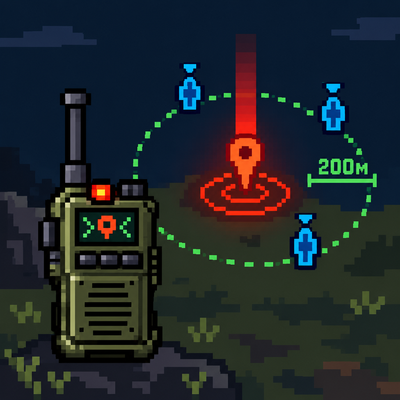
A new item called the "Radio Marker" has been added. It lets a player mark a position, creating a point visible to teammates (/team) and the player within 200 blocks.
 mod
mod CurseForge · Minecraft
[SBW] Air Strikes
Call in mortar barrages and air raids anywhere on the battlefield with a radio beacon.
 mod
mod CurseForge · Minecraft
Discord Presence
Customizable communcation between minecraft chat + advancements and discord.