Minecraft version
Back to mods 
CurseForge · Minecraft mod
Create Missions 6.0
Create Missions For Create Fabric 6.0
Choose a version Pick your version below, then grab the matching file.
Quick answer
Which Create Missions 6.0 release should I use?
Latest stable file missions-fabric-0.5.0.jar
Game version 1.20.1
Loader Fabric
Create Missions 6.0 missions-fabric-0.5.0.jar targets 1.20.1 with Fabric. The project page does not say whether this file belongs on the client, dedicated server, or both. No extra mods listed for this file.
Where it goes
Is Create Missions 6.0 required on the client, server, or both?
The project page does not say whether this file belongs on the client, dedicated server, or both.
Client Source doesn’t say
Dedicated server Source doesn’t say
Loader for this release Fabric
Required install it here Optional supported, not mandatory Not supported do not install here Source doesn’t say do not assume
The source does not explicitly classify this release as client-only or server-only.
What else does Create Missions 6.0 missions-fabric-0.5.0.jar need?
missions-fabric-0.5.0.jar. Change the file and its required mods may change too.
This file does not list any required mods. Do not add a library just because a different file uses it.
This file does not list any required or optional mods.
Before you install it
Add Create Missions 6.0 without breaking your instance.
Built for Create Missions 6.0 missions-fabric-0.5.0.jar. Pick another file and the loader, install side or required mods may change.
- 01
Stick to this file
Use missions-fabric-0.5.0.jar. It targets 1.20.1 with Fabric; another release may have different loader, side or dependency requirements.
- 02
Bring the mods it needs
This file does not list any required mods. Do not add a library just because a different file uses it.
- 03
Put it on the correct side
The project page does not say whether this file belongs on the client, dedicated server, or both.
- 04
Pick the file you checked
Use the “Get this file” button beside missions-fabric-0.5.0.jar. It opens that exact file at the source.
About this project
What does Create Missions 6.0 add?
This Is a port for create fabric 6.0.8.1.
Credit goes to the creator :Missions
Create: Missions is a Create addon focused for Create mod servers. It will also work in singleplayers worlds, but it's designed to bring an economy throughout a server's lifetime. We hope to give server owners a better way of giving players a currency, while also encouraging players to build their own shop contraptions/exchange banks/banks.
What's this addon?
It works by giving 10 random missions per player per week. These missions can be vanilla missions like "Break X Veridium" or Create mod related like "Drive a train for 4 km with at least 2 passengers". You can also reroll the missions, and claim prices by completing them. Open the mission GUI pressing H key (by default) or using /missions command
Mission types:
As time goes on, more missions will be added. Some missions can have lots of variation like breaking a block, while others are simpler like walking.
There are in total 16 Mission Types that use Create-related mechanics.
cut, compact, sail, craft, ride, harvester, train-driver-passenger, crush, eat, train-passenger, place, dive, press, mix, train-driver, break, saw, kill, drill, drink, mill, minecart, fly, relocate, fish, walk, swim, feed, belt-walk
Special thanks to:
- TheLegendofSaram, Mexican translation
- __Tesseract, French translation
- MrRedRhino, German translation
- глебикс, Russian translation
- Starlotte, mission complete sound
- Seboso, Jar of Tips texture
Needed for server owners
<details> <summary>Spoilers</summary>
Select the currencies and their exchange in config\missions\currency.json
As an example with Create: Numismatics it would look like this:
[
  {"numismatics:spur": "8"},
  {"numismatics:bevel": "2"},
  {"numismatics:sprocket": "4"},
  {"numismatics:cog": "8"},
  {"numismatics:crown": "8"},
  {"numismatics:sun": "1"}
]
<details> <summary>missions.json -> How to configure the missions? </summary> This file can be found in config\missions\missions.json. An example mission configuration:
{
  "config-version": 2,
  "eat": {
    "weight": 1,
    "missions": [
      {
        "items": {
          "apple": "120-300"
        },
        "titles": [
          "Forced meal"
        ],
        "rewards": [
          {
            "item": "minecraft:diamond",
            "amount": "30-80"
          }
        ]
      },
      {
        "items": {
          "honey_bottle": "1-3"
        },
        "titles": [
          "Drink up"
        ],
        "rewards": [
          {
            "item": "minecraft:diamond",
            "amount": "20-50"
          }
        ]
      }
    ]
  }
}
Don't use tags, they are not supported in the missions.json
Ranges like 1-3 means a number at random from 1 to 3, both included. Mission example: Eat 2 Honey Bottle(s) Reward example: 27 Diamond(s)
The "weight" is the chance of this mission to be selected. From 0 to 1.
You can add as many item id's to the "items" bracket, and add as many titles to "titles" bracket, for a mission to be granted one item and one title, both randomly from those inside the bracket.
</details> <details> <summary>Mechanical Exchanger</summary>
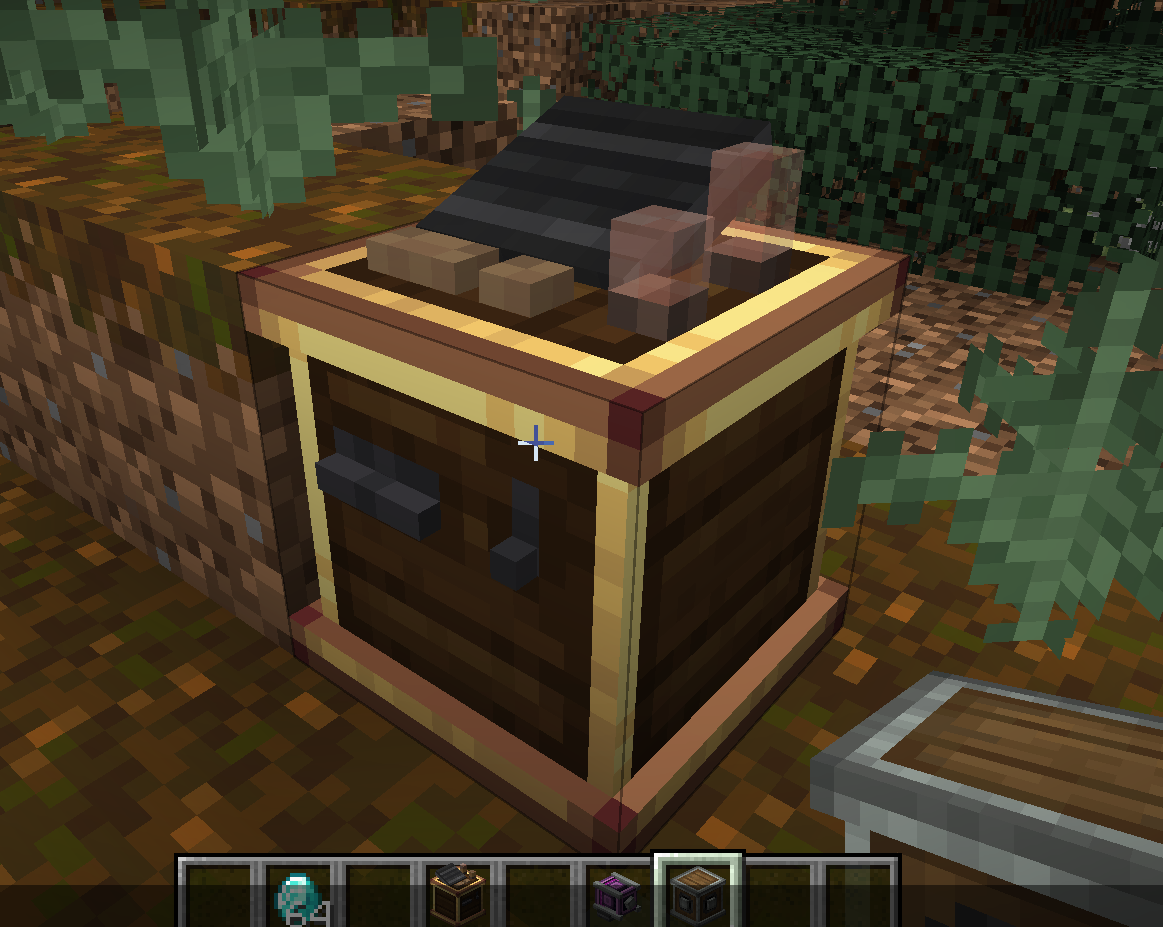 The Mechanical Exchanger doesn't have a crafting recipe, and can only be obtained with a 5% chance (default) after completing a hard mission. It lets you to exchange currencies from smaller to bigger currency. Depends on which rotation direction the shaft has. It also requires 100 rpm, and consumes much more SU.
</details> </details>
For developers
It's really possible to add new missions for Create: Missions. You have examples here
Project description from CurseForge.
Pick your setup
Create Missions 6.0 by Minecraft version and loader
Choose the version and loader you play, then open the matching release.
Check the dependencies, then try the file in a copied instance before changing a world you care about.
Recent files
Create Missions 6.0 versions and loaders
missions-fabric-0.5.0.jar
12 Feb 2026
Client Source doesn’t say Server Source doesn’t say Dependencies No extras listed Listed on Release listing
Check the 1.20.1 · Fabric setup Fabric1.20.1 release
Looking for an older file? The official CurseForge project page is in Resources.
 mod
mod CurseForge · Minecraft
Viltrumite
Become Omni-Man or any other Viltrumite from Invincible and never go into aura debt. This mod is updated as a part of my video series on Youtube where I code it into reality (in Turkish).
 mod
mod CurseForge · Minecraft
RedKey
A Blue Lock-inspired soccer experience featuring unique abilities, characters, training systems, and competitive gameplay.
 mod
mod CurseForge · Minecraft
Fluorite: The Realm of Dreams
Adds a Terraria-inspired sky dimension to Minecraft filled with bosses alongside a new progression system beyond Netherite.