Minecraft version
Back to mods 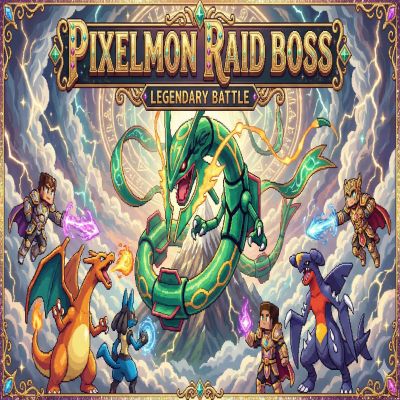
CurseForge · Minecraft mod
PixelmonRaidBoss
A Pixelmon Global Raid Boss Add-On. Which add more activities on your server...
Choose a version Pick your version below, then grab the matching file.
Quick answer
Which PixelmonRaidBoss release should I use?
Latest stable file pixelmonraid-1.0.jar
Game version 1.16.5
Loader Forge
PixelmonRaidBoss pixelmonraid-1.0.jar targets 1.16.5 with Forge. The project page does not say whether this file belongs on the client, dedicated server, or both. No extra mods listed for this file.
Where it goes
Is PixelmonRaidBoss required on the client, server, or both?
The project page does not say whether this file belongs on the client, dedicated server, or both.
Client Source doesn’t say
Dedicated server Source doesn’t say
Loader for this release Forge
Required install it here Optional supported, not mandatory Not supported do not install here Source doesn’t say do not assume
The source does not explicitly classify this release as client-only or server-only.
What else does PixelmonRaidBoss pixelmonraid-1.0.jar need?
pixelmonraid-1.0.jar. Change the file and its required mods may change too.
This file does not list any required mods. Do not add a library just because a different file uses it.
This file does not list any required or optional mods.
Before you install it
Add PixelmonRaidBoss without breaking your instance.
Built for PixelmonRaidBoss pixelmonraid-1.0.jar. Pick another file and the loader, install side or required mods may change.
- 01
Stick to this file
Use pixelmonraid-1.0.jar. It targets 1.16.5 with Forge; another release may have different loader, side or dependency requirements.
- 02
Bring the mods it needs
This file does not list any required mods. Do not add a library just because a different file uses it.
- 03
Put it on the correct side
The project page does not say whether this file belongs on the client, dedicated server, or both.
- 04
Pick the file you checked
Use the “Get this file” button beside pixelmonraid-1.0.jar. It opens that exact file at the source.
About this project
What does PixelmonRaidBoss add?
⚔️ Pixelmon Raid Boss
The Ultimate PvE Boss Fight & Economy Expansion for Pixelmon 1.16.5
Transform your Pixelmon server with dynamic, high-stakes Raid Boss battles! Pixelmon Raid Boss introduces an automated, highly customizable world boss system complete with dynamic difficulty scaling, a custom token economy, in-game interactive Admin GUIs, and competitive leaderboards.
Built from the ground up for server performance and player retention, this mod allows server owners to create epic, customized PvE events without ever needing to restart the server or edit files manually.
🌟 Key Features
Dynamic Boss Scaling: Boss HP and difficulty automatically scale based on the tier of the raid and the number of players participating. Features progressive win-streak scaling and Enrage/Sudden Death mechanics.
In-Game Admin Control Panel: Throw away your text editors! Manage boss tiers, force-start raids, toggle auto-spawning, and configure settings entirely through a beautiful, lag-free in-game GUI.
Custom Token Economy & Shop: Players earn Raid Tokens by participating and dealing damage. They can spend these tokens in a fully customizable GUI Shop featuring categories like Pokéballs, Rare Items, Keys, and Special Loot.
In-Game Loot Table Editor: Set up participation rewards, rank-based loot (Top 1, Top 2, Top 3), and "Killshot" bonuses effortlessly by just dropping items into an admin GUI.
Competitive Leaderboards: Keep players engaged with an All-Time Server Leaderboard (tracking total damage, kills, and raids joined) and a "Last Raid" podium displaying the top 5 damage dealers.
Flawless Customization: 100% customizable messages, UI colors, boss lists, and settings via a safe, auto-updating
pixelmonraid.jsonfile that fully supports Minecraft color codes.
📜 Commands & Permissions
🟢 Player Commands (Default Access)
These commands are available to all players to participate in the raid ecosystem.
/raid warp- Teleports the player directly to the designated Raid Arena./raid join- Opts the player into the active raid (requires them to be within the arena radius)./raid status- Displays the current boss phase, boss vitality (HP%), active challengers, or the timer counting down to the next auto-spawn./raid shop- Opens the custom Token Economy Shop to spend earned tokens./raid tokens balance- Checks the player's current Raid Token balance./raid leaderboard- Opens a GUI displaying the Top 5 damage dealers for the current or most recent raid./raidstats- Opens the multi-page All-Time Server Leaderboard tracking total damage and participation.
🔴 Admin Commands (Permission Level 2 required)
Everything can be managed via the main /raidadmin GUI, but manual commands are provided for console/setup flexibility.
/raidadmin- Opens the Master Admin Control Panel (Edit shop, loot tables, difficulty, and auto-spawns)./raidadmin start- Force-starts a raid sequence immediately./raidadmin stop- Aborts the current raid and resets the arena./raidadmin forcewin- Instantly defeats the boss and distributes loot to all participants./raidadmin setcenter- Sets the boss spawn point at the admin's current location./raidadmin setwarp- Sets the teleport location for players using/raid warp./raidadmin setholo- Sets the location for the holographic leaderboard (if enabled)./raidadmin toggleholo- Enables or disables the holographic leaderboard display./raidadmin reload- Safely reloads thepixelmonraid.jsonconfiguration file without restarting the server./raidadmin shop add <category> <price>- Quickly adds the item you are currently holding in your hand to the token shop. (Categories: BALLS, RARE, KEYS, SPECIAL)/raidadmin tokens give <player> <amount>- Adds tokens to a player's balance./raidadmin tokens take <player> <amount>- Removes tokens from a player's balance.
🛠️ Installation & Setup
Ensure you are running Minecraft Forge 1.16.5 and the corresponding Pixelmon mod.
Drop the
PixelmonRaid.jarinto your server'smodsfolder.Start the server. A
config/pixelmonraid.jsonfile will automatically generate.Join the game as an Op/Admin, stand where you want the boss to spawn, and type
/raidadmin setcenter.Stand where you want players to teleport to, and type
/raidadmin setwarp.Type
/raidadminto open your control panel, toggle Auto-Raids to ON, and start customizing your loot!
Updated version for 1.21.1 of our Pixelmon raid boss is available on our discord Join and enjoy
Discord :- https://discord.gg/VSBxDV54ys
Project description from CurseForge.
Pick your setup
PixelmonRaidBoss by Minecraft version and loader
Choose the version and loader you play, then open the matching release.
Check the dependencies, then try the file in a copied instance before changing a world you care about.
Recent files
PixelmonRaidBoss versions and loaders
pixelmonraid-1.0.jar
pixelmonraid-2.0.jar
17 Feb 2026
Client Source doesn’t say Server Source doesn’t say Dependencies No extras listed Listed on Release listing
Check the 1.16.5 · Forge setup 1.16.5Forge release
Looking for an older file? The official CurseForge project page is in Resources.
 mod
CurseForge + Modrinth · Minecraft
Casual Tinkering
A mod that adds some new tools for Tinkers' Construct.
 mod
CurseForge + Modrinth · Minecraft
Tips Extension
A functional and aesthetic extension for the Tips mod on Minecraft 1.12.2, adding pause menu support and customizable breathing effects.
 mod
CurseForge · Minecraft
Pert's Placeholders
A bunch Items with no uses or recipes designed for developers to add themselves