Quick answer
Which LegendGear Returns release should I use?
Latest stable file 1.2.1-B
Game version 1.12.2
Loader Forge
LegendGear Returns 1.2.1-B targets 1.12.2 with Forge. The project page does not say whether this file belongs on the client, dedicated server, or both. 1 required mod needs a matching file.
Where it goes
Is LegendGear Returns required on the client, server, or both?
The project page does not say whether this file belongs on the client, dedicated server, or both.
Client Source doesn’t say
Dedicated server Source doesn’t say
Loader for this release Forge
Required install it here Optional supported, not mandatory Not supported do not install here Source doesn’t say do not assume
The source does not explicitly classify this release as client-only or server-only.
What else does LegendGear Returns 1.2.1-B need?
1.2.1-B. Change the file and its required mods may change too.
Install Baubles first, but 1 required mod has no matching file for this setup. Do not mix loader builds to force a match.
Baubles Needed by LegendGear Returns 1.2.1-B requiredNo matching file
We only count dependency files that match this setup. A file for another loader does not fill the gap.
Before you install it
Add LegendGear Returns without breaking your instance.
Built for LegendGear Returns 1.2.1-B. Pick another file and the loader, install side or required mods may change.
- 01
Stick to this file
Use 1.2.1-B. It targets 1.12.2 with Forge; another release may have different loader, side or dependency requirements.
- 02
Bring the mods it needs
Install Baubles first, but 1 required mod has no matching file for this setup. Do not mix loader builds to force a match.
- 03
Put it on the correct side
The project page does not say whether this file belongs on the client, dedicated server, or both.
- 04
Pick the file you checked
Use the “Get this file” button beside 1.2.1-B. It opens that exact file at the source.
About this project
What does LegendGear Returns add?
LegendGear Returns is the 1.12.2 port of LegendGear by NMcCoy, it combines the content from both LegendGear 1 (1.5.2) and LegendGear 2 (1.7.10). Our port represents the best of both versions!
Most of the mod's content is heavily inspired after classic games like the Legend of Zelda and other RPGs. The main central focus of the mod however are the falling stars and the legendary Phoenix.
Baubles or any of its forks is required to run with this mod.
⚠️ IMPORTANT: This mod is going to stay on 1.12.2, there are no plans for porting from our side!
Equipment
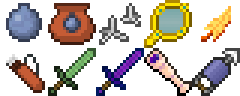
- Blast Charm: This bauble completely shields you from explosion damage while it is equipped. Has a small cooldown per use.
- Bomb Bag: Bombs picked up will be stored into the bag until it's full. Right-click to throw one of the stored bombs to the ground or left-click active bombs to defuse them.
- Bombs: Right-click to throw it to the ground. It will explode after a few seconds.
- Caltrops: Place them on the ground to use them as traps. There is a chance for them to wear out completely.
- Feather Charm: This bauble provides full immunity to fall damage and wall collision damage while it is equipped.
- Hookshot: Right-click to fire it. Once hooked into a block, it'll pull you towards it.
- Magic Boomerang: Right-click to throw it. The boomerang will magically return to you and pick up any items it touches.
- Magic Mirror: Hold down right-click to teleport to the last point you stood on that was exposed to the sky.
- Phoenix Charm: This bauble saves you from death while it is equipped. Has only one use.
- Phoenix Feather: Saves you from death while it is anywhere in your inventory. Has only one use.
- Quiver: Arrows picked up will be stored into the quiver until it's full. Right-click to store arrows into it or sneak and right-click to remove arrows from it.
- Slime Sword: It's a sword that does no damage. WOW!
- Spotting Scope: Hold down right-click to zoom. Quickly right-click to temporarily mark a location instead.
- Starglass Sword: All attacks with this sword have a 50% chance to deal a critical hit.
Medallions
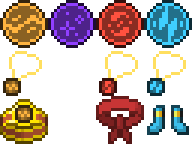
These are one-use items that can be thrown to cast immensely powerful spells at the impact point, but you'll first need to charge them through specific methods. Fully charged medallions are also used to craft special gear and amulets.
- Earth Medallion: Causes a massive shockwave that will throw off mobs into the air and deal over 70 damage by default. Requires you to take fall damage to charge it.
- Ender Medallion: Emits an expanding unstable ring of energy that will teleport mobs inside it once it reaches its threshold. Requires you to take damage from End mobs to charge it.
- Fire Medallion: Charges up three spinning fireballs that will circle around for a few seconds before exploding, any mobs within will be dealt over 80 damage and burn for 20 seconds by default. Requires you take fire damage to charge it.
- Null Medallion: Can be used to remove the currently applied medallion augment from a tool. Otherwise it does nothing (thus the name).
- Wind Medallion: Causes a huge arrow storm that will constantly rain towards mobs below, each arrow deals 4 damage by default and will ignore invincibility frames. Requires you to take arrow damage to charge it.
Medallion Equipment
Special equipment created with the power of the medallions.
- Aero Amulet: When this bauble is equipped, it will completely protect you from arrows shot at you.
- Geo Amulet: When this bauble is equipped, fall damage will be negated, and you will emit shockwaves on the ground after falling through great lengths.
- Headband of Valor: Makes you deal more damage when equipped.
- Pyro Amulet: When this bauble is equipped, fire damage will heal you instead.
- Titan Band: When this bauble is equipped, right-clicking mobs with an empty hand will pick them up. Right-click again to throw them!
- Whirlwind Boots: These pair of boots make you run much faster when they're equipped.
Medallion Augmentation
Fully charged medallions can be applied to tools by simply putting it and the tool of your choice into the crafting grid. Medallion Augments act similar to enchantments and will allow the tool to activate a special ability by holding right-click to charge it and then left-clicking when it's fully charged (or right-clicking when the tool is in the offhand slot).
- Earth: Causes a shockwave around you that knocks back mobs. Deals the damage of your tool multiplied by 1.5.
- Ender: Teleports to the mob you're looking at (even through walls!) but you will be teleported back after hitting a mob or after at least three seconds has passed. You will always deal a critical hit while under this state.
- Fire: Shoots a fiery projectile that burns mobs. Deals the damage of your tool.
- Wind: Shoots a windy projectile that heavily pushes nearby mobs, items, and experience orbs. Deals no damage.
Events
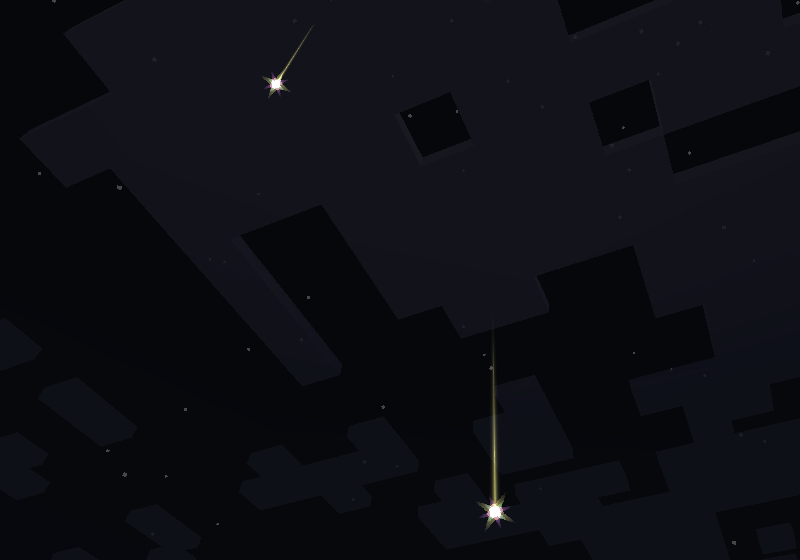
- Falling Stars: Extremely powerful sources of celestial energy. These stars can occasionally be found falling down at night!
- Lightning-Struck Blocks: When grass, dirt or sand are struck by lightning, they will become lightning-struck and can be dug up with a shovel for Fulgurite.
- Stardust / Infused Stardust: Placing a star piece on the crafting grid will net you three piles of dust, they are also obtained when a fallen star has not been caught for too long.
- Star Piece / Infused Star Piece: When a star is caught, you will gain a star piece and quite a bit of experience. Hold right-click for a while to infuse it at the cost of three levels by default, both star piece types are used in a variety of recipes.
- Starstone / Infused Starstone: Beautiful decorative blocks, the infused variant will also glow with a sheen and flash through many colors.
World

New features that can be found throughout the world.
- Azurite: This magical blue metal is connected to star energy. Clusters of Azurite ore can be found mainly at high altitude biomes such as Extreme Hills.
- Bomb Flowers: You can find these around lava pools. Left-click them to get them to drop bombs, but be sure to disable them in time to pick them up! The flowers will regenerate after a short amount of time.
- Dungeon Keys / Dungeon Locks: Available in six different varieties (Iron, Gold, Diamond, Emerald, Obsidian, and Boss)! Dungeon locks are completely unbreakable and can only be opened with the matching key. They currently cannot be encountered in survival but are available for adventure map creators and modpack creators.
- Mystic Shrubs / Energized Mystic Shrubs: These can spawn everywhere around the Overworld and can be broken for loot, the shrubs will regenerate after a short amount of time. During a thunderstorm, they will become energized and have even better loot!
Miscellaneous
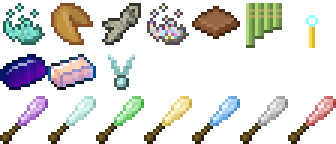
- Clay Urn: Right-click or throw an item to it to store the item to it. Breaking it will make it drop the item.
- Dimensional Catalyst: Right-click blocks with it to teleport them around, it can also be used to properly extract Azurite ore and various recipes.
- Fortune Cookie: Eat it to receive a fortune. You just never know what you might get!
- Fulgurite: A rare material obtained from the ground after a lightning strike.
- Magic Powder: Right-click certain blocks or mobs for shapeshifting surprises!
- Milk Chocolate: Cures all status effects while also being chocolatey.
- Mystic Seed: Plant it on the ground to spawn some Mystic Shrubs!
- Nether Star Block: Works for beacons, provides bragging rights, and has a special animation.
- Reed Pipes: Hold down right-click to play it! Pitch is determined by the angle you're looking at and notes are determined by sneaking.
- Rock Candy: These sugary treats are made from various different materials. They give different effects depending on the material.
- Skybeam Block: When activated with redstone, it will emit a cosmetic beam towards the sky!
- Starbeam Torch: Place these together and hop on them to use them as rails! Try hopping on them while running.
- Starglass Ingot: New alloy made out of sand and infused stardust.
- Starsteel Ingot: New alloy made out of iron and infused stardust.
- Sugar Cube: Storage blocks of sugar. Gets destroyed when under rain or in water.
- Sword Pedestal: Allows you to place swords within it. Place one on top of a Skybeam Block and insert a sword to activate it!
Tweaks
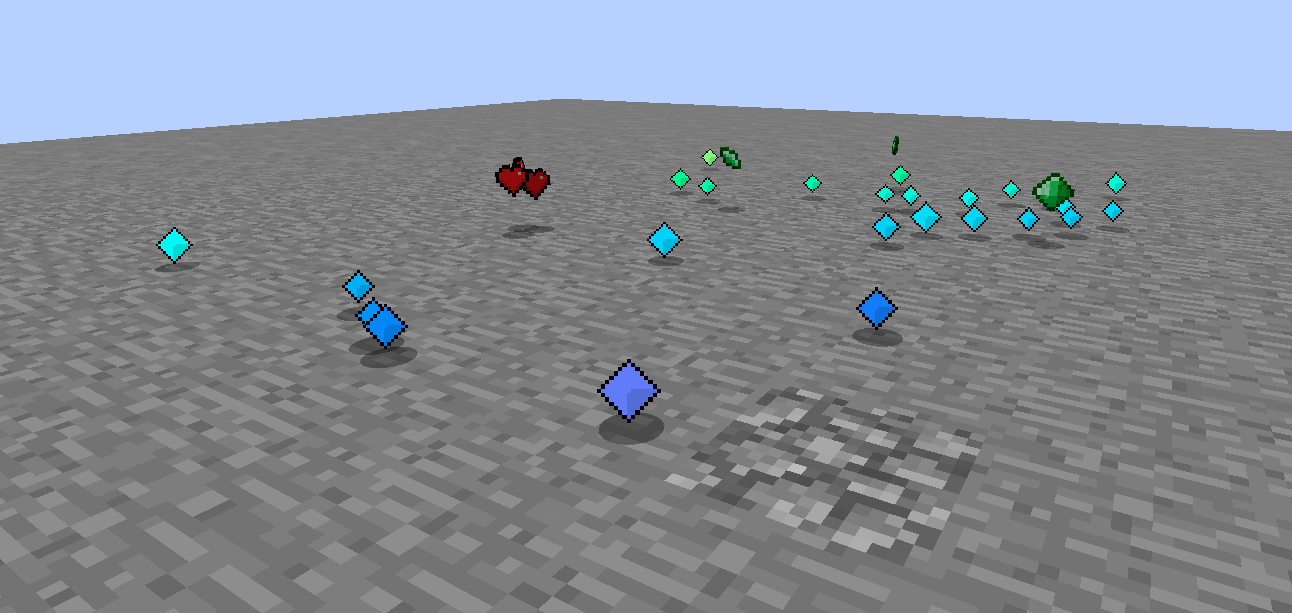
There are also some tweaks to make your game even more interesting than before…
- Emerald Shards: Creatures slain by you will occasionally drop emerald shards. Combine these into pieces and then into full emeralds to trade with villagers!
- Hearts: Creatures slain by you will occasionally drop hearts. Pick them up to heal some health!
- Prismatic Experience Orbs: Tired of those boring green experience orbs? They're rainbow with a different texture now!
🧩 Mod Compatibility
- Gnetum: Set Helmet Overlays to OFF for Spotting Scope compatibility
🙏 Special Thanks
- Originally creating LegendGear 1-2 (both licensed under CC BY-NC-SA 4.0) and making memories for a lot of players ~ NMcCoy
- Contacting NMcCoy for permissions and archiving the original source code ~ xJon
- Nether Star Block texture ~ fakeginkgo
🌐 Translators
Licensing
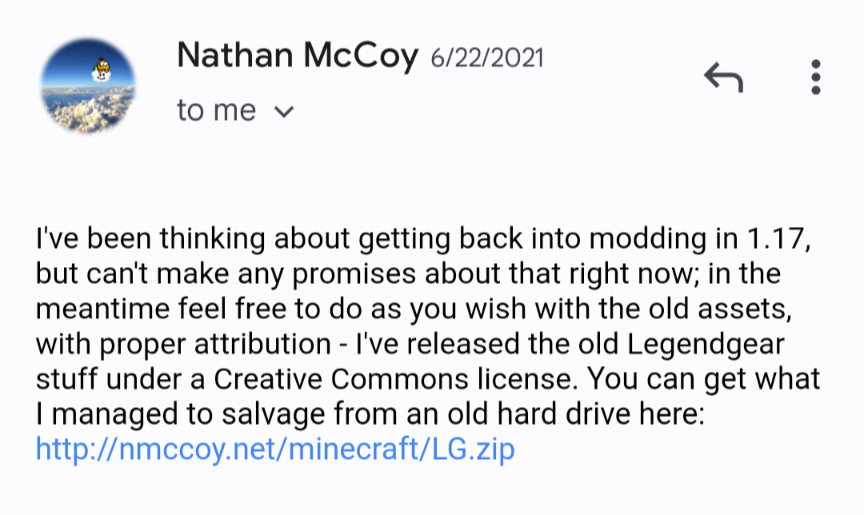
Code and assets from the original LegendGear mods are licensed under CC BY-NC-SA 4.0 (see LICENSE).
Assets specifically made for this port are licensed as All Rights Reserved (see LICENSE-ASSETS).
Permission by NMcCoy:
Project description from CurseForge.
Pick your setup
LegendGear Returns by Minecraft version and loader
Choose the version and loader you play, then open the matching release.
Minecraft version
1.12.2
1
loader build Check the dependencies, then try the file in a copied instance before changing a world you care about.
Recent files
LegendGear Returns versions and loaders
legendgear-1.2.1.jar
9 Aug 2026
Client Source doesn’t say Server Source doesn’t say Dependencies 1 unmatched of 1 Listed on Release listing
Check the 1.12.2 · Forge setup → legendgear-1.2.0.jar
7 Aug 2026
Client Source doesn’t say Server Source doesn’t say Dependencies 1 required · 1 unchecked Listed on Release listing
Check the 1.12.2 · Forge setup → LegendGearReturns-1.12.2-1.1.2.jar
31 May 2026
Client Source doesn’t say Server Source doesn’t say Dependencies 1 required · 1 unchecked Listed on Release listing
Check the 1.12.2 · Forge setup → LegendGearReturns-1.12.2-1.1.1.jar
4 May 2026
Client Source doesn’t say Server Source doesn’t say Dependencies 1 required · 1 unchecked Listed on Release listing
Check the 1.12.2 · Forge setup → 
 mod
mod mod
mod mod
mod