Minecraft version
Back to mods 
CurseForge · Minecraft mod
The Market Board
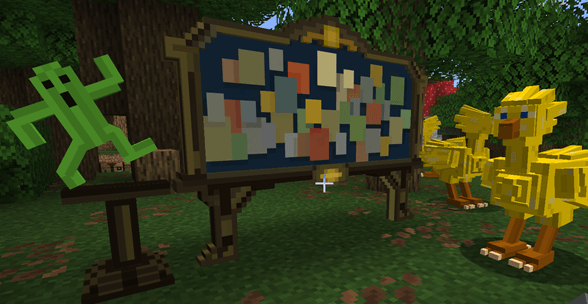
This mod adds Market Boards (inspired by FinalFantasyXIV) that lets players trade items with each other on a server: buy, sell, remove listings, and collect currencies from your sales.
Choose a version Pick your version below, then grab the matching file.
Quick answer
Which The Market Board release should I use?
Latest stable file marketboard-2.1.0-neoforge-26.2.jar
Game version 26.2
Loader NeoForge
The Market Board marketboard-2.1.0-neoforge-26.2.jar targets 26.2 with NeoForge. The project page does not say whether this file belongs on the client, dedicated server, or both. No extra mods listed for this file.
Where it goes
Is The Market Board required on the client, server, or both?
The project page does not say whether this file belongs on the client, dedicated server, or both.
Client Source doesn’t say
Dedicated server Source doesn’t say
Loader for this release NeoForge
Required install it here Optional supported, not mandatory Not supported do not install here Source doesn’t say do not assume
The source does not explicitly classify this release as client-only or server-only.
What else does The Market Board marketboard-2.1.0-neoforge-26.2.jar need?
marketboard-2.1.0-neoforge-26.2.jar. Change the file and its required mods may change too.
This file does not list any required mods. Do not add a library just because a different file uses it.
This file does not list any required or optional mods.
Before you install it
Add The Market Board without breaking your instance.
Built for The Market Board marketboard-2.1.0-neoforge-26.2.jar. Pick another file and the loader, install side or required mods may change.
- 01
Stick to this file
Use marketboard-2.1.0-neoforge-26.2.jar. It targets 26.2 with NeoForge; another release may have different loader, side or dependency requirements.
- 02
Bring the mods it needs
This file does not list any required mods. Do not add a library just because a different file uses it.
- 03
Put it on the correct side
The project page does not say whether this file belongs on the client, dedicated server, or both.
- 04
Pick the file you checked
Use the “Get this file” button beside marketboard-2.1.0-neoforge-26.2.jar. It opens that exact file at the source.
About this project
What does The Market Board add?
Market Board
What does this mod?
This mod adds Market Boards (inspired by FinalFantasyXIV) that lets players trade items with each other on a server: buy, sell, remove listings, and collect your currencies from your sales.
Just place the Market Board block and it’s ready to use.
v3.0 (for Minecraft 26.3+ only): Added an automatic rotating backups system, every 10mn
-Use /marketboard backup status to view available backups and their numbers
-Use /marketboard backup restore <number> to select a backup to restore
-Use /marketboard backup confirm
-Restart the server to apply the market data rollback
⚠️ Warning: Backups only restore global Market Board data. If data is lost due to a crash, items deposited between the last backup and the crash cannot be automatically returned to their original owners and must be reclaimed from a server administrator on a case-by-case basis.
v2.1 : Improved the reliability of the global data saving system in the event of server crashes or unexpected shutdowns. However, changes made in the last few seconds before a crash or shutdown may still be lost.
v2.0 : Choose your board
1-Market board, with a unique configurable currency, simple and easy to use (/give @s marketboard:market_board)
2-A new market board plus, slightly more complex UI that supports multiple currencies; admins can register up to 16 different currencies, and a sale can be made using up to 3 of these registered currencies on the same price (/give @s marketboard:market_board_plus)
How to use
-"/marketboard currency add" or "/marketboardplus currency add" to choose your currencies
⚠️The chosen currencies cannot be sold (anti-dup)
- Right-click to open the market interface (easy navigation with mouse wheel scrolling, slider buttons, sorting button and a search bar)
- Shift + right-click to open the manage interface (sell items, remove your listings, or collect your money from sales)
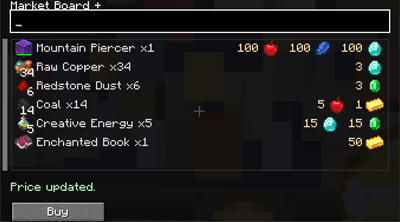
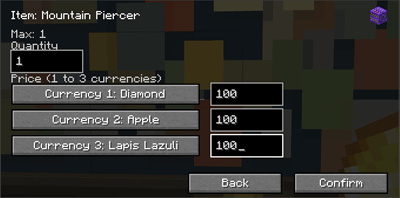
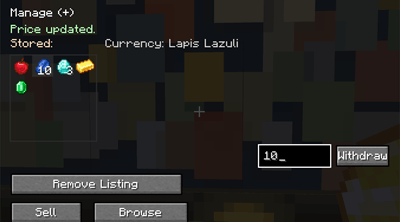
Features:
- All Market Boards placed in the world share the same global data
- All new Market Boards Plus placed in the world share the same global data
- Each player can list up to 20 items at the same time (configurable via commands: 1–80);
⚠️ Note that the default limits are designed to prevent disrupting the server economy; the more items a player can list for sale, the more unstable the server economy is likely become (an unique rich player can broke the economy with 80 sales, low prices on rare items, potencially longer listing loading times, etc.)
-Each player gets an account that safely stores:
- earned currencies
- items automatically removed from sale
- Unsold items are automatically removed from the Market after 15 days and returned to their owner the next time they join the server:
- if the player inventory is full, the items are dropped on the ground
- unsold items are kept for 21 days, then automatically deleted (15+21)
- Anti-duplication protection: the client always queries the server before any transaction
- If two players try to buy the same item, then the first-click rule applies.
- Transactions can be refused during heavy/prolonged server lag
- Transactions will be refused if the user inventory is full
- An ambient music plays when a player is nearby, the sound can be on/off with a command
Note:
It is recommended to place multiple Market Boards to avoid crowds gathering around a single spot.
The anti-duplication protects the server economy from glitches, not from players using hacks.
Possible additions if you have reasonable suggestions.
Project description from CurseForge.
Pick your setup
The Market Board by Minecraft version and loader
Choose the version and loader you play, then open the matching release.
Minecraft version
26.2
3 loader buildsMinecraft version
26.1.2
3 loader buildsMinecraft version
26.1.1
3 loader buildsMinecraft version
26.1
3 loader buildsMinecraft version
1.21.11
2 loader buildsMinecraft version
1.21.1
3 loader buildsMinecraft version
1.20.1
2 loader buildsCheck the dependencies, then try the file in a copied instance before changing a world you care about.
Recent files
The Market Board versions and loaders
marketboard-2.1.0-neoforge-26.2.jar
20 Oct 2026
Client Source doesn’t say Server Source doesn’t say Dependencies No extras listed Listed on Release listing
Check the 26.2 · NeoForge setup NeoForge26.2 release
marketboard-2.1.0-neoforge-26.1-26.1.2.jar
20 Oct 2026
Client Source doesn’t say Server Source doesn’t say Dependencies No extras listed Listed on Release listing
Check the 26.1.2 · NeoForge setup NeoForge26.126.1.126.1.2 release
marketboard-2.1.0-neoforge-1.21.11.jar
20 Oct 2026
Client Source doesn’t say Server Source doesn’t say Dependencies No extras listed Listed on Release listing
Check the 1.21.11 · NeoForge setup NeoForge1.21.11 release
marketboard-2.1.0-neoforge-1.21.1.jar
20 Oct 2026
Client Source doesn’t say Server Source doesn’t say Dependencies No extras listed Listed on Release listing
Check the 1.21.1 · NeoForge setup 1.21.1NeoForge release
marketboard-2.1.0-forge-26.2.jar
20 Oct 2026
Client Source doesn’t say Server Source doesn’t say Dependencies No extras listed Listed on Release listing
Check the 26.2 · Forge setup Forge26.2 release
marketboard-2.1.0-forge-26.1-26.1.2.jar
20 Oct 2026
Client Source doesn’t say Server Source doesn’t say Dependencies No extras listed Listed on Release listing
Check the 26.1.2 · Forge setup Forge26.126.1.126.1.2 release
marketboard-2.1.0-forge-1.21.1.jar
20 Oct 2026
Client Source doesn’t say Server Source doesn’t say Dependencies No extras listed Listed on Release listing
Check the 1.21.1 · Forge setup Forge1.21.1 release
marketboard-2.1.0-forge-1.20.1.jar
20 Oct 2026
Client Source doesn’t say Server Source doesn’t say Dependencies No extras listed Listed on Release listing
Check the 1.20.1 · Forge setup 1.20.1Forge release
marketboard-2.1.0-fabric-26.2.jar
20 Oct 2026
Client Source doesn’t say Server Source doesn’t say Dependencies No extras listed Listed on Release listing
Check the 26.2 · Fabric setup Fabric26.2 release
marketboard-2.1.0-fabric-26.1-26.1.2.jar
20 Oct 2026
Client Source doesn’t say Server Source doesn’t say Dependencies No extras listed Listed on Release listing
Check the 26.1.2 · Fabric setup Fabric26.126.1.126.1.2 release
marketboard-2.1.0-fabric-1.21.11.jar
20 Oct 2026
Client Source doesn’t say Server Source doesn’t say Dependencies No extras listed Listed on Release listing
Check the 1.21.11 · Fabric setup Fabric1.21.11 release
marketboard-2.1.0-fabric-1.21.1.jar
20 Oct 2026
Client Source doesn’t say Server Source doesn’t say Dependencies No extras listed Listed on Release listing
Check the 1.21.1 · Fabric setup Fabric1.21.1 release
Looking for an older file? The official CurseForge project page is in Resources.
 mod
mod CurseForge + Modrinth · Minecraft
Cobblemon Pokedex Network
The mod introduces shared Pokémon discovery data, allowing players to see complete information about Pokémon scanned by others. It also adds catch info to the Pokédex, including who caught each Pokémon first and when
 mod
mod CurseForge + Modrinth · Minecraft
Super Factory Manager Retro
Build Super Factory Manager programs on a visual node canvas instead of writing SFML by hand. Drag nodes, wire them together, search items and fluids by name, and import/export programs you have already written.
 mod
mod CurseForge · Minecraft
Buildprint - Schematics & Printer (Litematica Alternative)
Load any schematic as a ghost in your world, see what's missing, and build it with easy place or the printer. Opens .litematic, .schem, .schematic, .nbt and Axiom .bp. A client-side alternative to Litematica.