Back to mods
Chiselmon - Cobblemon QOL project artwork

CurseForge · Minecraft mod

Chiselmon - Cobblemon QOL

Cobblemon alerts, tooltips, PC bookmarks, wallpapers, and much more. Fully customisable and client side.

Choose a version Pick your version below, then grab the matching file.

Quick answer

Which Chiselmon - Cobblemon QOL release should I use?

Updated yesterday
Latest stable file Chiselmon-neoforge-1.3.2-beta+1.21.1.jar
Game version 1.21.1
Loader NeoForge

Chiselmon - Cobblemon QOL Chiselmon-neoforge-1.3.2-beta+1.21.1.jar targets 1.21.1 with NeoForge. The project page does not say whether this file belongs on the client, dedicated server, or both. All 4 required mods have matching files.

Where it goes

Is Chiselmon - Cobblemon QOL required on the client, server, or both?

The project page does not say whether this file belongs on the client, dedicated server, or both.

Client Source doesn’t say
Dedicated server Source doesn’t say
Loader for this release NeoForge
Required install it here Optional supported, not mandatory Not supported do not install here Source doesn’t say do not assume

The source does not explicitly classify this release as client-only or server-only.

What else does Chiselmon - Cobblemon QOL Chiselmon-neoforge-1.3.2-beta+1.21.1.jar need?

Chiselmon-neoforge-1.3.2-beta+1.21.1.jar. Change the file and its required mods may change too.

All 4 required mods have matching files

Install YetAnotherConfigLib, Cobblemon, YetAnotherConfigLib (YACL), Kotlin for Forge first. We found matching files for this game-version and loader setup. 3 come through another mod in the chain.

4 listed on this file 3 pulled in by those mods
Jade 🔍 Optional for Chiselmon - Cobblemon QOL Chiselmon-neoforge-1.3.2-beta+1.21.1.jar
optional
Matching file found Matched file: [NeoForge 1.21.1] 15.10.6

YetAnotherConfigLib Needed by Chiselmon - Cobblemon QOL Chiselmon-neoforge-1.3.2-beta+1.21.1.jar
required
Matching file found Matched file: 3.8.2 for neoforge 1.21.1
Cobblemon Needed by Chiselmon - Cobblemon QOL Chiselmon-neoforge-1.3.2-beta+1.21.1.jar
required
Matching file found Matched file: Cobblemon v1.8.0 ~ NeoForge
YetAnotherConfigLib (YACL) Needed by Chiselmon - Cobblemon QOL Chiselmon-neoforge-1.3.2-beta+1.21.1.jar
required
Matching file found Matched file: 3.8.2+1.21.1-neoforge
Just Enough Items (JEI) Needed by Jade 🔍
pulled in
Matching file found Matched file: 19.53.0.426 for NeoForge 1.21.1
Kotlin for Forge Needed by Cobblemon
pulled in
Matching file found Matched file: Kotlin for Forge 5.12.0

3 extra mods were pulled in by other dependencies. Indented rows show who needs each one. We only count dependency files that match this setup. A file for another loader does not fill the gap.

Before you install it

Add Chiselmon - Cobblemon QOL without breaking your instance.

Built for Chiselmon - Cobblemon QOL Chiselmon-neoforge-1.3.2-beta+1.21.1.jar. Pick another file and the loader, install side or required mods may change.

  1. 01

    Stick to this file

    Use Chiselmon-neoforge-1.3.2-beta+1.21.1.jar. It targets 1.21.1 with NeoForge; another release may have different loader, side or dependency requirements.

  2. 02

    Bring the mods it needs

    Install YetAnotherConfigLib, Cobblemon, YetAnotherConfigLib (YACL), Kotlin for Forge first. We found matching files for this game-version and loader setup. 3 come through another mod in the chain.

  3. 03

    Put it on the correct side

    The project page does not say whether this file belongs on the client, dedicated server, or both.

  4. 04

    Pick the file you checked

    Use the “Get this file” button beside Chiselmon-neoforge-1.3.2-beta+1.21.1.jar. It opens that exact file at the source.

About this project

What does Chiselmon - Cobblemon QOL add?

Chiselmon

Lurantis with magnifying glass, the Chiselmon logo

Sculpt your perfect Cobblemon experience with deeply customisable QOL tweaks!

Installation

Chiselmon is a fully client side Cobblemon sidemod for Fabric and NeoForge.

To use Chiselmon, make sure you have Cobblemon 1.7.0+ and Yet Another Config Lib installed. To get the most out of the mod, consider also installing Jade.

Customising Your Tweaks

If you haven't used Chiselmon before, I recommend exploring the config options beforehand so you can see what features are available.
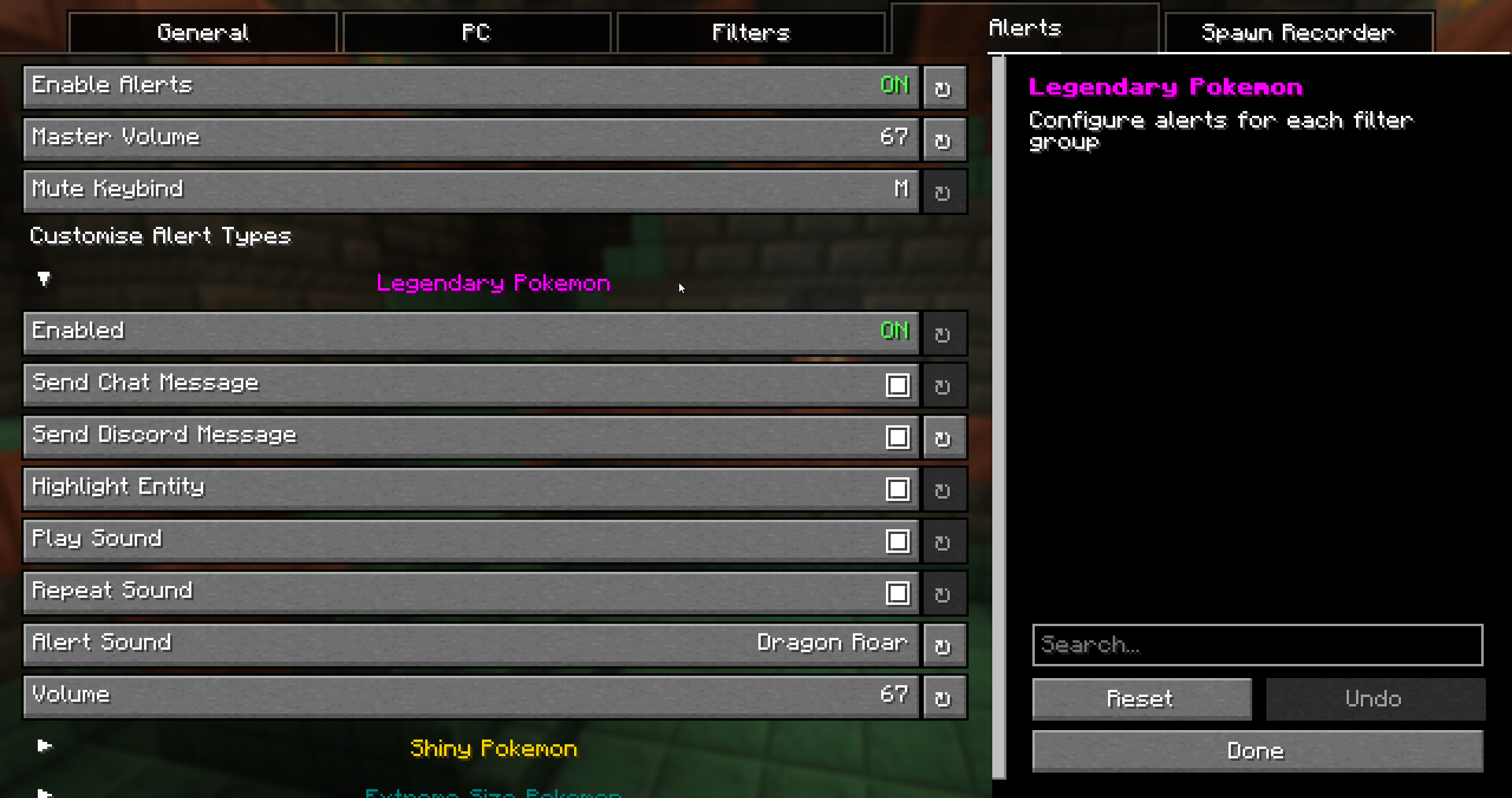
Alert config screen You can open the Chiselmon config in 3 ways:

  1. Click the Chiselmon icon in your mod menu.
  2. Use the /ch config command in-game.
  3. Press the hotkey. The default is ;, but this can be changed in the config.

Features

PC Overhaul:

PC screen

  • Bookmark up to 5 boxes and jump to them at any time.
  • 10 new wallpapers. Hold Ctrl while choosing to apply a selected wallpaper to every box at once.
  • Quick-sort any box. Default hotkey is Middle-Click.
  • 6 unique icons to easily identify special pokemon (shiny, high IVs, hidden ability, extreme size, marks, rideable).
  • Detailed tooltips showing IVs, original trainer, form, friendship, ride styles, marks, and egg hatch progress.
  • 2 new box sorting modes. Sort by Pokemon size and total IVs.

Egg Spy:

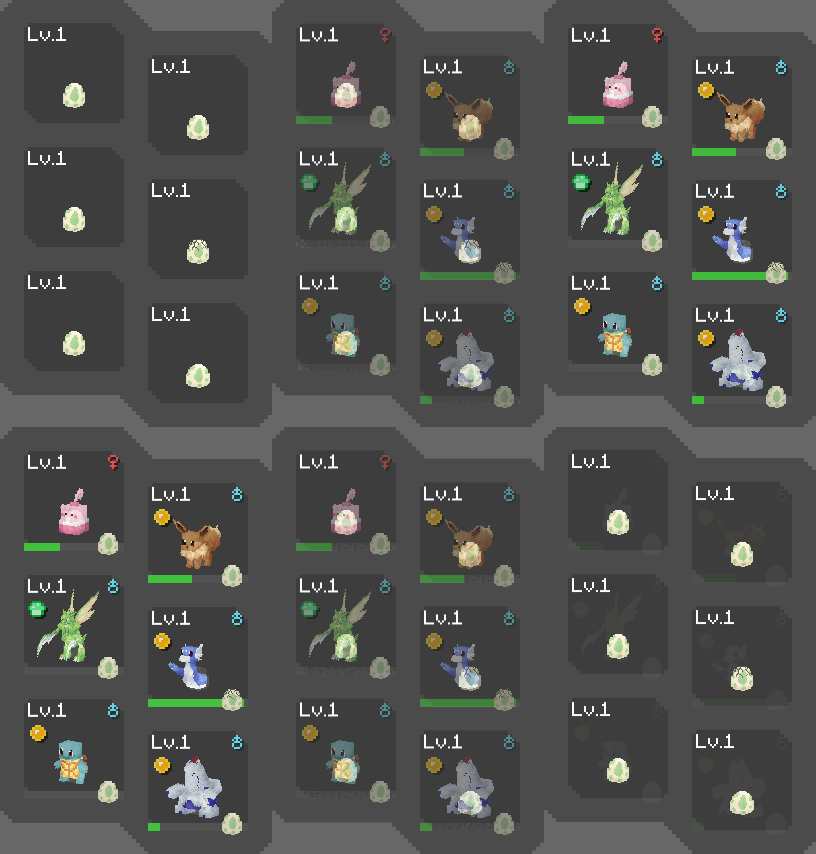
Eggs in PC Eggs in Party

  • Use Chiselmon's cutting edge ultrasound technology to preview what's inside pokemon eggs (NeoDaycare only).
  • Optionally replaces the HP and XP bar of eggs in your party overlay with their hatch progress so you can easily keep track while hatching.

Spawn Alerts:

Discord alert

  • Alert system for legendaries, shinies, size variations, or custom whitelisted pokemon that spawn around you.
  • Create unlimited custom filters to receive alerts for with Chiselmon's logic building system.
  • 4 Fully configurable alert types per filter - chat messages, Discord webhook messages, sounds, colored highlights.
  • Mute all active alert sounds with the 'M' keybind (configurable in Minecraft controls and Chiselmon config).

Spawn Recorder:

  • Records total pokemon spawns and the number of each species in the current session.
  • Use the /ch recorder start, stop, pause, and resume commands to manage your session.
  • Optional action bar display: shows the total spawns and time passed since starting, and the number of currently loaded pokemon + how many are old enough to start despawning.
  • Optional despawn glow: highlights loaded pokemon in green, turning red when they're ready to despawn.

Misc:

Move Tooltips

Move tooltip

/checkspawn Improvemennts

/checkspawn command output /checkspawn results now have hoverable tooltips showing egg group and EV yield info to make cake hunting easier.

Jade Addons:

Pokemon Extra Info

Jade Pokemon

  • Types
  • Weaknesses
  • Form
  • Pokedex status
  • Egg groups
  • EV yield
  • Catch rate
  • Catch chance % (when holding a Pokeball - considers level, status, etc!)
  • Warnings for self-damaging moves - never lose a shiny to explosion again! </3

Poke Snack Extra Info:

Jade Pokesnack

  • Bites remaining
  • Ingredients
  • Seasoning effects

Project description from CurseForge.

Pick your setup

Chiselmon - Cobblemon QOL by Minecraft version and loader

Choose the version and loader you play, then open the matching release.

2 available setups

Check the dependencies, then try the file in a copied instance before changing a world you care about.

Recent files

Chiselmon - Cobblemon QOL versions and loaders

25 of 25 releases match

Looking for an older file? The official CurseForge project page is in Resources.