Minecraft version
Back to mods 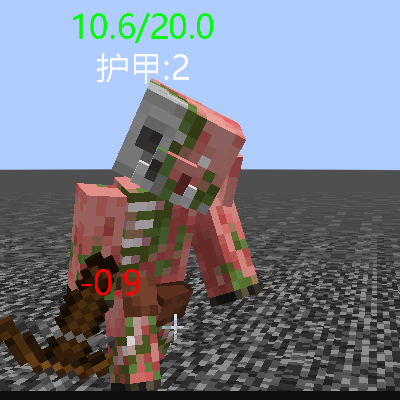
CurseForge · Minecraft mod
Display Tool
A simple lightweight information display mod.
Choose a version Pick your version below, then grab the matching file.
Quick answer
Which Display Tool release should I use?
Latest stable file display_tool-1.0.5_forge1.20.1.jar
Game version 1.20.1
Loader Forge
Display Tool display_tool-1.0.5_forge1.20.1.jar targets 1.20.1 with Forge. The project page does not say whether this file belongs on the client, dedicated server, or both. No extra mods listed for this file.
Where it goes
Is Display Tool required on the client, server, or both?
The project page does not say whether this file belongs on the client, dedicated server, or both.
Client Source doesn’t say
Dedicated server Source doesn’t say
Loader for this release Forge
Required install it here Optional supported, not mandatory Not supported do not install here Source doesn’t say do not assume
The source does not explicitly classify this release as client-only or server-only.
What else does Display Tool display_tool-1.0.5_forge1.20.1.jar need?
display_tool-1.0.5_forge1.20.1.jar. Change the file and its required mods may change too.
This file does not list any required mods. Do not add a library just because a different file uses it.
This file does not list any required or optional mods.
Before you install it
Add Display Tool without breaking your instance.
Built for Display Tool display_tool-1.0.5_forge1.20.1.jar. Pick another file and the loader, install side or required mods may change.
- 01
Stick to this file
Use display_tool-1.0.5_forge1.20.1.jar. It targets 1.20.1 with Forge; another release may have different loader, side or dependency requirements.
- 02
Bring the mods it needs
This file does not list any required mods. Do not add a library just because a different file uses it.
- 03
Put it on the correct side
The project page does not say whether this file belongs on the client, dedicated server, or both.
- 04
Pick the file you checked
Use the “Get this file” button beside display_tool-1.0.5_forge1.20.1.jar. It opens that exact file at the source.
About this project
What does Display Tool add?
If you simply want to show a creature's health, armor, and damage, then this module is a good choice.
Module rendering performance requirements are extremely low (because it is text rendering), so the range of blood bar display is extremely large (the specific distance depends on the player's viewing distance).
1.0.1 Added function to show the effect of blood recovery.
如果你只是想简单的显示一下生物的生命值、护甲、造成的伤害,那么这个模组是一个不错的选择。
模组渲染性能要求极低(因为是文字渲染),所以血条显示的范围极其的大(具体距离取决于玩家的视距)。
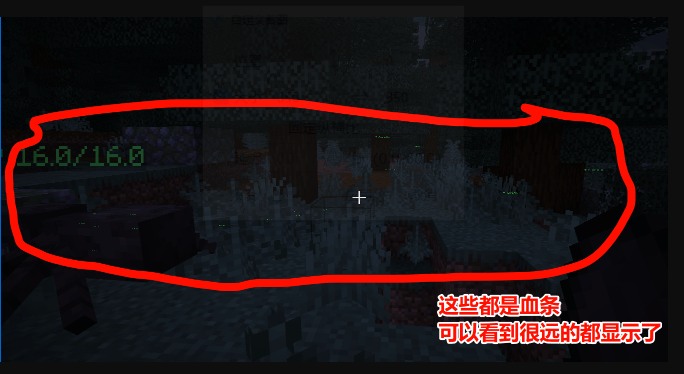
1.0.1新增功能,显示回血效果。
Project description from CurseForge.
Pick your setup
Display Tool by Minecraft version and loader
Choose the version and loader you play, then open the matching release.
Minecraft version
1.20.1
1 loader buildCheck the dependencies, then try the file in a copied instance before changing a world you care about.
Recent files
Display Tool versions and loaders
display_tool-1.0.5_forge1.20.1.jar
17 May 2026
Client Source doesn’t say Server Source doesn’t say Dependencies No extras listed Listed on Release listing
Check the 1.20.1 · Forge setup 1.20.1Forge release
display_tool-1.0.4_forge1.20.1_47.4.16.jar
6 May 2026
Client Source doesn’t say Server Source doesn’t say Dependencies No extras listed Listed on Release listing
Check the 1.20.1 · Forge setup 1.20.1Forge release
display_tool-1.0.3_forge1.20.1_47.4.16.jar
5 May 2026
Client Source doesn’t say Server Source doesn’t say Dependencies No extras listed Listed on Release listing
Check the 1.20.1 · Forge setup 1.20.1Forge release
display_tool-forge-mcr-1.0.2-1.20.1-47.4.16.jar
15 Mar 2026
Client Source doesn’t say Server Source doesn’t say Dependencies No extras listed Listed on Release listing
Check the 1.20.1 · Forge setup 1.20.1Forge release
display_tool-1.0.2_forge1.20.1_47.4.16.jar
display_tool-1.0.2.jar
10 Mar 2026
Client Source doesn’t say Server Source doesn’t say Dependencies No extras listed Listed on Release listing
Check the 1.20.1 · Forge setup 1.20.1Forge release
display_tool-1.0.1_forge1.20.1-47.4.16.jar
8 Mar 2026
Client Source doesn’t say Server Source doesn’t say Dependencies No extras listed Listed on Release listing
Check the 1.20.1 · Forge setup 1.20.1Forge release
display_tool-1.0.1_fabric1.21.11-0.18.4.jar
8 Mar 2026
Client Source doesn’t say Server Source doesn’t say Dependencies No extras listed Listed on Release listing
Check the 1.21.11 · Fabric setup Fabric1.21.11 release
Looking for an older file? The official CurseForge project page is in Resources.
 mod
mod CurseForge + Modrinth · Minecraft
Pet Home
Add some pet collar to make your pets engaging, improves upon and compliments tameable mobs
 mod
mod CurseForge · Minecraft
Bonfires to Map: Xaero's Minimap & Bonfires Addon
Show the Bonfires you have discovered as Xaero's Minimap waypoints, and remove them when the bonfire is destroyed.
 mod
mod CurseForge · Minecraft
Tempad to Map: Xaero's Minimap & Tempad Addon
Keep your Tempad destinations in sync as Xaero's Minimap waypoints.