Minecraft version
Back to mods 
CurseForge · Minecraft mod
*NEW* VM computers
This project adds working computers as vm's in Minecraft, this is a fan made port of original VM computers by Delta2Force
Choose a version Pick your version below, then grab the matching file.
Quick answer
Which *NEW* VM computers release matches 1.20.1 Forge?
Best match for your filters (DEPRECATED) newvmcomputers-1.5-1.20.1-forge.jar
Game version 1.20.1
Loader Forge
*NEW* VM computers (DEPRECATED) newvmcomputers-1.5-1.20.1-forge.jar targets 1.20.1 with Forge. The project page does not say whether this file belongs on the client, dedicated server, or both. No extra mods listed for this file.
Where it goes
Is *NEW* VM computers required on the client, server, or both?
The project page does not say whether this file belongs on the client, dedicated server, or both.
Client Source doesn’t say
Dedicated server Source doesn’t say
Loader for this release Forge
Required install it here Optional supported, not mandatory Not supported do not install here Source doesn’t say do not assume
The source does not explicitly classify this release as client-only or server-only.
What else does *NEW* VM computers (DEPRECATED) newvmcomputers-1.5-1.20.1-forge.jar need?
(DEPRECATED) newvmcomputers-1.5-1.20.1-forge.jar on 1.20.1 Forge. Every mod below is checked against that same setup.
This file does not list any required mods. Do not add a library just because a different file uses it.
This file does not list any required or optional mods.
Before you install it
Add *NEW* VM computers without breaking your instance.
Built for *NEW* VM computers (DEPRECATED) newvmcomputers-1.5-1.20.1-forge.jar on 1.20.1 Forge. Pick another file and the loader, install side or required mods may change.
- 01
Stick to this file
Use (DEPRECATED) newvmcomputers-1.5-1.20.1-forge.jar. It targets 1.20.1 with Forge; another release may have different loader, side or dependency requirements.
- 02
Bring the mods it needs
This file does not list any required mods. Do not add a library just because a different file uses it.
- 03
Put it on the correct side
The project page does not say whether this file belongs on the client, dedicated server, or both.
- 04
Pick the file you checked
Use the “Get this file” button beside (DEPRECATED) newvmcomputers-1.5-1.20.1-forge.jar. It opens that exact file at the source.
About this project
What does *NEW* VM computers add?
FOR NEWER VERSIONS PLEASE GO TO MODRINTH, THERE WILL BE NO RELEASES FOR CURSEFORGE
THIS IS A FAN MADE PORT OF VM COMPUTERS BY Delta2Force
Transfers VM Computers to modern Minecraft version (1.20.1)
Original Mod
Check out the original VM Computers mod by Delta2Force:
https://www.curseforge.com/minecraft/mc-mods/vm-computers
If you have problems with this port, please submit them to my GitHub.
Join the VM Computers Discord server:
https://discord.gg/gNgaxZa4yX
Donate to the original creator (Delta2Force)
Note: Only accepts Bitcoin and BitcoinCash
BTC3GubEkHV69gCkjWhRgRWYqWqyjcWW3gxFF
BCHbitcoincash:qq6jttzlvgj68lvecnh75pt3znezj4vx6sysfvj3j5
Dependencies
- Minecraft 1.20.1
- Fabric
- Fabric API (0.92.7+1.20.1) 1.20.1)
- VirtualBox 6.1
How to use
Ordering
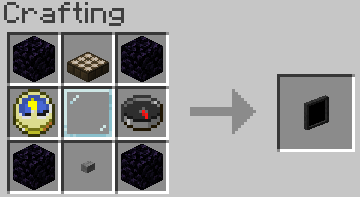
Craft an Ordering Tablet
Wait until it detects a satellite (they appear quite often)
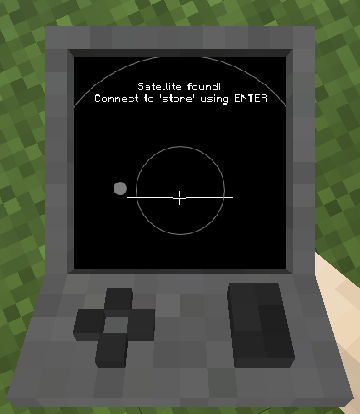
The rest is (hopefully) self‑explanatory.
Creating a Hard Drive / Importing an ISO
Virtual Hard Drives are created by right‑clicking while holding a hard drive.
It does not matter if it already has a disk image assigned — the menu will always open.
You can either:
- use an existing hard drive located in
.minecraft/vm_computers/vhds - create a new one
ISO images (CD/DVD images) should be placed in:
.minecraft/vm_computers/isos
After placing them there, they can be selected in the PC case menu.
Building the Computer
You will need the following items (purchased using the Ordering Tablet):
- PC Case
- Motherboard
- RAM
- GPU
- Monitor
Note:
Keyboard and mouse are currently decorative only, and the VM can start even without a hard drive or ISO.
Steps
Place the PC Case
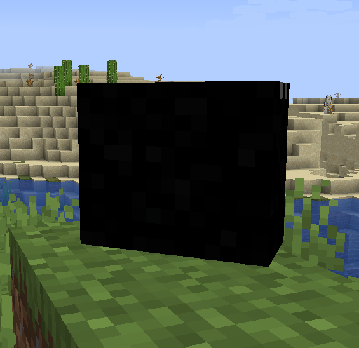
Right‑click the case
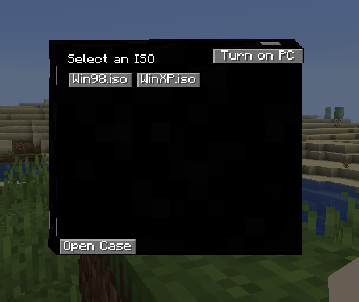
(Optional) Select an ISO image.
Open the case
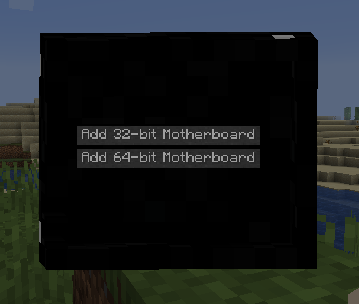
Note: Buttons will be disabled if the required item is not in your inventory.
- The rest should be self‑explanatory.
Using the Computer
- Press Power On in the PC case menu to start the computer.
- Right‑click the monitor to interact with it.
Note:
- Pressing Alt + F4 will close Minecraft, not the virtual machine window.
To stop interacting with the computer, press the keys shown in the top‑right corner of the screen.
Contributing
If you'd like to contribute:
- Fork the master branch.
- Make your changes.
- Submit a pull request.
For larger changes, create an issue first to discuss the idea.
Guidelines
Use lambda expressions when appropriate
- Writing
(), {}is often faster and cleaner.
- Writing
Follow the existing code style
- This keeps the project readable and consistent.
Write clear commit messages
- Avoid messages like
Update file. - Briefly describe what changed and why.
- Avoid messages like
When creating a pull request, ensure all intended changes are included
- Continually pushing changes after opening a PR can make review messy.
Project description from CurseForge.
Pick your setup
*NEW* VM computers by Minecraft version and loader
Choose the version and loader you play, then open the matching release.
Check the dependencies, then try the file in a copied instance before changing a world you care about.
Recent files
*NEW* VM computers versions and loaders
(DEPRECATED) newvmcomputers-1.5-1.20.1-forge.jar
newvmcomputers-1.5-1.20.1.jar
29 Mar 2026
Client Source doesn’t say Server Source doesn’t say Dependencies No extras listed Listed on Release listing
Check the 1.20.1 · Forge setup 1.20.1Forge release
Looking for an older file? The official CurseForge project page is in Resources.
 mod
CurseForge · Minecraft
SCP RP sever pack by Doverack
Its a Forge 1.20.1 mod that focus on making SCPs Playable and make an enviorment usefull for my Minecraft Server.
 mod
CurseForge · Minecraft
Gash's Super Pylons
Modular Minecraft pylons for storage, farming, and processing, with upgrades and wires for items, fluids, energy, and XP.
 mod
CurseForge · Minecraft
EasyChat
EasyChat replaces traditional Minecraft's chat box with modern, app-style chat bubbles like WhatsApp & iMessage.