Minecraft version
Back to mods 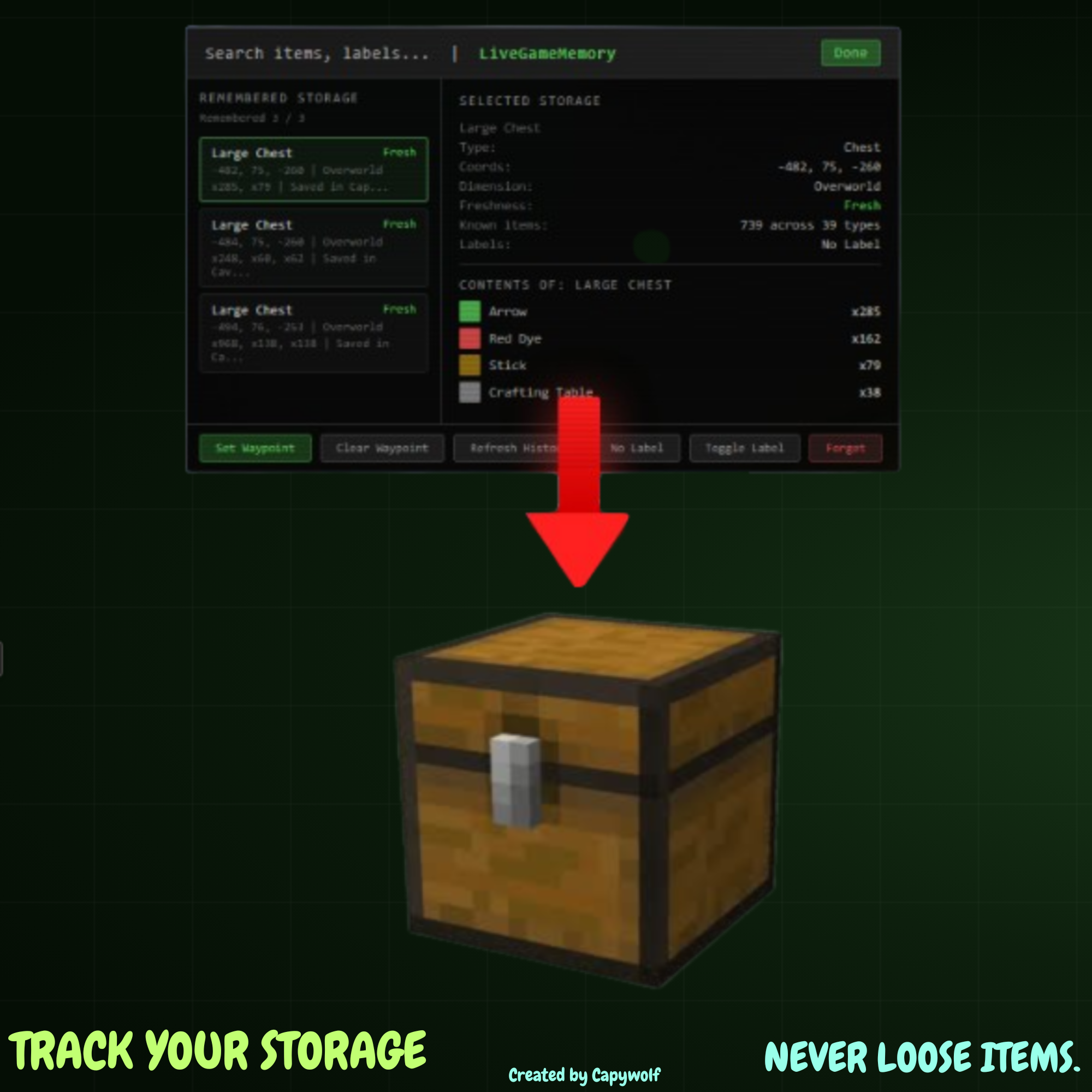
CurseForge · Minecraft mod
StorageMemory
Keep Memory of What was in Chests the Last time you Opened them, NEVER LOSE YOUR ITEMS AGAIN!
Choose a version Pick your version below, then grab the matching file.
Quick answer
Which StorageMemory release should I use?
Latest stable file StorageMemoryV1
Game version 1.21.11
Loader Fabric
StorageMemoryV1 targets 1.21.11 with Fabric. The project page does not say whether this file belongs on the client, dedicated server, or both. No extra mods listed for this file.
Where it goes
Is StorageMemory required on the client, server, or both?
The project page does not say whether this file belongs on the client, dedicated server, or both.
Client Source doesn’t say
Dedicated server Source doesn’t say
Loader for this release Fabric
Required install it here Optional supported, not mandatory Not supported do not install here Source doesn’t say do not assume
The source does not explicitly classify this release as client-only or server-only.
What else does StorageMemoryV1 need?
StorageMemoryV1. Change the file and its required mods may change too.
This file does not list any required mods. Do not add a library just because a different file uses it.
This file does not list any required or optional mods.
Before you install it
Add StorageMemory without breaking your instance.
Built for StorageMemoryV1. Pick another file and the loader, install side or required mods may change.
- 01
Stick to this file
Use StorageMemoryV1. It targets 1.21.11 with Fabric; another release may have different loader, side or dependency requirements.
- 02
Bring the mods it needs
This file does not list any required mods. Do not add a library just because a different file uses it.
- 03
Put it on the correct side
The project page does not say whether this file belongs on the client, dedicated server, or both.
- 04
Pick the file you checked
Use the “Get this file” button beside StorageMemoryV1. It opens that exact file at the source.
About this project
What does StorageMemory add?
StorageMemory helps you keep track of what you last saw inside storage blocks, with a simple vanilla-style browser so you can find things fast.
What it does
- Saves snapshots of storage containers you open.
- Shows names (including renamed chests), coords, dimension, source world/server, and item counts.
- Keeps per-world/server memory and merged global memory.
Main features
- LiveGameMemory (in-game)
View storage memories from your current world/server. - Total Memory (main menu)
View all saved storage memories across all worlds/servers. - Auto save/load JSON logs
Data is stored in .minecraft/MemoryLogs with separate profile files per world/server. - Double chest support
- Storage-only tracking
Ignores non-storage containers like crafting tables and furnaces. - Scrollable UI + search
- Performance cap in Total Memory
Shows 15 entries at once with a Show More button.
Important note
StorageMemory is not a cheat.
It only shows snapshots from containers you already opened. It does not let you open or modify containers remotely.
Default keybinds
- B Open LiveGameMemory
- V Open deposit planner / item-based memory search
- G Clear waypoint
Requirements
- Minecraft 1.21.11
- Fabric Loader 0.18.4+
- Fabric API
Credits
* Soley Coded By Capywolf.
Project description from CurseForge.
Pick your setup
StorageMemory by Minecraft version and loader
Choose the version and loader you play, then open the matching release.
Check the dependencies, then try the file in a copied instance before changing a world you care about.
Recent files
StorageMemory versions and loaders
StorageMemoryV1
storagememory-0.1.1.jar
10 Mar 2026
Client Source doesn’t say Server Source doesn’t say Dependencies No extras listed Listed on Release listing
Check the 1.21.11 · Fabric setup Fabric1.21.11 release
Looking for an older file? The official CurseForge project page is in Resources.
 mod
mod CurseForge · Minecraft
RegionAPI
library that dynamically partitions Minecraft worlds into procedural regions, territories, and biome zones.
 mod
mod CurseForge · Minecraft
DisplayHost: Raid Fortress
Reinforced blocks, doors and C4 with real HP for raids, damaged by TACZ guns and explosives.
 mod
mod CurseForge · Minecraft
Wathe:Last Stop Files
Wathe: Last Stop Files is a professional role expansion mod for the Wathe train deduction minigame. It adds 7 unique playable roles and 2 exclusive mechanic traits