Minecraft version
Back to mods 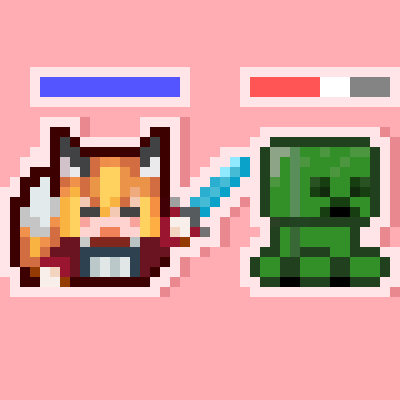
CurseForge · Minecraft mod
Team healthbar
Minimalistic health bars, capable of distinguishing teams, with normal teammates highlighted.
Choose a version Pick your version below, then grab the matching file.
Quick answer
Which Team healthbar release should I use?
Latest stable file team_healthbar-1.5.2-1.21.1-neoforge.jar
Game version 1.21.1
Loader NeoForge
Team healthbar team_healthbar-1.5.2-1.21.1-neoforge.jar targets 1.21.1 with NeoForge. The project page does not say whether this file belongs on the client, dedicated server, or both. No extra mods listed for this file.
Where it goes
Is Team healthbar required on the client, server, or both?
The project page does not say whether this file belongs on the client, dedicated server, or both.
Client Source doesn’t say
Dedicated server Source doesn’t say
Loader for this release NeoForge
Required install it here Optional supported, not mandatory Not supported do not install here Source doesn’t say do not assume
The source does not explicitly classify this release as client-only or server-only.
What else does Team healthbar team_healthbar-1.5.2-1.21.1-neoforge.jar need?
team_healthbar-1.5.2-1.21.1-neoforge.jar. Change the file and its required mods may change too.
This file does not list any required mods. Do not add a library just because a different file uses it.
This file does not list any required or optional mods.
Before you install it
Add Team healthbar without breaking your instance.
Built for Team healthbar team_healthbar-1.5.2-1.21.1-neoforge.jar. Pick another file and the loader, install side or required mods may change.
- 01
Stick to this file
Use team_healthbar-1.5.2-1.21.1-neoforge.jar. It targets 1.21.1 with NeoForge; another release may have different loader, side or dependency requirements.
- 02
Bring the mods it needs
This file does not list any required mods. Do not add a library just because a different file uses it.
- 03
Put it on the correct side
The project page does not say whether this file belongs on the client, dedicated server, or both.
- 04
Pick the file you checked
Use the “Get this file” button beside team_healthbar-1.5.2-1.21.1-neoforge.jar. It opens that exact file at the source.
About this project
What does Team healthbar add?
(The following is the AI translation. Please excuse any inaccuracies.)
This is a minimalist health bar display mod, but its functionality is not simple.
Health bar display function
· The color of the health bar can distinguish the teams. Default, the friendly team is blue and the enemy team is red.
· It can display the absorption value (default in gold color).
· Before attacking, in invisibility, or 5 seconds after not attacking, the health bar will be hidden.
· When dealing damage to enemies, a white buffer bar will appear on the health bar, which can help increase your accuracy~
Team Highlight Function
· Teammates will receive normal highlighting. This effect is unidirectional and can only be seen by teammates. The default color is the same as the health bar.
· When enemies have the highlighting effect, the glowing color will change to the corresponding color of the health bar.
· When the team sets a color, the glowing color will change to the color of the team.
Multiple Configurable Items
Length, width, color of the health bar, visibility range, retention duration.
>>>
This mod was created by me using AI. If you encounter any issues, please submit them to me.
Project description from CurseForge.
Pick your setup
Team healthbar by Minecraft version and loader
Choose the version and loader you play, then open the matching release.
Minecraft version
1.20.1
1 loader buildCheck the dependencies, then try the file in a copied instance before changing a world you care about.
Recent files
Team healthbar versions and loaders
team_healthbar-1.5.2-1.21.1-neoforge.jar
16 Aug 2026
Client Source doesn’t say Server Source doesn’t say Dependencies No extras listed Listed on Release listing
Check the 1.21.1 · NeoForge setup 1.21.1NeoForge release
team_healthbar-1.5.2-1.20.1-forge.jar
16 Aug 2026
Client Source doesn’t say Server Source doesn’t say Dependencies No extras listed Listed on Release listing
Check the 1.20.1 · Forge setup 1.20.1Forge release
team_healthbar-1.5.1-1.20.1-forge.jar
14 Aug 2026
Client Source doesn’t say Server Source doesn’t say Dependencies No extras listed Listed on Release listing
Check the 1.20.1 · Forge setup 1.20.1Forge release
team_healthbar-1.5.1-1.21.1-neoforge.jar
14 Aug 2026
Client Source doesn’t say Server Source doesn’t say Dependencies No extras listed Listed on Release listing
Check the 1.21.1 · NeoForge setup 1.21.1NeoForge release
team_healthbar-1.5.0-1.20.1-forge.jar
11 Aug 2026
Client Source doesn’t say Server Source doesn’t say Dependencies No extras listed Listed on Release listing
Check the 1.20.1 · Forge setup 1.20.1Forge release
team_healthbar-1.5.0-1.21.1-neoforge.jar
11 Aug 2026
Client Source doesn’t say Server Source doesn’t say Dependencies No extras listed Listed on Release listing
Check the 1.21.1 · NeoForge setup 1.21.1NeoForge release
team_healthbar-1.4.0-1.21.1-neoforge.jar
7 Aug 2026
Client Source doesn’t say Server Source doesn’t say Dependencies No extras listed Listed on Release listing
Check the 1.21.1 · NeoForge setup 1.21.1NeoForge release
team_healthbar-1.4.0-1.20.1-forge.jar
7 Aug 2026
Client Source doesn’t say Server Source doesn’t say Dependencies No extras listed Listed on Release listing
Check the 1.20.1 · Forge setup 1.20.1Forge release
team_healthbar-1.3.0-1.2.0.1-forge.jar
19 Jun 2026
Client Source doesn’t say Server Source doesn’t say Dependencies No extras listed Listed on Release listing
Check the 1.20.1 · Forge setup 1.20.1Forge release
team_healthbar-1.3.0-1.21.1-neoforge.jar
19 Jun 2026
Client Source doesn’t say Server Source doesn’t say Dependencies No extras listed Listed on Release listing
Check the 1.21.1 · NeoForge setup 1.21.1NeoForge release
team_healthbar-1.2.0-1.21.1-neoforge.jar
27 Apr 2026
Client Source doesn’t say Server Source doesn’t say Dependencies No extras listed Listed on Release listing
Check the 1.21.1 · NeoForge setup 1.21.1NeoForge release
team_healthbar-1.1.0-1.21.1-neoforge.jar
14 Apr 2026
Client Source doesn’t say Server Source doesn’t say Dependencies No extras listed Listed on Release listing
Check the 1.21.1 · NeoForge setup 1.21.1NeoForge release
Looking for an older file? The official CurseForge project page is in Resources.
 mod
mod CurseForge + Modrinth · Minecraft
Sweeper Maid
A lightweight mod that collects all dropped items and unnecessary entities for optimization.
 mod
mod CurseForge · Minecraft
Command tools
Command Tools adds customizable pickaxes, swords, and axes, plus a world-editing axe. Right-click to adjust stats, left-click to select areas. Fill, clear, replace, and undo blocks. Limits: 90K liquid blocks, 100K other blocks.
 mod
mod CurseForge + Modrinth · Minecraft
Rune Enchanting
Replace the enchanting system with a rune system. Find runes in the world and apply them to items