Minecraft version
Back to mods 
CurseForge · Minecraft mod
Shulker Peek
Hover over any shulker box to instantly preview its full 9x3 contents in the tooltip. Color matched background tint, optional title and item counts, Shift-to-preview mode, keybind toggle, and in-game config support.
Choose a version Pick your version below, then grab the matching file.
Quick answer
Which Shulker Peek release should I use?
Latest stable file ShulkerPeek 1.4.0 (Fabric 1.21.8)
Game version 1.21.8
Loader Fabric
Shulker Peek ShulkerPeek 1.4.0 (Fabric 1.21.8) targets 1.21.8 with Fabric. The project page does not say whether this file belongs on the client, dedicated server, or both. No extra mods listed for this file.
Where it goes
Is Shulker Peek required on the client, server, or both?
The project page does not say whether this file belongs on the client, dedicated server, or both.
Client Source doesn’t say
Dedicated server Source doesn’t say
Loader for this release Fabric
Required install it here Optional supported, not mandatory Not supported do not install here Source doesn’t say do not assume
The source does not explicitly classify this release as client-only or server-only.
What else does Shulker Peek ShulkerPeek 1.4.0 (Fabric 1.21.8) need?
ShulkerPeek 1.4.0 (Fabric 1.21.8). Change the file and its required mods may change too.
This file does not list any required mods. Do not add a library just because a different file uses it.
This file does not list any required or optional mods.
Before you install it
Add Shulker Peek without breaking your instance.
Built for Shulker Peek ShulkerPeek 1.4.0 (Fabric 1.21.8). Pick another file and the loader, install side or required mods may change.
- 01
Stick to this file
Use ShulkerPeek 1.4.0 (Fabric 1.21.8). It targets 1.21.8 with Fabric; another release may have different loader, side or dependency requirements.
- 02
Bring the mods it needs
This file does not list any required mods. Do not add a library just because a different file uses it.
- 03
Put it on the correct side
The project page does not say whether this file belongs on the client, dedicated server, or both.
- 04
Pick the file you checked
Use the “Get this file” button beside ShulkerPeek 1.4.0 (Fabric 1.21.8). It opens that exact file at the source.
About this project
What does Shulker Peek add?
ShulkerPeek : Shulker Box Tooltip Preview for Fabric, Forge and NeoForge
See inside any shulker box without opening it.
ShulkerPeek is a client-side shulker box tooltip preview mod. Hover over any shulker box in your inventory and instantly see its full shulker box contents in a clean 9x3 visual grid. No placing. No opening. No guessing what is inside.
The tooltip background tint matches the box dye color so you can see inside shulker boxes at a glance before even reading the name. The fastest way to manage shulker box storage in survival, technical play, or any modpack with heavy item management.
How the shulker box tooltip preview works
When you hover over a shulker box item, ShulkerPeek checks for stored inventory data. If data is found, the default tooltip is replaced with a fully rendered shulker box contents grid showing all 27 slots. Box title, stack counts, and color tint are all optional and configurable.
Everything runs client-side only. ShulkerPeek reads item data already on the client and renders it visually. It does not send data to servers and needs no server-side installation works on any server.
Shulker box preview features
- Shulker box contents on hover no placing or opening required
- Full 9x3 visual grid matching the real shulker inventory layout
- Shulker box tooltip background tint matched to the dye color
- Optional box title or custom name shown above the contents grid
- Optional item stack count overlays on each slot
- Shift-to-show mode shulker preview only appears while holding Shift
- Keybind toggle to enable or disable the shulker tooltip instantly in-game
- Config file at config/shulkerpeek.json
- In-game config screen on Forge and NeoForge via the Mods menu
Perfect for shulker box storage management
ShulkerPeek is built for players who carry many shulker boxes and need fast identification. Instead of placing and opening multiple boxes to find the right one, hover and see inside shulker boxes in seconds.
- Large shulker box storage systems in survival worlds
- Technical Minecraft and building playthroughs with sorted item storage
- Modpacks with heavy inventory and item management
- Multiplayer servers where quick inventory sorting matters
Configuration
| Setting | Default | Description |
|---|---|---|
| Enabled | true | Master on/off toggle |
| Require Shift | false | Show shulker box tooltip on hover by default |
| Show title | true | Display box name above the contents grid |
| Show item counts | true | Stack size overlay on each slot |
| Color tint strength | medium | Intensity of the dye color tint |
| Slot background darkness | medium | Visibility of individual slot backgrounds |
Config file: config/shulkerpeek.json
In-game config screen available on Forge and NeoForge.
Requirements
- Fabric: Fabric Loader and Fabric API required
- Forge: no extra dependencies required
- NeoForge: no extra dependencies required
What ShulkerPeek does not do
- Does not modify, move, or duplicate any items
- Does not add new blocks, items, or recipes
- Does not require placing the shulker box
- Does not send any data to servers
- Does not change any gameplay mechanics
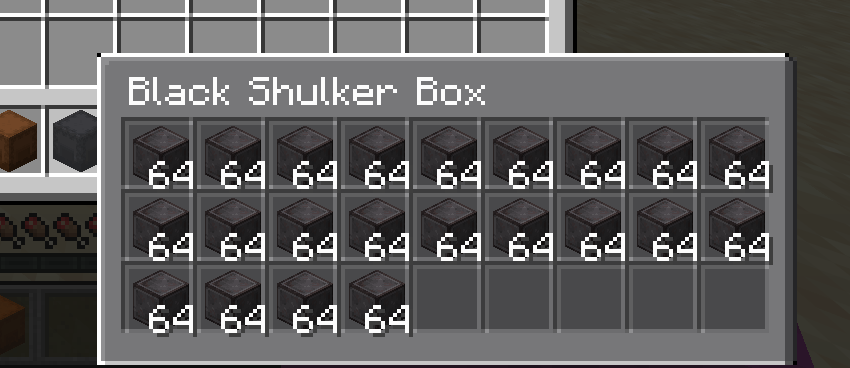
Project description from CurseForge.
Pick your setup
Shulker Peek by Minecraft version and loader
Choose the version and loader you play, then open the matching release.
Minecraft version
26.2
3 loader buildsMinecraft version
26.1.2
3 loader buildsMinecraft version
26.1.1
3 loader buildsMinecraft version
26.1
3 loader buildsMinecraft version
1.21.11-snapshot
2 loader buildsMinecraft version
1.21.11
2 loader buildsMinecraft version
1.21.10
3 loader buildsMinecraft version
1.21.9-snapshot
1 loader buildMinecraft version
1.21.9
3 loader buildsMinecraft version
1.21.8
3 loader buildsMinecraft version
1.21.7
3 loader buildsShowing the newest 12 of 19 game versions. Older files are in the list below.
Check the dependencies, then try the file in a copied instance before changing a world you care about.
Recent files
Shulker Peek versions and loaders
ShulkerPeek 1.4.0 (Fabric 1.21.8)
shulkerpeek-1.4.0.jar
14 Nov 2026
Client Source doesn’t say Server Source doesn’t say Dependencies No extras listed Listed on Release listing
Check the 1.21.8 · Fabric setup Fabric1.21.8 release
ShulkerPeek 1.4.0 (Forge 1.21.8)
shulkerpeek-forge-1.21.8-1.4.0.jar
14 Nov 2026
Client Source doesn’t say Server Source doesn’t say Dependencies No extras listed Listed on Release listing
Check the 1.21.8 · Forge setup 1.21.8Forge release
ShulkerPeek 1.4.0 (NeoForge 1.21.8)
shulkerpeek-neoforge-1.21.8-1.4.0.jar
14 Nov 2026
Client Source doesn’t say Server Source doesn’t say Dependencies No extras listed Listed on Release listing
Check the 1.21.8 · NeoForge setup 1.21.8NeoForge release
ShulkerPeek 1.4.0 (Fabric 1.21.7)
shulkerpeek-1.4.0.jar
14 Nov 2026
Client Source doesn’t say Server Source doesn’t say Dependencies No extras listed Listed on Release listing
Check the 1.21.7 · Fabric setup Fabric1.21.7 release
ShulkerPeek 1.4.0 (Forge 1.21.7)
shulkerpeek-forge-1.21.7-1.4.0.jar
14 Nov 2026
Client Source doesn’t say Server Source doesn’t say Dependencies No extras listed Listed on Release listing
Check the 1.21.7 · Forge setup Forge1.21.7 release
ShulkerPeek 1.4.0 (NeoForge 1.21.7)
shulkerpeek-neoforge-1.21.7-1.4.0.jar
14 Nov 2026
Client Source doesn’t say Server Source doesn’t say Dependencies No extras listed Listed on Release listing
Check the 1.21.7 · NeoForge setup 1.21.7NeoForge beta
ShulkerPeek 1.4.0 (Fabric 1.21.6)
shulkerpeek-1.4.0.jar
14 Nov 2026
Client Source doesn’t say Server Source doesn’t say Dependencies No extras listed Listed on Release listing
Check the 1.21.6 · Fabric setup Fabric1.21.6 release
ShulkerPeek 1.4.0 (Forge 1.21.6)
shulkerpeek-forge-1.21.6-1.4.0.jar
14 Nov 2026
Client Source doesn’t say Server Source doesn’t say Dependencies No extras listed Listed on Release listing
Check the 1.21.6 · Forge setup Forge1.21.6 release
ShulkerPeek 1.4.0 (NeoForge 1.21.6)
shulkerpeek-neoforge-1.21.6-1.4.0.jar
14 Nov 2026
Client Source doesn’t say Server Source doesn’t say Dependencies No extras listed Listed on Release listing
Check the 1.21.6 · NeoForge setup 1.21.6NeoForge beta
ShulkerPeek 1.4.0 (Fabric 1.21.5)
shulkerpeek-1.4.0.jar
14 Nov 2026
Client Source doesn’t say Server Source doesn’t say Dependencies No extras listed Listed on Release listing
Check the 1.21.5 · Fabric setup Fabric1.21.5 release
ShulkerPeek 1.4.0 (Forge 1.21.5)
shulkerpeek-forge-1.21.5-1.4.0.jar
14 Nov 2026
Client Source doesn’t say Server Source doesn’t say Dependencies No extras listed Listed on Release listing
Check the 1.21.5 · Forge setup 1.21.5Forge release
ShulkerPeek 1.4.0 (NeoForge 1.21.5)
shulkerpeek-neoforge-1.21.5-1.4.0.jar
14 Nov 2026
Client Source doesn’t say Server Source doesn’t say Dependencies No extras listed Listed on Release listing
Check the 1.21.5 · NeoForge setup 1.21.5NeoForge release
Looking for an older file? The official CurseForge project page is in Resources.
 mod
Modrinth · Minecraft
ShulkerPeek
Shulker box tooltip preview mod see the full shulker box contents on hover in a clean 9x3 grid. Color-matched background, item counts, Shift-to-show mode, keybind toggle, and in-game config. Fabric, Forge, and NeoForge.
 mod
CurseForge · Minecraft
Note Bot
Play using the surrounding sound blocks.
 mod
CurseForge · Minecraft
Random NTM Continuum Additions
Adds random things to NTM Continuum