Minecraft version
Back to mods 
CurseForge · Minecraft mod
LittleFrames Remote
A companion addon for LittleFrames that adds a craftable remote, per-user playlist files, direct video selection, and simple in-game playback controls.
Choose a version Pick your version below, then grab the matching file.
Quick answer
Which LittleFrames Remote release should I use?
Latest stable file lfremote-0.7.4-forge-1.20.1-mc1.20.1.jar
Game version 1.20.1
Loader Forge
LittleFrames Remote lfremote-0.7.4-forge-1.20.1-mc1.20.1.jar targets 1.20.1 with Forge. The project page does not say whether this file belongs on the client, dedicated server, or both. No extra mods listed for this file.
Where it goes
Is LittleFrames Remote required on the client, server, or both?
The project page does not say whether this file belongs on the client, dedicated server, or both.
Client Source doesn’t say
Dedicated server Source doesn’t say
Loader for this release Forge
Required install it here Optional supported, not mandatory Not supported do not install here Source doesn’t say do not assume
The source does not explicitly classify this release as client-only or server-only.
What else does LittleFrames Remote lfremote-0.7.4-forge-1.20.1-mc1.20.1.jar need?
lfremote-0.7.4-forge-1.20.1-mc1.20.1.jar. Change the file and its required mods may change too.
This file does not list any required mods. Do not add a library just because a different file uses it.
This file does not list any required or optional mods.
Before you install it
Add LittleFrames Remote without breaking your instance.
Built for LittleFrames Remote lfremote-0.7.4-forge-1.20.1-mc1.20.1.jar. Pick another file and the loader, install side or required mods may change.
- 01
Stick to this file
Use lfremote-0.7.4-forge-1.20.1-mc1.20.1.jar. It targets 1.20.1 with Forge; another release may have different loader, side or dependency requirements.
- 02
Bring the mods it needs
This file does not list any required mods. Do not add a library just because a different file uses it.
- 03
Put it on the correct side
The project page does not say whether this file belongs on the client, dedicated server, or both.
- 04
Pick the file you checked
Use the “Get this file” button beside lfremote-0.7.4-forge-1.20.1-mc1.20.1.jar. It opens that exact file at the source.
About this project
What does LittleFrames Remote add?
LittleFrames Remote
I reuploaded the most recent version due to the wrong one for the volume update being uploaded sorry for the incovience
finished the work in progress version it is now an offical release I will be adding a patch to it for the playlist import book soon instead of a whole new version check below for whats new if you use that version please give any feedback im a solo dev so anything is helpful
A companion addon for LittleFrames on NeoForge 1.21.1 that adds a craftable remote, playlist files, in-game media selection, playback controls, and a working Media Visor HUD.
Features
- Craftable Frame Remote
- Per-user playlist files stored in the config folder
- In-game playlist selection
- Previous / Next / Play-Pause controls
- Main menu playlist access
- Media Visor HUD
- Working visor video
- Working visor audio
- Visor playback no longer cuts out at range
- Support for local
file:///...video URLs - Support for YouTube URLs with the WaterMedia YouTube plugin
Dependencies
Required:
- CreativeCore
- LittleFrames
- LittleTiles
- WaterMedia
Optional for YouTube:
- WaterMedia YT Plugin
Target platform:
- Minecraft 1.21.1
- NeoForge
How Playlists Work
Playlists are stored here:
config/littleframes_remote/playlists/
Each playlist is a .txt file.
Controls
- Right-click air: next video
- Sprint + right-click air: previous video
- Sneak + right-click air: play/pause
- Press
V: open playlist UI - Press
H: toggle visor HUD - Press
J: configure visor HUD
Recipes
Frame Remote
Use a **Creative Picture Frame** in the recipe instead of a normal item frame.
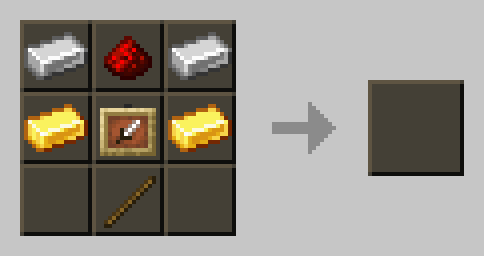
Creative Picture Frame
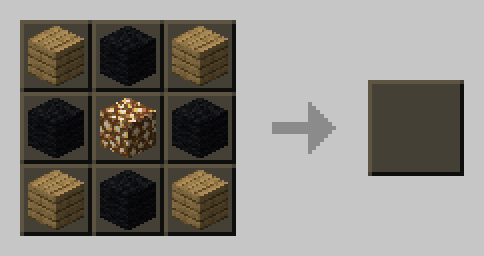
Playlist Import Book
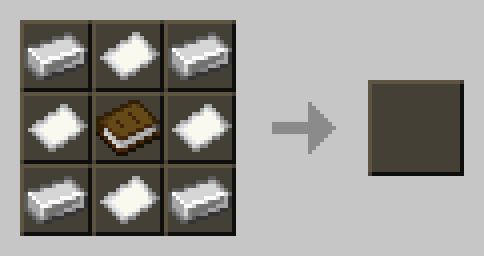
Media Visor
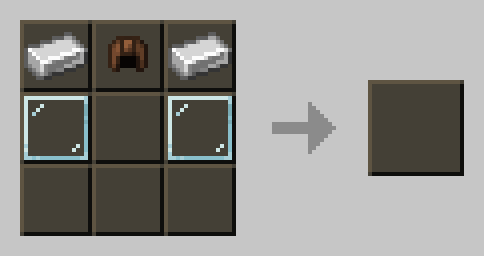
Media Visor Upgrade
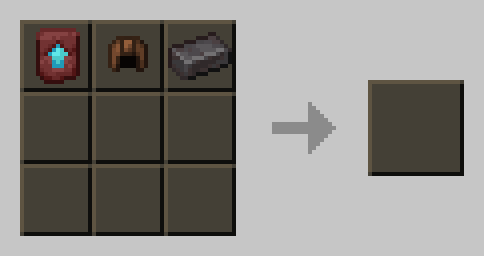
Current Status
Working
- Remote controls
- Playlist loading
- Playlist UI
- Main menu playlist access
- Visor video
- Visor audio
- Visor playback at range
Bug Reports
Please include:
- Minecraft version
- NeoForge version
- LittleFrames Remote version
- LittleFrames / LittleTiles / CreativeCore versions
- WaterMedia version
latest.logor crash report
Project description from CurseForge.
Pick your setup
LittleFrames Remote by Minecraft version and loader
Choose the version and loader you play, then open the matching release.
Minecraft version
1.20.1
1 loader buildCheck the dependencies, then try the file in a copied instance before changing a world you care about.
Recent files
LittleFrames Remote versions and loaders
lfremote-0.7.4-forge-1.20.1-mc1.20.1.jar
10 Apr 2026
Client Source doesn’t say Server Source doesn’t say Dependencies No extras listed Listed on Release listing
Check the 1.20.1 · Forge setup 1.20.1Forge release
lfremote-0.7.4-forge-1.20.1-mc1.20.1.jar
8 Apr 2026
Client Source doesn’t say Server Source doesn’t say Dependencies No extras listed Listed on Release listing
Check the 1.20.1 · Forge setup 1.20.1Forge release
lfremote-0.7.4-forge-1.20.1
lfremote-0.7.4-forge-1.20.1-mc1.20.1.jar
7 Apr 2026
Client Source doesn’t say Server Source doesn’t say Dependencies No extras listed Listed on Release listing
Check the 1.20.1 · Forge setup 1.20.1Forge release
lfremote-0.7.4-mc1.21.1.jar
lfremote-0.7.4-experimental-mc1.21.1.jar
7 Apr 2026
Client Source doesn’t say Server Source doesn’t say Dependencies No extras listed Listed on Release listing
Check the 1.21.1 · NeoForge setup 1.21.1NeoForge release
Beta(WIP)lfremote-0.7.3-neoforge-mc1.21.1.jar
lfremote-0.7.3-neoforge-mc1.21.1.jar
4 Apr 2026
Client Source doesn’t say Server Source doesn’t say Dependencies No extras listed Listed on Release listing
Check the 1.21.1 · NeoForge setup 1.21.1NeoForge release
lfremote-0.7.0-neoforge-mc1.21.1.jar
31 Mar 2026
Client Source doesn’t say Server Source doesn’t say Dependencies No extras listed Listed on Release listing
Check the 1.21.1 · NeoForge setup 1.21.1NeoForge release
Looking for an older file? The official CurseForge project page is in Resources.
 mod
mod CurseForge + Modrinth · Minecraft
Data Anchor
Simple library mod with helpful data attaching and networking utilities including attaching data to entities, chunks, players, and worlds with low boilerplate code. Its own system built from the ground up for multiloader support.
 mod
mod CurseForge · Minecraft
Overweight Animals
Adds fat variants of vanilla animals, which drop more loot and are more clumsy.
 mod
mod CurseForge · Minecraft
Endless Progression
An all-in-one type mod adding gear, decorations, foods and base reinforcements made to complement large apocalypse or vanilla+ modpacks