Minecraft version
Back to mods 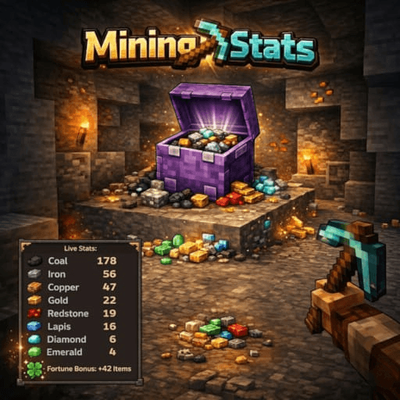
CurseForge · Minecraft mod
MiningStats
MiningStats tracks ore mining statistics in real-time, counting mined ores and calculating Fortune enchantment bonuses via an on-screen HUD overlay.
Choose a version Pick your version below, then grab the matching file.
Quick answer
Which MiningStats release should I use?
Latest stable file miningstats-fabric-1.5.0+mc26.3.jar
Game version 26.3
Loader Fabric
miningstats-fabric-1.5.0+mc26.3.jar targets 26.3 with Fabric. The project page does not say whether this file belongs on the client, dedicated server, or both. No extra mods listed for this file.
Where it goes
Is MiningStats required on the client, server, or both?
The project page does not say whether this file belongs on the client, dedicated server, or both.
Client Source doesn’t say
Dedicated server Source doesn’t say
Loader for this release Fabric
Required install it here Optional supported, not mandatory Not supported do not install here Source doesn’t say do not assume
The source does not explicitly classify this release as client-only or server-only.
What else does miningstats-fabric-1.5.0+mc26.3.jar need?
miningstats-fabric-1.5.0+mc26.3.jar. Change the file and its required mods may change too.
This file does not list any required mods. Do not add a library just because a different file uses it.
This file does not list any required or optional mods.
Before you install it
Add MiningStats without breaking your instance.
Built for miningstats-fabric-1.5.0+mc26.3.jar. Pick another file and the loader, install side or required mods may change.
- 01
Stick to this file
Use miningstats-fabric-1.5.0+mc26.3.jar. It targets 26.3 with Fabric; another release may have different loader, side or dependency requirements.
- 02
Bring the mods it needs
This file does not list any required mods. Do not add a library just because a different file uses it.
- 03
Put it on the correct side
The project page does not say whether this file belongs on the client, dedicated server, or both.
- 04
Pick the file you checked
Use the “Get this file” button beside miningstats-fabric-1.5.0+mc26.3.jar. It opens that exact file at the source.
About this project
What does MiningStats add?
⛏️ MiningStats
Track every ore you mine. See your Fortune bonus. All in a clean HUD.
MiningStats is a lightweight, client-side Fabric mod that gives you live mining statistics directly on your screen. Whether you're strip mining for diamonds or hunting ancient debris in the Nether — MiningStats keeps count so you don't have to.
✨ Features
📊 Live Ore Tracking
- Manual session control — Start and pause tracking whenever you want with J
- Automatic counting — Every ore you break during an active session is tracked instantly
- 10 vanilla ores — Coal, Iron, Gold, Diamond, Emerald, Lapis Lazuli, Redstone, Copper, Nether Quartz, Ancient Debris
- Deepslate support — Deepslate variants are recognized and optionally merged with normal ores
- Modded ore support — Add custom block IDs in the config (e.g.
create:zinc_ore) - Smart detection — Only counts player-mined ores (ignores TNT, pistons, commands, etc.)
🍀 Fortune Bonus Calculation
- Real-time tracking — See exactly how many extra drops Fortune gave you
- Per-ore breakdown — Fortune bonus tracked individually for each ore type
- Silk Touch aware — Automatically detects Silk Touch and skips bonus counting
🖥️ Clean HUD Overlay
- Ore icons — Beautiful item icons next to each ore count
- Two display modes — Toggle between full and compact HUD with H
- Session timer — Track how long you've been actively mining (paused time excluded)
- Pause indicator — HUD title shows pause status in orange when session is paused
- Smart visibility — HUD only appears while holding a pickaxe, keeping your screen clean
- Adjustable opacity — Customize the background transparency to your liking
🎉 Milestones & Effects
- Milestone alerts — Get a chat message when you hit milestones like 100 Diamonds
- Golden flash — Visual effect when mining Diamonds or Ancient Debris
- Session summary — See your full stats in chat when leaving a world
🎮 Controls
| Key | Action |
|---|---|
| J | Start / Pause session |
| H | Toggle compact / full HUD mode |
| K | Reset current session |
⚙️ Customization
Configure the mod to your preferences via Mod Menu + Cloth Config, or by editing .minecraft/config/miningstats.json:
- HUD position (all 4 screen corners)
- HUD background opacity
- Always visible or only with pickaxe
- Merge deepslate variants on/off
- Custom milestone thresholds
- Modded ore tracking
- Session summary on/off
📋 Requirements
- Minecraft: 1.21 – 1.21.11 & 26.x
- Fabric Loader: 0.18.3 or higher
- Fabric API: Required
- Java: 21 or higher
- Mod Menu + Cloth Config: Optional (for in-game config screen)
🚀 How It Works
- You join a world and get a hint to press J
- Press J to start your mining session
- Mine ores — the HUD updates instantly with counts and Fortune bonus
- Press J again to pause tracking (timer pauses too)
- Hit a milestone? You get a chat notification!
- Leave the world and get a full session summary
Start, pause, and resume whenever you want — you're in full control.
💡 Perfect For
- Strip Miners — Track your diamond haul across long mining sessions
- Nether Explorers — Count every piece of Ancient Debris without pen and paper
- Fortune Testers — See exactly how much Fortune is boosting your drops
- Completionists — Chase milestone achievements while you mine
- Everyone — Anyone who wants to know their mining stats at a glance!
❓ FAQ
Does this mod work on servers? Yes! It's fully client-side and works on any server without server-side installation.
Does it affect performance? No. MiningStats is lightweight and only processes data when you break an ore block.
Are stats saved between sessions? No. Stats are per-session only and reset when you leave a world. You can also manually reset with K.
Does it detect Fortune correctly? Yes. MiningStats reads the Fortune level from your held pickaxe and calculates the bonus based on actual dropped items.
🌍 Languages
Available in English and German.
🔗 Links
- Issues & Bugs: GitHub Issues
- Source Code: GitHub Repository
📜 License
This mod is open-source and licensed under the MIT License.
Project description from CurseForge.
Pick your setup
MiningStats by Minecraft version and loader
Choose the version and loader you play, then open the matching release.
Minecraft version
26.2
2 loader buildsMinecraft version
26.1.2
2 loader buildsMinecraft version
26.1.1
1 loader buildMinecraft version
26.1
1 loader buildMinecraft version
1.21.11
2 loader buildsMinecraft version
1.21.10
2 loader buildsMinecraft version
1.21.9
2 loader buildsMinecraft version
1.21.8
2 loader buildsMinecraft version
1.21.7
2 loader buildsMinecraft version
1.21.6
2 loader buildsMinecraft version
1.21.5
2 loader buildsShowing the newest 12 of 17 game versions. Older files are in the list below.
Check the dependencies, then try the file in a copied instance before changing a world you care about.
Recent files
MiningStats versions and loaders
miningstats-fabric-1.5.0+mc26.3.jar
27 Sept 2026
Client Source doesn’t say Server Source doesn’t say Dependencies No extras listed Listed on Release listing
Check the 26.3 · Fabric setup Fabric26.3 release
miningstats-neoforge-1.5.0+mc26.3.jar
27 Sept 2026
Client Source doesn’t say Server Source doesn’t say Dependencies No extras listed Listed on Release listing
Check the 26.3 · NeoForge setup NeoForge26.3 release
miningstats-neoforge-1.5.0+mc1.21-1.21.5.jar
25 Jul 2026
Client Source doesn’t say Server Source doesn’t say Dependencies No extras listed Listed on Release listing
Check the 1.21.5 · NeoForge setup 1.211.21.51.21.41.21.1 release
miningstats-neoforge-1.5.0+mc1.21.6-1.21.8.jar
25 Jul 2026
Client Source doesn’t say Server Source doesn’t say Dependencies No extras listed Listed on Release listing
Check the 1.21.8 · NeoForge setup 1.21.81.21.61.21.7NeoForge release
miningstats-neoforge-1.5.0+mc1.21.9-1.21.11.jar
25 Jul 2026
Client Source doesn’t say Server Source doesn’t say Dependencies No extras listed Listed on Release listing
Check the 1.21.11 · NeoForge setup NeoForge1.21.91.21.101.21.11 release
miningstats-neoforge-1.5.0+mc26.1.2.jar
25 Jul 2026
Client Source doesn’t say Server Source doesn’t say Dependencies No extras listed Listed on Release listing
Check the 26.1.2 · NeoForge setup NeoForge26.1.2 release
miningstats-neoforge-1.5.0+mc26.2.jar
25 Jul 2026
Client Source doesn’t say Server Source doesn’t say Dependencies No extras listed Listed on Release listing
Check the 26.2 · NeoForge setup NeoForge26.2 release
miningstats-fabric-1.5.0+mc1.21-1.21.5.jar
25 Jul 2026
Client Source doesn’t say Server Source doesn’t say Dependencies No extras listed Listed on Release listing
Check the 1.21.5 · Fabric setup 1.21Fabric1.21.51.21.4 release
miningstats-fabric-1.5.0+mc1.21.6-1.21.8.jar
25 Jul 2026
Client Source doesn’t say Server Source doesn’t say Dependencies No extras listed Listed on Release listing
Check the 1.21.8 · Fabric setup Fabric1.21.81.21.61.21.7 release
miningstats-fabric-1.5.0+mc1.21.9-1.21.11.jar
25 Jul 2026
Client Source doesn’t say Server Source doesn’t say Dependencies No extras listed Listed on Release listing
Check the 1.21.11 · Fabric setup Fabric1.21.91.21.101.21.11 release
miningstats-fabric-1.5.0+mc26.1-26.1.2.jar
25 Jul 2026
Client Source doesn’t say Server Source doesn’t say Dependencies No extras listed Listed on Release listing
Check the 26.1.2 · Fabric setup Fabric26.126.1.126.1.2 release
miningstats-fabric-1.5.0+mc26.2.jar
25 Jul 2026
Client Source doesn’t say Server Source doesn’t say Dependencies No extras listed Listed on Release listing
Check the 26.2 · Fabric setup Fabric26.2 release
Looking for an older file? The official CurseForge project page is in Resources.
 mod
mod CurseForge · Minecraft
SCorpse
SCorpse is a lightweight corpse system for Minecraft servers, preserving player items after death with secure corpse inventories, death location tracking, privacy controls, recovery tools, and multilingual support.
 mod
mod CurseForge · Minecraft
Villager Trade Peek
See every locked villager trade up to Master level, greyed out right in the trading screen. No more guessing.
 mod
mod CurseForge · Minecraft
Minecraft Mineralogy
A geology-inspired mod for Minecraft that adds various types of real-world rocks.