Minecraft version
Back to mods 
CurseForge · Minecraft mod
Click To Move
Click to Move is a challenge mod that completely removes the standard controls
Choose a version Pick your version below, then grab the matching file.
Quick answer
Which Click To Move release should I use?
Latest stable file clicktomove-1.0.2.jar
Game version 26.1, 26.1.1
Loader NeoForge
Click To Move clicktomove-1.0.2.jar targets 26.1, 26.1.1 with NeoForge. The project page does not say whether this file belongs on the client, dedicated server, or both. No extra mods listed for this file.
Where it goes
Is Click To Move required on the client, server, or both?
The project page does not say whether this file belongs on the client, dedicated server, or both.
Client Source doesn’t say
Dedicated server Source doesn’t say
Loader for this release NeoForge
Required install it here Optional supported, not mandatory Not supported do not install here Source doesn’t say do not assume
The source does not explicitly classify this release as client-only or server-only.
What else does Click To Move clicktomove-1.0.2.jar need?
clicktomove-1.0.2.jar. Change the file and its required mods may change too.
This file does not list any required mods. Do not add a library just because a different file uses it.
This file does not list any required or optional mods.
Before you install it
Add Click To Move without breaking your instance.
Built for Click To Move clicktomove-1.0.2.jar. Pick another file and the loader, install side or required mods may change.
- 01
Stick to this file
Use clicktomove-1.0.2.jar. It targets 26.1, 26.1.1 with NeoForge; another release may have different loader, side or dependency requirements.
- 02
Bring the mods it needs
This file does not list any required mods. Do not add a library just because a different file uses it.
- 03
Put it on the correct side
The project page does not say whether this file belongs on the client, dedicated server, or both.
- 04
Pick the file you checked
Use the “Get this file” button beside clicktomove-1.0.2.jar. It opens that exact file at the source.
About this project
What does Click To Move add?

Click to Move - is a challenge mod that completely removes the standard controls, replacing nearly all functions with mouse controls.
The inventory mechanics have also been completely revamped.
Now the inventory appears as a series of rings, with 9 slots initially available, plus slots for your off-hand and armor. However, if you place a chest in the appropriate slot, you’ll gain 3 additional rings that you can switch between to cycle through items!
How do you get a workbench if there’s no crafting window in the inventory? Just chop down any tree and use any type of log to hit another log, and you’ll get a workbench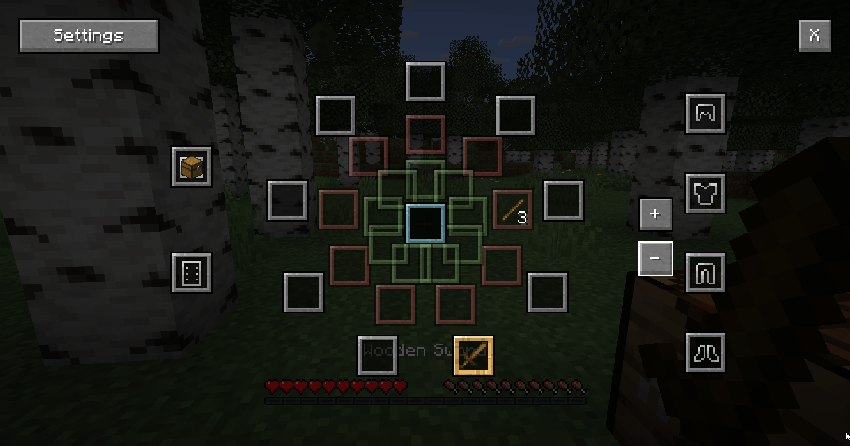
Controls: Movement - Hold down the right mouse button (you will move in the direction you are facing) Jump - Double-click the left mouse button Sneak - Double-click the right mouse button Open inventory - Middle mouse button
Project description from CurseForge.
Pick your setup
Click To Move by Minecraft version and loader
Choose the version and loader you play, then open the matching release.
Minecraft version
26.1
1 loader buildCheck the dependencies, then try the file in a copied instance before changing a world you care about.
Recent files
Click To Move versions and loaders
clicktomove-1.0.2.jar
9 Apr 2026
Client Source doesn’t say Server Source doesn’t say Dependencies No extras listed Listed on Release listing
Check the 26.1.1 · NeoForge setup NeoForge26.126.1.1 release
clicktomove-1.0.1.jar
9 Apr 2026
Client Source doesn’t say Server Source doesn’t say Dependencies No extras listed Listed on Release listing
Check the 26.1.1 · NeoForge setup NeoForge26.126.1.1 release
clicktomove-1.0.0.jar
8 Apr 2026
Client Source doesn’t say Server Source doesn’t say Dependencies No extras listed Listed on Release listing
Check the 26.1.1 · NeoForge setup NeoForge26.126.1.1 release
Looking for an older file? The official CurseForge project page is in Resources.
 mod
CurseForge + Modrinth · Minecraft
Reach Display
A configurable visual representation of your reach and hit distances
 mod
CurseForge · Minecraft
JEI_Commands
Adds commands to open JEI recipe, usage, and effect views directly.
 mod
CurseForge · Minecraft
Old Radio
Adds a retro radio that plays old music. It has a nice warm glow at night.