Minecraft version
Back to mods 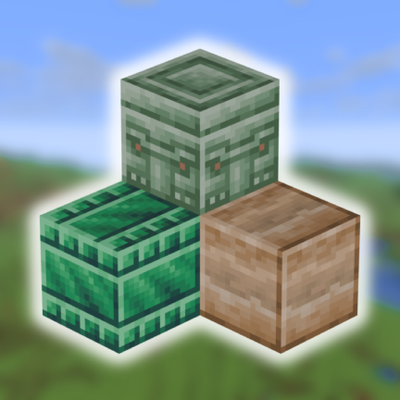
CurseForge · Minecraft mod
Deco Rocks
Mod adds over 100 new decorative stone blocks to Minecraft, along with new structures and natural ore generation. Explore new ways to build and explore with Deco Rocks!
Choose a version Pick your version below, then grab the matching file.
Quick answer
Which Deco Rocks release should I use?
Latest stable file Deco_Rocks-1.0.0-neoforge-1.21.8.jar
Game version 1.21.8
Loader NeoForge
Deco Rocks Deco_Rocks-1.0.0-neoforge-1.21.8.jar targets 1.21.8 with NeoForge. The project page does not say whether this file belongs on the client, dedicated server, or both. No extra mods listed for this file.
Where it goes
Is Deco Rocks required on the client, server, or both?
The project page does not say whether this file belongs on the client, dedicated server, or both.
Client Source doesn’t say
Dedicated server Source doesn’t say
Loader for this release NeoForge
Required install it here Optional supported, not mandatory Not supported do not install here Source doesn’t say do not assume
The source does not explicitly classify this release as client-only or server-only.
What else does Deco Rocks Deco_Rocks-1.0.0-neoforge-1.21.8.jar need?
Deco_Rocks-1.0.0-neoforge-1.21.8.jar. Change the file and its required mods may change too.
This file does not list any required mods. Do not add a library just because a different file uses it.
This file does not list any required or optional mods.
Before you install it
Add Deco Rocks without breaking your instance.
Built for Deco Rocks Deco_Rocks-1.0.0-neoforge-1.21.8.jar. Pick another file and the loader, install side or required mods may change.
- 01
Stick to this file
Use Deco_Rocks-1.0.0-neoforge-1.21.8.jar. It targets 1.21.8 with NeoForge; another release may have different loader, side or dependency requirements.
- 02
Bring the mods it needs
This file does not list any required mods. Do not add a library just because a different file uses it.
- 03
Put it on the correct side
The project page does not say whether this file belongs on the client, dedicated server, or both.
- 04
Pick the file you checked
Use the “Get this file” button beside Deco_Rocks-1.0.0-neoforge-1.21.8.jar. It opens that exact file at the source.
About this project
What does Deco Rocks add?
new block sets:
Ironstone - the most common stone in the mod. Besides its decorative use, it can be smelted into an iron nugget.
Eclogite - found in deepslate mines, deep underground.
Nephrite - the rarest one. Can only be found in cherry groves and jungles — but even then, getting Nephrite gems is never easy!
Mylonite - a rock that only generates in the transition layer between regular stone and deepslate.
Soapstone - a soft rock commonly found at sea level. Check lakebeds and shorelines for an easier time finding it
New structures:
Scattered across the world are the remnants of ancient civilizations that existed long before us. This mod also adds new structures built from some of the new materials — 3 types in total, each with its own variants
Ironstone ruins - ancient formations commonly found in plains, deserts, and savannas.
Eclogite ruins - medieval structures buried beneath the snow of cold biomes.
Nephrite ruins - venture deep into the jungle or climb up to the cherry blossom trees to discover these mythical, long-forgotten buildings
Credits:
Created with MCreator <3. All textures are original
Project description from CurseForge.
Pick your setup
Deco Rocks by Minecraft version and loader
Choose the version and loader you play, then open the matching release.
Check the dependencies, then try the file in a copied instance before changing a world you care about.
Recent files
Deco Rocks versions and loaders
Deco_Rocks-1.0.0-neoforge-1.21.8.jar
8 Apr 2026
Client Source doesn’t say Server Source doesn’t say Dependencies No extras listed Listed on Release listing
Check the 1.21.8 · NeoForge setup 1.21.8NeoForge release
Looking for an older file? The official CurseForge project page is in Resources.
 mod
mod CurseForge · Minecraft
ExfilCraft
Extraction survival for Minecraft: carry your kit into hostile raid worlds, fight for loot, and survive the extraction channel to bring it home — or die and drop it all. Build a home base, squad up, and risk it for one more chest.
 mod
mod CurseForge · Minecraft
The Yandere
The yandere mod will add in new items, armor, a block and a new entity into Minecraft.
 mod
mod CurseForge · Minecraft
Simple Ice Caves
Adds Ice Caves That's It!